
PKGRipper PS4: Difference between revisions
More actions
No edit summary |
No edit summary |
||
| (3 intermediate revisions by 2 users not shown) | |||
| Line 1: | Line 1: | ||
{{Infobox PS4 Homebrews | {{Infobox PS4 Homebrews | ||
|title=PKGRipper | |title=PKGRipper | ||
|image= | |image=pkgripperps42.png | ||
|description= | |description=Remove content from PS4 pkg files. | ||
|author=enriquesomolinos | |author=enriquesomolinos | ||
|lastupdated=2022/02/01 | |lastupdated=2022/02/01 | ||
|type= | |type=PC Utilities | ||
|version=2.5 | |version=2.5 | ||
|license=Mixed | |license=Mixed | ||
|download=https:// | |download=https://github.com/enriquesomolinos/pkgRipper/releases | ||
|website=https://github.com/enriquesomolinos/pkgRipper | |website=https://github.com/enriquesomolinos/pkgRipper | ||
|source=https://github.com/enriquesomolinos/pkgRipper | |source=https://github.com/enriquesomolinos/pkgRipper | ||
|donation= | |donation=https://github.com/enriquesomolinos/pkgRipper | ||
}} | }} | ||
{{#seo: | {{#seo: | ||
|title= ( | |title= (PC Utilities) - GameBrew | ||
|title_mode=append | |title_mode=append | ||
|image=pkgripperps4.png | |image=pkgripperps4.png | ||
|image_alt=PKGRipper | |image_alt=PKGRipper | ||
}} | }}<!--https://dlhb.gamebrew.org/ps4homebrews/pkgripperps4.7z?k33p0fil35--> | ||
PKGRipper is a tool that helps shrink your PS4 game backups by removing unnecessary files. It applies special patches to trim content without affecting gameplay, some games like F1 2020 can be reduced by over 20GB.<ref>Enrique Somolinos. [https://github.com/enriquesomolinos/pkgRipper/blob/master/README.md#current-patches pkgRipper/README.md at master · enriquesomolinos/pkgRipper]. GitHub. 2022-02-11</ref> | |||
PKGRipper is a tool that | |||
The program automatically detects | The program automatically detects which files can be removed when: | ||
* You have multiple game updates installed. | |||
* Later updates include files that replace older versions. | |||
* There's leftover data no longer needed for gameplay. | |||
For example, a game with a base version of 01.00 and updates 01.01, 01.02 can have four different patches: | |||
* A patch for the pkg 01.00 to remove duplicated content from version 01.01. | |||
* A patch for the pkg 01.00 to remove duplicated content from version 01.02. | |||
* A patch for the update pkg 01.01 to remove duplicated content from version 01.02. | |||
* A patch for the update pkg 01.02 to remove content from version 01.02. | |||
Due to this, the program will always prompt the user to specify which update they have. | Due to this, the program will always prompt the user to specify which update they have. | ||
== | == User guide == | ||
[https://github.com/PhR34x0r PhR34x0r] has shared a great | [https://github.com/PhR34x0r PhR34x0r] has shared a great [https://github.com/enriquesomolinos/pkgRipper/raw/master/PKGRipper.Manual.pdf manual] (PDF). | ||
=== Requirements === | ==== Requirements ==== | ||
* Windows machine | * Windows machine | ||
* .Net Framework | * .Net Framework | ||
* | * [https://github.com/CyB1K/PS4-Fake-PKG-Tools-3.87 Fake PKG Tools]. Gengp4 and orbis-pub-cmd files must be in the same folder of PkgRipper. | ||
* Your | * Your [https://github.com/enriquesomolinos/pkgripper-patches custom patches] to apply. They should be placed under the patches folder. | ||
=== Structure === | ==== Structure ==== | ||
* Output folder | * Output folder - Repackaged backups will be stored here. | ||
* temp folder | * temp folder - Temporal folder to extract and modify pkgs. | ||
* patches folder | * patches folder - Contains all patches that can be applied. | ||
=== Usage | ==== Usage example ==== | ||
Depending on the size of your files PkgRipper can take a lot of time. | |||
* If you want to patch a base fpkg file you can follow this video: https://youtu.be/-M4qvpxHKqc | * If you want to patch a base fpkg file you can follow this video: https://youtu.be/-M4qvpxHKqc | ||
* If you want to patch an update fpkg file you can follow this video: https://youtu.be/boaHX81oSUU | * If you want to patch an update fpkg file you can follow this video: https://youtu.be/boaHX81oSUU | ||
In case you apply a patch to your base pkg you'll need to repackage the update to link with the new base.pkg, this can be done with PkgRipper applying a fake patch (see transformers patch). | |||
Author's notes: | |||
* | * Use only with your own backups, we don't support piracy. | ||
* Use at your own risk, test always the output PKG, we don't | * Use at your own risk, test always the output PKG, we don't assure perfect results. | ||
=== | ==Screenshots== | ||
https://dlhb.gamebrew.org/ps4homebrews/images/pkgripperps43.png | |||
==Media== | ==Media== | ||
''' | '''PkgRipper 1.00: base pkg sample''' ([https://www.youtube.com/watch?v=boaHX81oSUU Enrique Somolinos]) <br> | ||
<youtube width=" | <youtube width="600">boaHX81oSUU </youtube> | ||
'''PkgRipper 1.00: Update fpkg sample''' ([https://www.youtube.com/watch?v=-M4qvpxHKqc Enrique Somolinos]) <br> | |||
https:// | <youtube width="600">-M4qvpxHKqc</youtube> | ||
==Changelog== | ==Changelog== | ||
| Line 146: | Line 76: | ||
'''v2.4.0''' | '''v2.4.0''' | ||
*Fix | *Fix | ||
** [https://github.com/enriquesomolinos/pkgRipper/issues/6 #6] : patches with empty file lines will not break the execution | ** [https://github.com/enriquesomolinos/pkgRipper/issues/6 #6] : patches with empty file lines will not break the execution. | ||
*New | *New | ||
** [https://github.com/enriquesomolinos/pkgripper-patches/issues/8 enriquesomolinos/pkgripper-patches#8]: In the patch creator we can add entire folders | ** [https://github.com/enriquesomolinos/pkgripper-patches/issues/8 enriquesomolinos/pkgripper-patches#8]: In the patch creator we can add entire folders. | ||
** In the patch creator, duplicated content from updates patches will generate all fields (update_pkg_required and title) | ** In the patch creator, duplicated content from updates patches will generate all fields (update_pkg_required and title). | ||
'''v2.3.1''' | '''v2.3.1''' | ||
* As people have started to collaborate I remove the donate button. | * As people have started to collaborate I remove the donate button. | ||
* Small stability fixes | * Small stability fixes. | ||
'''v2.3.0''' | '''v2.3.0''' | ||
* Now we can check a folder in the patch creator to trim all files inside it. | * Now we can check a folder in the patch creator to trim all files inside it. | ||
'''v2.2''' | '''v2.2''' | ||
* Added file size inthe patch creator | * Added file size inthe patch creator. | ||
'''v2.1''' | '''v2.1''' | ||
* Patch creator is now available | * Patch creator is now available. | ||
* Patch List | * Patch List. | ||
* Minor bugs on GUI | * Minor bugs on GUI. | ||
'''v2.0''' | '''v2.0''' | ||
* FIX: [https://github.com/enriquesomolinos/pkgRipper/issues/3 #3] | * FIX: [https://github.com/enriquesomolinos/pkgRipper/issues/3 #3] | ||
| Line 171: | Line 101: | ||
'''v0.1''' | '''v0.1''' | ||
* First Release. | * First Release. | ||
==References== | |||
<references /> | |||
== External links == | == External links == | ||
* | * GitHub - https://github.com/enriquesomolinos/pkgRipper | ||
Latest revision as of 01:08, 9 June 2025
| PKGRipper | |
|---|---|
 | |
| General | |
| Author | enriquesomolinos |
| Type | PC Utilities |
| Version | 2.5 |
| License | Mixed |
| Last Updated | 2022/02/01 |
| Links | |
| Download | |
| Website | |
| Source | |
| Support Author | |
PKGRipper is a tool that helps shrink your PS4 game backups by removing unnecessary files. It applies special patches to trim content without affecting gameplay, some games like F1 2020 can be reduced by over 20GB.[1]
The program automatically detects which files can be removed when:
- You have multiple game updates installed.
- Later updates include files that replace older versions.
- There's leftover data no longer needed for gameplay.
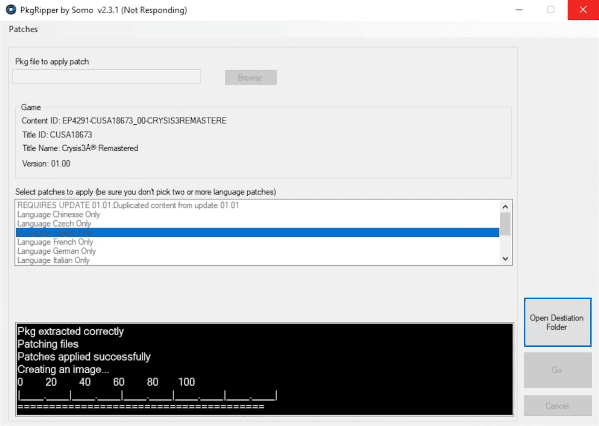
For example, a game with a base version of 01.00 and updates 01.01, 01.02 can have four different patches:
- A patch for the pkg 01.00 to remove duplicated content from version 01.01.
- A patch for the pkg 01.00 to remove duplicated content from version 01.02.
- A patch for the update pkg 01.01 to remove duplicated content from version 01.02.
- A patch for the update pkg 01.02 to remove content from version 01.02.
Due to this, the program will always prompt the user to specify which update they have.
User guide
PhR34x0r has shared a great manual (PDF).
Requirements
- Windows machine
- .Net Framework
- Fake PKG Tools. Gengp4 and orbis-pub-cmd files must be in the same folder of PkgRipper.
- Your custom patches to apply. They should be placed under the patches folder.
Structure
- Output folder - Repackaged backups will be stored here.
- temp folder - Temporal folder to extract and modify pkgs.
- patches folder - Contains all patches that can be applied.
Usage example
Depending on the size of your files PkgRipper can take a lot of time.
- If you want to patch a base fpkg file you can follow this video: https://youtu.be/-M4qvpxHKqc
- If you want to patch an update fpkg file you can follow this video: https://youtu.be/boaHX81oSUU
In case you apply a patch to your base pkg you'll need to repackage the update to link with the new base.pkg, this can be done with PkgRipper applying a fake patch (see transformers patch).
Author's notes:
- Use only with your own backups, we don't support piracy.
- Use at your own risk, test always the output PKG, we don't assure perfect results.
Screenshots
Media
PkgRipper 1.00: base pkg sample (Enrique Somolinos)
PkgRipper 1.00: Update fpkg sample (Enrique Somolinos)
Changelog
v2.5.0
- New
- #10: now we can see the current uncompressed size of files when we are creating a patch.
v2.4.0
- Fix
- #6 : patches with empty file lines will not break the execution.
- New
- enriquesomolinos/pkgripper-patches#8: In the patch creator we can add entire folders.
- In the patch creator, duplicated content from updates patches will generate all fields (update_pkg_required and title).
v2.3.1
- As people have started to collaborate I remove the donate button.
- Small stability fixes.
v2.3.0
- Now we can check a folder in the patch creator to trim all files inside it.
v2.2
- Added file size inthe patch creator.
v2.1
- Patch creator is now available.
- Patch List.
- Minor bugs on GUI.
v2.0
- FIX: #3
- From now we will have only one file for each game. This file will contain all patches that can be applied to all fpkgs of this CUSA.
- Now we can apply one or more patches to a fpkg file.
- Patches will be downloaded automatically when app launchs.
- Added GUI messages to inform the user what is happening.
v1.0
- First GUI implementation.
v0.1
- First Release.
References
- ↑ Enrique Somolinos. pkgRipper/README.md at master · enriquesomolinos/pkgRipper. GitHub. 2022-02-11