
FPKG Maker GUI PS4: Difference between revisions
More actions
Created page with "{{Infobox PS4 Homebrews |title=fPKG Maker GUI |image=fpkgmakerguips4.png |description=A user friendly User Interface for fPKG Tools for PS4. |author=codemasterv |lastupdated=2022/01/25 |type=PC Utilities |version=1.1.0 |license=Mixed |download=https://dlhb.gamebrew.org/ps4homebrews/fpkgmakerguips4.7z |website=https://www.reddit.com/r/ps4homebrew/comments/rt50kn/fpkg_maker_gui_is_out_for_testing_read_video/ |source=https://github.com/codemasterv/fPKG_Maker_GUI |donation=h..." |
No edit summary |
||
| (One intermediate revision by the same user not shown) | |||
| Line 2: | Line 2: | ||
|title=fPKG Maker GUI | |title=fPKG Maker GUI | ||
|image=fpkgmakerguips4.png | |image=fpkgmakerguips4.png | ||
|description=A user friendly User Interface for fPKG | |description=A user friendly User Interface for fPKG tools for PS4. | ||
|author=codemasterv | |author=codemasterv | ||
|lastupdated=2022/01/25 | |lastupdated=2022/01/25 | ||
| Line 19: | Line 19: | ||
|image_alt=fPKG Maker GUI | |image_alt=fPKG Maker GUI | ||
}} | }} | ||
A user-friendly user interface for fPKG tools. | |||
Requires Windows 10 or preferably Windows 11 with its more simplified Windows Subsystem Linux. | |||
Windows 8.1, Windows 8 and Windows 7 will not work with this tool. | |||
==Features== | |||
*Dump the game via FTP and GoldenHen on port 2121. | |||
*Generate gp4 files. | |||
*Build the games from the gp4 files. | |||
*Create dlc unlockers. | |||
==User guide== | |||
If not installed already, be sure to install WSL2 Ubuntu 20.04 via the button in the bottom left corner of the program, or install from the [https://www.microsoft.com/en-us/p/ubuntu-2004-lts/9n6svws3rx71?SilentAuth=1&wa=wsignin1.0&activetab=pivot:overviewtab Windows App Store]. | |||
Needed tools for WSL Ubuntu 20.04: | |||
* <code>sudo apt-get update -y</code> | |||
* <code>sudo apt-get upgrade -y</code> | |||
* <code>sudo apt install -y dos2unix</code> | |||
* <code>sudo apt install -y wget</code> | |||
* <code>sudo apt install -y curl</code> | |||
Please note that all fields including the base game information need to be filled out before the patch will build properly. | |||
===DLC Unlocker=== | |||
To use this unlocker tool go to the PlayStation store and find your DLC. | |||
Copy the link in your link bar and paste it into the text box below the Example Link and click Build. | |||
This will output the file to the directory in the log window. | |||
===Updating the ftpdump script from hippie68=== | |||
Latest version can be found at https://github.com/hippie68/ftpdump | |||
If you do want to use a new ftpdump script from hippie68, replace the ftpdump file in the same folder as the _fPKG_Maker_GUI.exe. Edit the ftpdump file and add two spaces after the | |||
ip= | |||
and add the port you want to use. | |||
port=2121 | |||
The program will make a copy of ftpdump named yourftpdump. It keeps the ftpdump persistent and untouched. | |||
===Updating fPKG tools=== | |||
If fPKG tool do get an update from v3.87 you can just dump them right in the same folder as the _fPKG_Maker_GUI.exe and overwrite the old ones. | |||
==Screenshots== | |||
https://dlhb.gamebrew.org/ps4homebrews/fpkgmakerguips4-01.png | |||
https://dlhb.gamebrew.org/ps4homebrews/fpkgmakerguips4-02.png | |||
==Media== | ==Media== | ||
'''fPKG_Maker_GUI Demo Video''' ([https://www.youtube.com/watch?v=6IIYGGSWvbg Code masterv]) <br> | '''fPKG_Maker_GUI Demo Video''' ([https://www.youtube.com/watch?v=6IIYGGSWvbg Code masterv]) <br> | ||
<youtube width= | <youtube width="640">6IIYGGSWvbg</youtube> | ||
'''PS4 FPKG Maker GUI App Released | Make DLC Unlockers, Dump Games to PC, Build FPKGs''' ([https://www.youtube.com/watch?v=lg0LFdZl3dU BrutalSam]) <br> | '''PS4 FPKG Maker GUI App Released | Make DLC Unlockers, Dump Games to PC, Build FPKGs''' ([https://www.youtube.com/watch?v=lg0LFdZl3dU BrutalSam]) <br> | ||
<youtube width= | <youtube width="640">lg0LFdZl3dU</youtube> | ||
== | ==Known issues== | ||
Currently this program has an issue with directory paths with spaces in the name.<br> | |||
(e.g. C:\MyComputer\user\my folder\fpkg_maker_gui\fpkg_maker_gui.exe) | |||
Please place this application on the root of a drive to avoid path errors.<br> | |||
(e.g. E:\fpkg_maker_gui\fpkg_maker_gui.exe) | |||
Also, WSL 2 operates in a lightweight VM and does not have USB pass-through access, so you can not dump a game to the USB drive but you can use the tool to build game dumps that are on a USB drive. | |||
==Changelog== | ==Changelog== | ||
'''v1.1.0''' | '''v1.1.0''' | ||
* Updated hippies ftp dump scripts to support dumping games that may start with names other than CUSA like STRN, SNES, HMBW, SLUS & NPSX. | * Updated hippies ftp dump scripts to support dumping games that may start with names other than CUSA like STRN, SNES, HMBW, SLUS & NPSX. | ||
* You can now dump any running app/ PSXtoFPKG/ PS2toFPKG/ STRNtoFPKG/ Homebrew/ NPSX | * You can now dump any running app/ PSXtoFPKG/ PS2toFPKG/ STRNtoFPKG/ Homebrew/ NPSX. | ||
* Added latest fpkg tools 3.87 dll's that CyB1K made. The latest has removed the limit of 100GB game creations. | * Added latest fpkg tools 3.87 dll's that CyB1K made. The latest has removed the limit of 100GB game creations. | ||
* Thank you CyB1K for the updated tools! | * Thank you CyB1K for the updated tools! | ||
'''v1.0.8''' | '''v1.0.8''' | ||
* Updated UI to include New Features | * Updated UI to include New Features. | ||
* Added: | * Added: | ||
** Ability to just dump: | ** Ability to just dump: | ||
| Line 52: | Line 97: | ||
** DLC | ** DLC | ||
** Keystone | ** Keystone | ||
* Also fixed an issue with running in the background after closing | * Also fixed an issue with running in the background after closing. | ||
'''v1.0.5''' | '''v1.0.5''' | ||
* Fixes spelling in log and also includes the release signed version. | * Fixes spelling in log and also includes the release signed version. | ||
| Line 73: | Line 118: | ||
* First Release. | * First Release. | ||
== | ==Credits== | ||
* DLC Unlcocker Script Written in python 3.5 by TheRadziu | * DLC Unlcocker Script Written in python 3.5 by TheRadziu. | ||
* Thank you to CyB1K for his updated fPKG Tools, You can find his github here: | * Thank you to CyB1K for his updated fPKG Tools, You can find his github here: | ||
** https://github.com/CyB1K/PS4-Fake-PKG-Tools-3.87 | ** https://github.com/CyB1K/PS4-Fake-PKG-Tools-3.87 | ||
| Line 83: | Line 128: | ||
== External links == | == External links == | ||
* GitHub - https://github.com/codemasterv/fPKG_Maker_GUI | |||
* Reddit - https://www.reddit.com/r/ps4homebrew/comments/rt50kn/fpkg_maker_gui_is_out_for_testing_read_video/ | * Reddit - https://www.reddit.com/r/ps4homebrew/comments/rt50kn/fpkg_maker_gui_is_out_for_testing_read_video/ | ||
Latest revision as of 02:29, 6 June 2025
| fPKG Maker GUI | |
|---|---|
 | |
| General | |
| Author | codemasterv |
| Type | PC Utilities |
| Version | 1.1.0 |
| License | Mixed |
| Last Updated | 2022/01/25 |
| Links | |
| Download | |
| Website | |
| Source | |
| Support Author | |
A user-friendly user interface for fPKG tools.
Requires Windows 10 or preferably Windows 11 with its more simplified Windows Subsystem Linux.
Windows 8.1, Windows 8 and Windows 7 will not work with this tool.
Features
- Dump the game via FTP and GoldenHen on port 2121.
- Generate gp4 files.
- Build the games from the gp4 files.
- Create dlc unlockers.
User guide
If not installed already, be sure to install WSL2 Ubuntu 20.04 via the button in the bottom left corner of the program, or install from the Windows App Store.
Needed tools for WSL Ubuntu 20.04:
sudo apt-get update -ysudo apt-get upgrade -ysudo apt install -y dos2unixsudo apt install -y wgetsudo apt install -y curl
Please note that all fields including the base game information need to be filled out before the patch will build properly.
DLC Unlocker
To use this unlocker tool go to the PlayStation store and find your DLC.
Copy the link in your link bar and paste it into the text box below the Example Link and click Build.
This will output the file to the directory in the log window.
Updating the ftpdump script from hippie68
Latest version can be found at https://github.com/hippie68/ftpdump
If you do want to use a new ftpdump script from hippie68, replace the ftpdump file in the same folder as the _fPKG_Maker_GUI.exe. Edit the ftpdump file and add two spaces after the
ip=
and add the port you want to use.
port=2121
The program will make a copy of ftpdump named yourftpdump. It keeps the ftpdump persistent and untouched.
Updating fPKG tools
If fPKG tool do get an update from v3.87 you can just dump them right in the same folder as the _fPKG_Maker_GUI.exe and overwrite the old ones.
Screenshots
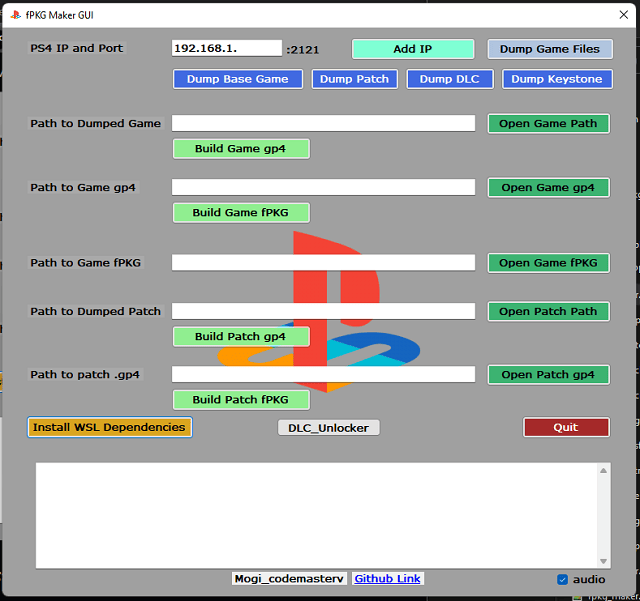
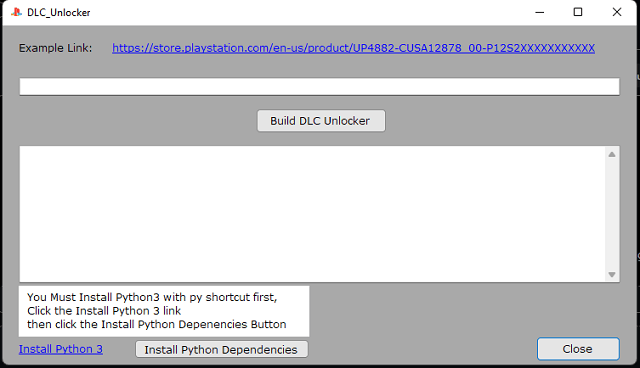
Media
fPKG_Maker_GUI Demo Video (Code masterv)
PS4 FPKG Maker GUI App Released | Make DLC Unlockers, Dump Games to PC, Build FPKGs (BrutalSam)
Known issues
Currently this program has an issue with directory paths with spaces in the name.
(e.g. C:\MyComputer\user\my folder\fpkg_maker_gui\fpkg_maker_gui.exe)
Please place this application on the root of a drive to avoid path errors.
(e.g. E:\fpkg_maker_gui\fpkg_maker_gui.exe)
Also, WSL 2 operates in a lightweight VM and does not have USB pass-through access, so you can not dump a game to the USB drive but you can use the tool to build game dumps that are on a USB drive.
Changelog
v1.1.0
- Updated hippies ftp dump scripts to support dumping games that may start with names other than CUSA like STRN, SNES, HMBW, SLUS & NPSX.
- You can now dump any running app/ PSXtoFPKG/ PS2toFPKG/ STRNtoFPKG/ Homebrew/ NPSX.
- Added latest fpkg tools 3.87 dll's that CyB1K made. The latest has removed the limit of 100GB game creations.
- Thank you CyB1K for the updated tools!
v1.0.8
- Updated UI to include New Features.
- Added:
- Ability to just dump:
- Base Game
- Game Patch
- DLC
- Keystone
- Also fixed an issue with running in the background after closing.
v1.0.5
- Fixes spelling in log and also includes the release signed version.
- Release version = fPKG_Maker_GUI.exe - Use this version
- Debug version = _fPKG_Maker_GUI.exe and is larger ~50MB - Use this if release fails. This one starts with a underscore " _ "
v1.0.4
- Works with both Windows 10 and windows 11
- Added DLC Unlocker and UI updates.
- Fixed lockup issue due to large resource file
- Fixed log window double printing
v1.0.3
- Added log window
- Fixed build path errors
- updated UI
- Added details for log errors
- General Bug fixes
v1.0.2
- Windows10 support.
v1.0.0
- First Release.
Credits
- DLC Unlcocker Script Written in python 3.5 by TheRadziu.
- Thank you to CyB1K for his updated fPKG Tools, You can find his github here:
- Thank you to hippie68 for his outstanding FTP Dump Linux Script. You can find his github here:
- Thank you to all the devs in the community!
- And thank you to LightningMods, Keep that homebrew scene going my dude. He runs an outstanding website you can find by searching for DKS.