
Icon Mask PS4: Difference between revisions
From GameBrew
More actions
Created page with "{{Infobox PS4 Homebrews |title=Icon Mask |image=iconmaskps4.png |description=The program will allow you to easily customize your board because it allows you to modify the appearance of the icons on the interface. |author=Lapy |lastupdated=2024/05/10 |type=Other Apps |version=1.14 |license=Mixed |download=https://dlhb.gamebrew.org/ps4homebrews/iconmaskps4.7z |website=https://twitter.com/Lapy05575948/status/1616198877316583461 |source= |donation=https://www.paypal.com/pay..." |
m Text replacement - "https://www.paypal.com/paypalme/LapyGames" to "https://ko-fi.com/lapygamez" |
||
| (One intermediate revision by the same user not shown) | |||
| Line 2: | Line 2: | ||
|title=Icon Mask | |title=Icon Mask | ||
|image=iconmaskps4.png | |image=iconmaskps4.png | ||
|description= | |description=Modify the appearance of the icons on the interface. | ||
|author=Lapy | |author=Lapy | ||
|lastupdated=2024/05/10 | |lastupdated=2024/05/10 | ||
| Line 9: | Line 9: | ||
|license=Mixed | |license=Mixed | ||
|download=https://dlhb.gamebrew.org/ps4homebrews/iconmaskps4.7z | |download=https://dlhb.gamebrew.org/ps4homebrews/iconmaskps4.7z | ||
|website=https:// | |website=https://lapygames.wordpress.com/apps/ | ||
|source= | |source= | ||
|donation=https:// | |donation=https://ko-fi.com/lapygamez | ||
}} | }} | ||
{{#seo: | {{#seo: | ||
| Line 19: | Line 19: | ||
|image_alt=Icon Mask | |image_alt=Icon Mask | ||
}} | }} | ||
With this app you can modify the appearances of the main menu icons through predesigned masks. | |||
This allows you to apply transparency effects, add custom boarders, etc. | |||
==Screenshots== | ==Screenshots== | ||
| Line 34: | Line 31: | ||
https://dlhb.gamebrew.org/ps4homebrews/iconmaskps4-04.png | https://dlhb.gamebrew.org/ps4homebrews/iconmaskps4-04.png | ||
==Media== | |||
'''NEW Icon Mask 1.14 by lapy | Added 6 New Anubis Masks | Complete UI Redesign | PS4 9.00 or lower''' ([https://www.youtube.com/watch?v=KAAalIHJJ38 DRAVSZOO]) <br> | |||
<youtube width="640">KAAalIHJJ38</youtube> | |||
==Compatibility== | |||
From 5.00 to 11.00. | |||
==Changelog== | ==Changelog== | ||
| Line 45: | Line 49: | ||
*Sorry, I screwed up the “What's New” icon transparency, update again to 1.10. | *Sorry, I screwed up the “What's New” icon transparency, update again to 1.10. | ||
'''v1.09''' | '''v1.09''' | ||
* 4 new masks from @Anubis_Qz | * 4 new masks from @Anubis_Qz. | ||
* improved code. | * improved code. | ||
'''v1.08''' | '''v1.08''' | ||
* 5 new masks from @Anubis_Qz | * 5 new masks from @Anubis_Qz. | ||
* New step by step method requested by @Wr0zen | * New step by step method requested by @Wr0zen. | ||
* No more FW Selection Screen, better system mounting fuction and HB Store update check thanks to @LightningMods_ | * No more FW Selection Screen, better system mounting fuction and HB Store update check thanks to @LightningMods_. | ||
'''v1.07''' | '''v1.07''' | ||
* 3 new masks from @Anubis_Qz | * 3 new masks from @Anubis_Qz | ||
| Line 57: | Line 61: | ||
*Enjoy 6 new designs by @Anubis_Qz. | *Enjoy 6 new designs by @Anubis_Qz. | ||
'''v1.05''' | '''v1.05''' | ||
* New @Anubis_Qz mask and 2 from @VitaHex | * New @Anubis_Qz mask and 2 from @VitaHex. | ||
* Fixed transparency bug in the "What's New" icon found by @JB4Pro | * Fixed transparency bug in the "What's New" icon found by @JB4Pro. | ||
* Now you can save your ICONS folder in /data/, @Uchith2's idea | * Now you can save your ICONS folder in /data/, @Uchith2's idea. | ||
'''v1.04''' | '''v1.04''' | ||
* 2 new masks: @Anubis_Qz square and @NanospeedGamer Ring. | * 2 new masks: @Anubis_Qz square and @NanospeedGamer Ring. | ||
* New option to add pre-made icons from USB (create an ICONS folder and put them there) | * New option to add pre-made icons from USB (create an ICONS folder and put them there). | ||
'''v1.02''' | '''v1.02''' | ||
* Layered masks. | * Layered masks. | ||
| Line 76: | Line 80: | ||
* Spanish translation (I need to fix an small typo in the english translation). | * Spanish translation (I need to fix an small typo in the english translation). | ||
* one mask by @Anubis_Qz | * one mask by @Anubis_Qz | ||
== External links == | == External links == | ||
* Author's website - https://lapygames.wordpress.com/ | |||
* PSX-Place - https://www.psx-place.com/resources/icon-mask.1215/ | * PSX-Place - https://www.psx-place.com/resources/icon-mask.1215/ | ||
* PKG-Zone - https://pkg-zone.com/details/LAPY20007 | |||
* Twitter - https://twitter.com/Lapy05575948/status/1616198877316583461 | * Twitter - https://twitter.com/Lapy05575948/status/1616198877316583461 | ||
Latest revision as of 01:24, 20 June 2025
| Icon Mask | |
|---|---|
 | |
| General | |
| Author | Lapy |
| Type | Other Apps |
| Version | 1.14 |
| License | Mixed |
| Last Updated | 2024/05/10 |
| Links | |
| Download | |
| Website | |
| Support Author | |
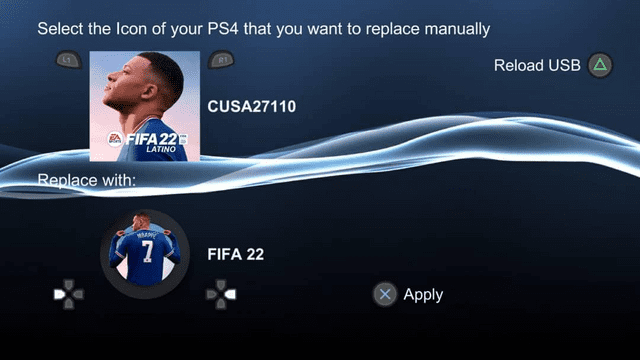
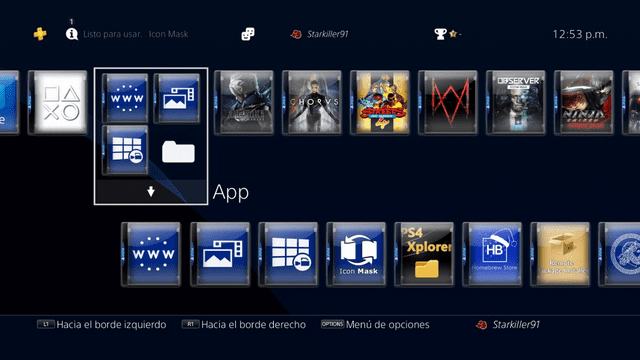
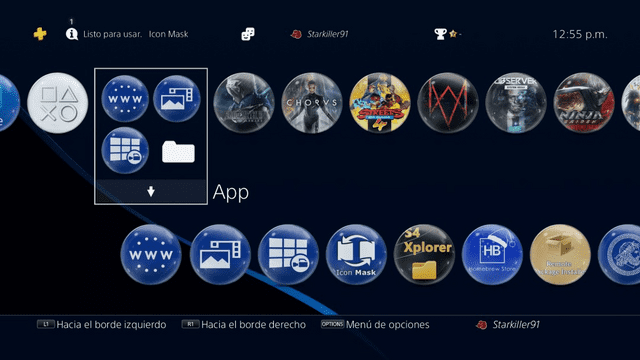
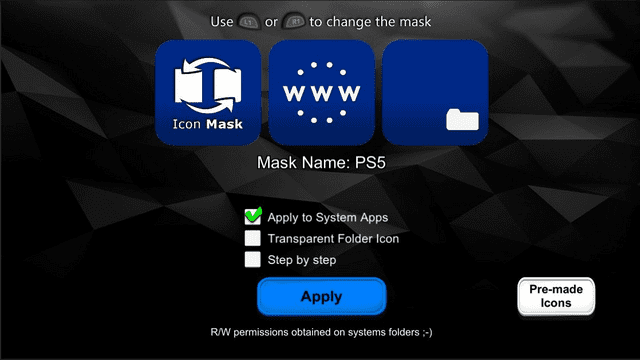
With this app you can modify the appearances of the main menu icons through predesigned masks.
This allows you to apply transparency effects, add custom boarders, etc.
Screenshots
Media
NEW Icon Mask 1.14 by lapy | Added 6 New Anubis Masks | Complete UI Redesign | PS4 9.00 or lower (DRAVSZOO)
Compatibility
From 5.00 to 11.00.
Changelog
v1.14
- For new homebrew lovers who just arrived to 11.00, the latest version of Icon Mask works perfectly.
v1.12
- Enjoy this Christmas version with six new masks for the occasion, courtesy of @Anubis_Q.
v1.11
- 4 new masks from @Anubis_Qz.
v1.10
- Sorry, I screwed up the “What's New” icon transparency, update again to 1.10.
v1.09
- 4 new masks from @Anubis_Qz.
- improved code.
v1.08
- 5 new masks from @Anubis_Qz.
- New step by step method requested by @Wr0zen.
- No more FW Selection Screen, better system mounting fuction and HB Store update check thanks to @LightningMods_.
v1.07
- 3 new masks from @Anubis_Qz
- New option “Step by step” to allow you to apply the masks to the Icons you want, so you can apply several.
v1.06
- Enjoy 6 new designs by @Anubis_Qz.
v1.05
- New @Anubis_Qz mask and 2 from @VitaHex.
- Fixed transparency bug in the "What's New" icon found by @JB4Pro.
- Now you can save your ICONS folder in /data/, @Uchith2's idea.
v1.04
- 2 new masks: @Anubis_Qz square and @NanospeedGamer Ring.
- New option to add pre-made icons from USB (create an ICONS folder and put them there).
v1.02
- Layered masks.
- Icon rescale and relocation.
- Added some missing targets in system apps.
- 2 more masks from @Anubis_Qz
- Small fix on the UI.
- And much more to come.
v1.01
- new UI.
- fixed some issue with GoldHen.
- new mask method.
- Spanish translation (I need to fix an small typo in the english translation).
- one mask by @Anubis_Qz
External links
- Author's website - https://lapygames.wordpress.com/
- PSX-Place - https://www.psx-place.com/resources/icon-mask.1215/
- PKG-Zone - https://pkg-zone.com/details/LAPY20007
- Twitter - https://twitter.com/Lapy05575948/status/1616198877316583461