
PS4-Xplorer: Difference between revisions
More actions
No edit summary |
|||
| (9 intermediate revisions by 2 users not shown) | |||
| Line 3: | Line 3: | ||
|image=ps4xplorer.png | |image=ps4xplorer.png | ||
|description=A basic operations of a file explorer (cut, copy, paste, rename and delete files and complete folders). | |description=A basic operations of a file explorer (cut, copy, paste, rename and delete files and complete folders). | ||
|author= | |author=Lapy | ||
|lastupdated= | |lastupdated=2025/06/21 | ||
|type=File browsers | |type=File browsers | ||
|version=2. | |version=2.05 | ||
|license=Mixed | |license=Mixed | ||
|download=https://dlhb.gamebrew.org/ps4homebrews/ps4xplorer.7z?k33p0fil35 | |download=https://dlhb.gamebrew.org/ps4homebrews/ps4xplorer.7z?k33p0fil35 | ||
|website=https:// | |website=https://lapygames.wordpress.com/apps/ | ||
|source=https://github.com/Lapy055/PS4-Xplorer | |source=https://github.com/Lapy055/PS4-Xplorer | ||
|donation= | |donation=https://ko-fi.com/lapygamez | ||
}} | }} | ||
{{#seo: | {{#seo: | ||
| Line 18: | Line 18: | ||
|image=ps4xplorer.png | |image=ps4xplorer.png | ||
|image_alt=PS4-Xplorer | |image_alt=PS4-Xplorer | ||
}} | }}<!--pz--> | ||
PS4-Xplorer is a file manager homebrew developed by Lapy. It allows you to browse, edit, and execute various file types, with additional utilities such as FTP server activation and PKG installation. | |||
PS4-Xplorer is a file manager | |||
==Features== | ==Features== | ||
* Supported Firmware: 5.05 / 6.xx / 7.xx / 8.xx / 9.00 / 11.00 | * Supported Firmware: 5.05 / 6.xx / 7.xx / 8.xx / 9.00 / 11.00 / 12.02. | ||
* All menus and file lists have loops, this means that if you press down again when you reach the last item in the list, the first item will be selected, and vice versa. | * All menus and file lists have loops, this means that if you press down again when you reach the last item in the list, the first item will be selected, and vice versa. | ||
* | * Able to detect when a USB storage device is connected or disconnected. | ||
* You can quickly access the content of connected USB devices using the D-Pad as a shortcut, left for usb0 and right for usbl. | |||
* Search option that analyzes all files in the current location and its subfolders to find matches with the searched keyword. | |||
* You can quickly access the content of connected USB devices using the | |||
* | ==User guide== | ||
===Supported formats=== | |||
* | * Audio - ogg, wav. | ||
* Video - mp4, mov. | |||
* Images - jpg, png, dds. | |||
* Text (editable) - txt, ini, bat, xml, json, cfg, cmd. | |||
* Text (read only) - sfo, dat. | |||
* Installable - pkg. | |||
* Compressed - zip, rar, tar. | |||
* Avatars - xavatar. | |||
* Languages (translation) - xlang. | |||
===Audio player=== | |||
* Plays in background while using the app. | |||
* To enable background music when when you start the app, place auto.ogg in /data/PS4Xplorer/. | |||
===Video player=== | |||
* No audio in root mode. | |||
* Has audio in sandbox mode. | |||
===PKG Installation=== | |||
* You can select multiple files and install them at once (L2+Cross). | |||
* Note: It cannot install from /data or /user/app. | |||
===Compressed files=== | |||
* RAR5, multi-part, or password-protected archives are not supported. | |||
* For TAR files, please remove the second extension before extraction. | |||
===Language=== | |||
* To install a language, just open the XLANG file with X and restart Xplorer. | * To install a language, just open the XLANG file with X and restart Xplorer. | ||
== | ===Advanced Options=== | ||
''' | * Search (experimental): | ||
** Search for files/folders in the current directory (including subfolders). | |||
** Stop after 100 results or by pressing Square. | |||
** Press Cross on a result to navigate to it. | |||
* Set Home: | |||
** Saves the current location as a bookmark. | |||
** Press R3 to quickly return to this location. | |||
* Download URL: | |||
** Download a file from an HTTP URL to the current directory. | |||
* Activate FTP (Shortcut: L3): | |||
** Enable an FTP server on your PS4 (IP and port will be displayed on-screen). | |||
* Get Full R/W: | |||
** Grant write permissions in system folders. | |||
* Installed PKGs: | |||
** Show all installed PKGs (internal or extended storage). | |||
* Settings (Options button): | |||
**Help - Displays control mappings. | |||
**Adjust Borders - Calibrates screen display area. | |||
**Temperature - Toggles between °C / °F. | |||
==Controls== | |||
'''File browser:''' | |||
D-Pad Up/Down or Left Stick - Navigate (hold L2 scroll faster) | |||
Cross - Open a folder, Execute file | |||
Circle - Go back | |||
D-Pad Left - Quick access to USB storage device (/mnt/usb0) | |||
D-Pad Right - Quick access to USB storage device (/mnt/usb1) | |||
Triangle - Context menu (create/cut/copy/paste/rename...) | |||
L2+Triangle - Advanced Options | |||
R1 - Select/deselect items | |||
Hold R2+R1 - Select all items | |||
L1 - Cancel multi-selection | |||
'''Audio player:''' | |||
Square - Stop playback | |||
'''Image viewer:''' | |||
D-Pad Left/Right - Navigate between images | |||
'''Text viewer:''' | |||
D-Pad or Left Stick - Move between keys | |||
Right Stick - Move cursor | |||
==Screenshots== | ==Screenshots== | ||
| Line 49: | Line 127: | ||
https://dlhb.gamebrew.org/ps4homebrews/ps4xplorer-05.png | https://dlhb.gamebrew.org/ps4homebrews/ps4xplorer-05.png | ||
https://dlhb.gamebrew.org/ps4homebrews/ps4xplorer-07.png | https://dlhb.gamebrew.org/ps4homebrews/ps4xplorer-07.png | ||
https://dlhb.gamebrew.org/ps4homebrews/ps4xplorer-08.png | https://dlhb.gamebrew.org/ps4homebrews/ps4xplorer-08.png | ||
==Media== | |||
'''PS4 Xplorer 2.0 Released, Testing and Comparing to v1.34''' ([https://www.youtube.com/watch?v=6D_5xBhpYTk BrutalSam]) <br> | |||
<youtube width="640">6D_5xBhpYTk</youtube> | |||
==Compatibility== | |||
2.0+: 5.00 to 12.02 | |||
1.34: 4.55, 4.74, 5.01, 5.05, 6.72, 7.02, 7.5X, 9.00 | |||
==Changelog== | ==Changelog== | ||
'''v2.05''' | |||
* Added support for firmware up to 12.02. | |||
* Thanks to yousef333__ from Discord for testing. | |||
'''v2.04''' | |||
* Fixed the delete option for some problematic folders. | |||
* Reduce the PKG size (again). | |||
* Thanks to @Wr0zen for beta test it and everyone who report the bug, in special @NanospeedGamer and Xalfie from Discord. | |||
'''v2.0.3''' | '''v2.0.3''' | ||
*Added support for firmware from 5.00 to 11.00 thanks to @notnotzecoxao and @LightningMods_. | * Added support for firmware from 5.00 to 11.00 thanks to @notnotzecoxao and @LightningMods_. | ||
'''v2.0.2''' | '''v2.0.2''' | ||
*A few small updates have been send for PS4-Xplorer 2.0 (2.02) and PS5-Xplorer (1.02) to support LOG files at @crump_youtube request. | * A few small updates have been send for PS4-Xplorer 2.0 (2.02) and PS5-Xplorer (1.02) to support LOG files at @crump_youtube request. | ||
'''v2.0.1''' | '''v2.0.1''' | ||
*This new release Fixes issues with Firmware 6.72 Autodetection, Fixes some bugs in Sandbox mode, Improves deletion, and fixes memory cleanup issues when closing the app. | * This new release Fixes issues with Firmware 6.72 Autodetection, Fixes some bugs in Sandbox mode, Improves deletion, and fixes memory cleanup issues when closing the app. | ||
'''v2.0.0''' | '''v2.0.0''' | ||
*This not need much introduction, but there are many new things and small secrets that I will reveal with the days. | * This not need much introduction, but there are many new things and small secrets that I will reveal with the days. | ||
'''v1.19''' | '''v1.19''' | ||
*Support Avatars made with the Avatar Maker tool | * Support Avatars made with the Avatar Maker tool | ||
*There is a bug when are more than one user, it shows "Lapy" in the 1st one. If you move between users it will be fix it. When I can upload a new version I'll fix it for good | * There is a bug when are more than one user, it shows "Lapy" in the 1st one. If you move between users it will be fix it. When I can upload a new version I'll fix it for good | ||
'''v1.18''' | '''v1.18''' | ||
* Supported Themes (.xtheme files from the "PS4-Xplorer Theme Maker" windows app). To avoid applying a theme by mistake, you need to touch the X button twice in a row over a theme file (.xtheme) to apply it. | * Supported Themes (.xtheme files from the "PS4-Xplorer Theme Maker" windows app). To avoid applying a theme by mistake, you need to touch the X button twice in a row over a theme file (.xtheme) to apply it. | ||
| Line 84: | Line 176: | ||
== External links == | == External links == | ||
* | * Author's website - https://lapygames.wordpress.com/ | ||
* | * GitHub - https://github.com/Lapy055/PS4-Xplorer | ||
* PKG-Zone - https:// | * PKG-Zone - https://x.com/Lapy05575948/status/1894425121927962958 | ||
* PSX-Place - https://www.psx-place.com/threads/ps4-xplorer-v2-0-by-lapy-massive-overhaul-of-this-file-manager-with-v2-0.38237/ | * PSX-Place - https://www.psx-place.com/threads/ps4-xplorer-v2-0-by-lapy-massive-overhaul-of-this-file-manager-with-v2-0.38237/ | ||
Latest revision as of 06:21, 22 June 2025
| PS4-Xplorer | |
|---|---|
 | |
| General | |
| Author | Lapy |
| Type | File browsers |
| Version | 2.05 |
| License | Mixed |
| Last Updated | 2025/06/21 |
| Links | |
| Download | |
| Website | |
| Source | |
| Support Author | |
PS4-Xplorer is a file manager homebrew developed by Lapy. It allows you to browse, edit, and execute various file types, with additional utilities such as FTP server activation and PKG installation.
Features
- Supported Firmware: 5.05 / 6.xx / 7.xx / 8.xx / 9.00 / 11.00 / 12.02.
- All menus and file lists have loops, this means that if you press down again when you reach the last item in the list, the first item will be selected, and vice versa.
- Able to detect when a USB storage device is connected or disconnected.
- You can quickly access the content of connected USB devices using the D-Pad as a shortcut, left for usb0 and right for usbl.
- Search option that analyzes all files in the current location and its subfolders to find matches with the searched keyword.
User guide
Supported formats
- Audio - ogg, wav.
- Video - mp4, mov.
- Images - jpg, png, dds.
- Text (editable) - txt, ini, bat, xml, json, cfg, cmd.
- Text (read only) - sfo, dat.
- Installable - pkg.
- Compressed - zip, rar, tar.
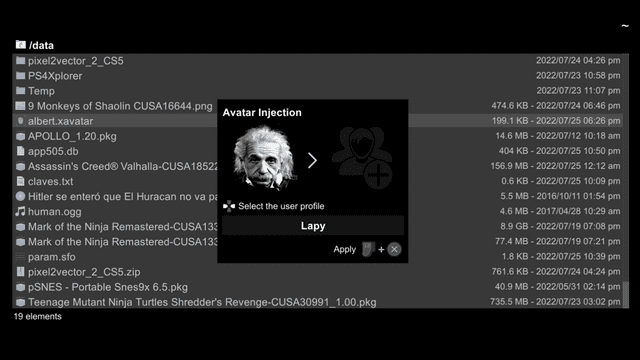
- Avatars - xavatar.
- Languages (translation) - xlang.
Audio player
- Plays in background while using the app.
- To enable background music when when you start the app, place auto.ogg in /data/PS4Xplorer/.
Video player
- No audio in root mode.
- Has audio in sandbox mode.
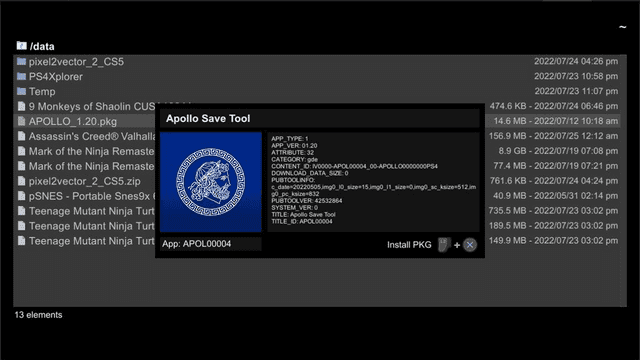
PKG Installation
- You can select multiple files and install them at once (L2+Cross).
- Note: It cannot install from /data or /user/app.
Compressed files
- RAR5, multi-part, or password-protected archives are not supported.
- For TAR files, please remove the second extension before extraction.
Language
- To install a language, just open the XLANG file with X and restart Xplorer.
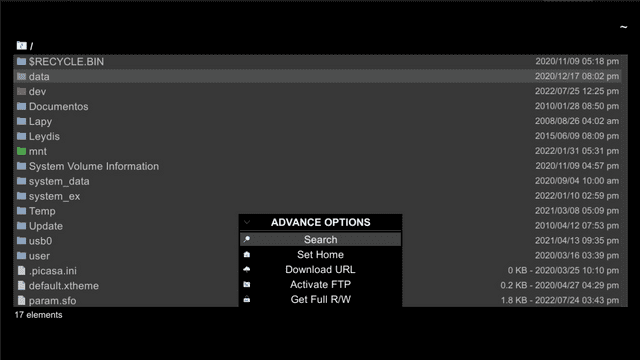
Advanced Options
- Search (experimental):
- Search for files/folders in the current directory (including subfolders).
- Stop after 100 results or by pressing Square.
- Press Cross on a result to navigate to it.
- Set Home:
- Saves the current location as a bookmark.
- Press R3 to quickly return to this location.
- Download URL:
- Download a file from an HTTP URL to the current directory.
- Activate FTP (Shortcut: L3):
- Enable an FTP server on your PS4 (IP and port will be displayed on-screen).
- Get Full R/W:
- Grant write permissions in system folders.
- Installed PKGs:
- Show all installed PKGs (internal or extended storage).
- Settings (Options button):
- Help - Displays control mappings.
- Adjust Borders - Calibrates screen display area.
- Temperature - Toggles between °C / °F.
Controls
File browser:
D-Pad Up/Down or Left Stick - Navigate (hold L2 scroll faster)
Cross - Open a folder, Execute file
Circle - Go back
D-Pad Left - Quick access to USB storage device (/mnt/usb0)
D-Pad Right - Quick access to USB storage device (/mnt/usb1)
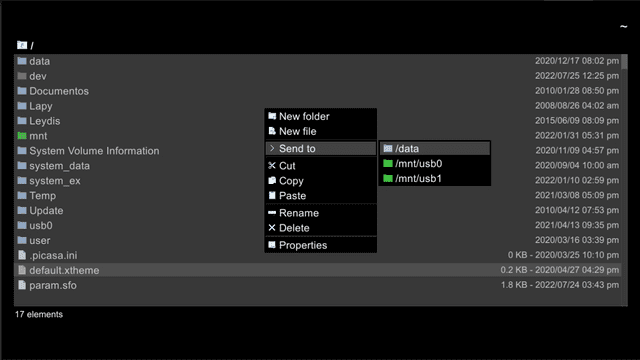
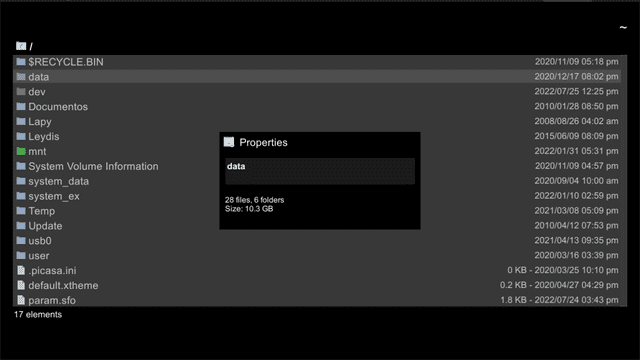
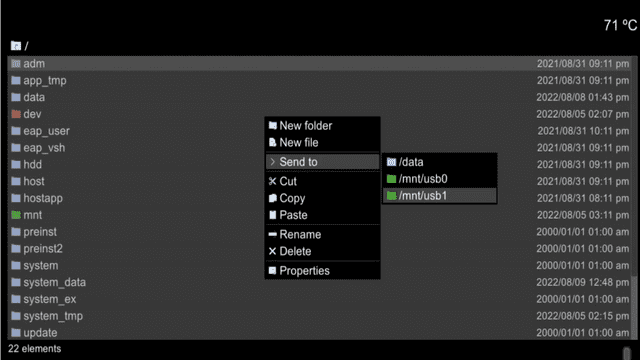
Triangle - Context menu (create/cut/copy/paste/rename...)
L2+Triangle - Advanced Options
R1 - Select/deselect items
Hold R2+R1 - Select all items
L1 - Cancel multi-selection
Audio player:
Square - Stop playback
Image viewer:
D-Pad Left/Right - Navigate between images
Text viewer:
D-Pad or Left Stick - Move between keys
Right Stick - Move cursor
Screenshots
Media
PS4 Xplorer 2.0 Released, Testing and Comparing to v1.34 (BrutalSam)
Compatibility
2.0+: 5.00 to 12.02
1.34: 4.55, 4.74, 5.01, 5.05, 6.72, 7.02, 7.5X, 9.00
Changelog
v2.05
- Added support for firmware up to 12.02.
- Thanks to yousef333__ from Discord for testing.
v2.04
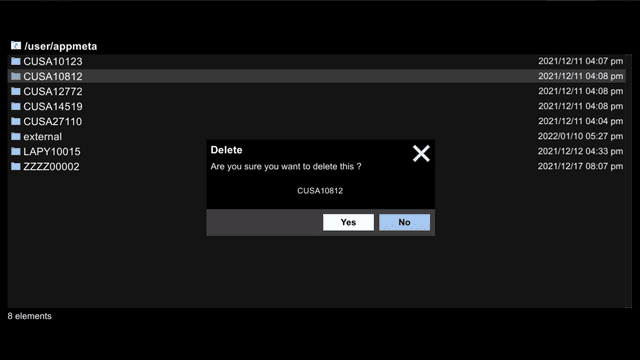
- Fixed the delete option for some problematic folders.
- Reduce the PKG size (again).
- Thanks to @Wr0zen for beta test it and everyone who report the bug, in special @NanospeedGamer and Xalfie from Discord.
v2.0.3
- Added support for firmware from 5.00 to 11.00 thanks to @notnotzecoxao and @LightningMods_.
v2.0.2
- A few small updates have been send for PS4-Xplorer 2.0 (2.02) and PS5-Xplorer (1.02) to support LOG files at @crump_youtube request.
v2.0.1
- This new release Fixes issues with Firmware 6.72 Autodetection, Fixes some bugs in Sandbox mode, Improves deletion, and fixes memory cleanup issues when closing the app.
v2.0.0
- This not need much introduction, but there are many new things and small secrets that I will reveal with the days.
v1.19
- Support Avatars made with the Avatar Maker tool
- There is a bug when are more than one user, it shows "Lapy" in the 1st one. If you move between users it will be fix it. When I can upload a new version I'll fix it for good
v1.18
- Supported Themes (.xtheme files from the "PS4-Xplorer Theme Maker" windows app). To avoid applying a theme by mistake, you need to touch the X button twice in a row over a theme file (.xtheme) to apply it.
- Supported unprotected .zip .rar .tar files (read and extract, except: multipart files). Note: for .tar.xxx files, you need to rename the file and remove the 2nd extension, leave only the .tar
- Added a shortcut to the FTP with L3.
- After more than a year of use in our scene, the period of Beta ends.
Credits
- @notzecoxao
- @LightningMods_
- @thedarkprogr
- @DouglasSampaioz
- @DefaultDNB
- @RetroGamer_74
- @Wr0zen