Toggle menu
Toggle preferences menu
Toggle personal menu
Not logged in
Your IP address will be publicly visible if you make any edits.

PS Multi Tools: Difference between revisions

From GameBrew
Created page with "{{Infobox PS4 Homebrews |title=PS Multi Tools |image=psmultitoolsps4.png |description=Backup manager for PS1, PS2, PSX, PS3, PS4, PS5 (later), PSP & PS Vita, containing homebrews, firmwares, tools (integrated) & other Windows tools. |author=SvenGDK |lastupdated=2024/05/09 |type=PC Utilities |version=14.1.1 |license=Mixed |download=https://dlhb.gamebrew.org/ps4homebrews/psmultitoolsps4.7z |website=https://github.com/SvenGDK/PS-Multi-Tools |source=https://github.com/SvenGD..."
 
No edit summary
 
(19 intermediate revisions by 2 users not shown)
Line 1: Line 1:
{{Infobox PS4 Homebrews
|title=PS Multi Tools
|title=PS Multi Tools
|image=psmultitoolsps4.png
|image=Psmultitoolps42.png
|description=Backup manager for PS1, PS2, PSX, PS3, PS4, PS5 (later), PSP & PS Vita, containing homebrews, firmwares, tools (integrated) & other Windows tools.
|description=Backup manager and utility for PS1, PS2, PSX, PS3, PS4, PS5, PSP & PS Vita, containing download for homebrews, firmwares, payload and more.
|author=SvenGDK
|author=SvenGDK
|lastupdated=2024/05/09
|lastupdated=2026/01/28
|type=PC Utilities
|type=PC Utilities
|version=14.1.1
|version=16.2
|license=Mixed
|license=Mixed
|download=https://dlhb.gamebrew.org/ps4homebrews/psmultitoolsps4.7z
|download=https://github.com/SvenGDK/PS-Multi-Tools/releases/
|website=https://github.com/SvenGDK/PS-Multi-Tools
|website=https://github.com/SvenGDK/PS-Multi-Tools
|source=https://github.com/SvenGDK/PS-Multi-Tools
|source=https://github.com/SvenGDK/PS-Multi-Tools
Line 19: Line 19:
|image_alt=PS Multi Tools
|image_alt=PS Multi Tools
}}
}}
{{cleanup|article|Needs cleanup}}
<!--psmultitoolsps4.7z-->
PS Multi Tools is an all-in-one utility that includes tools and a backup manager for PS1, PS2, PSX, PS3, PS4, PS5, PSP, and PS Vita.
All-In-One Utility with tools & backup manager for PS1, PS2, PSX, PS3, PS4 & PS5, PSP & PS Vita.
 
The [https://dotnet.microsoft.com/en-us/download/dotnet/thank-you/runtime-desktop-9.0.3-windows-x64-installer .NET 9 Desktop Runtime] is required in order to run it.


==Features==
==Features==
=== General ===
==== General ====
* FTP Browser
* FTP Browser.
* Downloader
* Downloader.
=== PS1 ===
==== PS1 ====
* Merge BIN files
* Convert BIN/CUE to ISO.
=== PS2 ===
* Merge BIN files.
* Convert BIN/CUE to ISO
==== PS2 ====
* PSX DVR XMB Games and Homebrew Installer
* Convert BIN/CUE to ISO.
=== PS3 ===
* CUE2POPS Converter.
* Core_OS Tools
* ELF2KELF Wrapper.
* Fix Tar Tool
==== PSX ====
* PS3 ISO Tools
* HDD Partition Manager (Create partition, Remove partition (destructive), Change partition visibility).
* PKG Extractor
* Install PS2 homebrew and games on the internal PSX HDD.
* PKG Infos Reader
* Install PS1 games on the internal PSX HDD.
* PUP Unpacker
* PS2 Game Partition Manager (Dump partition header, Change game title, flags, DMA).
* RCO Dumper
* XMB Files Explorer (XMB Tools):
* SELF Reader
** Open a _system or xosd folder to load, view and edit its content.
* PARAM.SFO Editor
** Text Editor for .xml &amp; .dic files with syntax highlighting.
=== PS4 ===
** Translate .dic &amp; .xml files automatically in most languages.
* PKG Sender (currently not working)
==== PS3 ====
* PKG Infos Reader
* Core_OS Tools.
* Payload Sender
* Fix Tar Tool.
* Show PSN Store Infos
* PARAM.SFO Editor.
* Decrypted PUP Unpacker
* ISO Tools:
* USB Writer
** Create an ISO of your backup folder.
* PARAM.SFO Editor
** Patch the ISO from 4.21 to 4.60.
* PKG Merger
** Extract the content of an ISO.
* PPPwn GUI
** Split the ISO in 4GB parts for FAT32 drives.
=== PS5 ===
** Decrypt an ISO using a decryption key or dkey file.
* General ELF &amp; BIN Payload Sender
* PKG Extractor.
* Mast1c0re ELF Payload &amp; PS2 ISO Sender
* PKG Infos Reader.
* APP.DB Modifier (Add the Internet Browser to the home menu for every profile with a simple click (requires FTPS5 loaded first))
* PUP Unpacker.
* Burn Blu Ray ISO images to Blu Ray discs
* RCO Dumper.
* NOTIFICATION2.DB Manager (requires FTPS5 loaded first)
* SELF Reader.
* Clear the console's error history (requires FTPS5 loaded first)
* webMAN MOD Features:
* PARAM.JSON Creator &amp; Editor
** PS3NetSrv Utilities:
* MANIFEST.JSON Creator &amp; Editor
*** Create folder structure (GAMES, PS3ISO, ...).
* GP5 Project Creator (requires prospero-pub-cmd at \Tools\PS5\ )
*** Manage virtual folders for ps3netsrv.
* PKG Builder (requires prospero-pub-cmd at \Tools\PS5\ )
*** Share a single folder.
* RCO Dumper (requires FTPS5 loaded first)
*** Share configured managed virtual folders.
* RCO Extractor
** Disc &amp; Game Utilities:
* AT9 &lt;-&gt; WAV Audio Converter (requires at9tool at \Tools\PS5\ )
*** Play inserted disc.
* FTP Grabber
*** Eject inserted disc.
** Allows dumping of games (/mnt/sandbox/pfsmnt) (detects the remote game folder automatically)
*** Insert disc in tray.
** Allows dumping of game metadata (/user/appmeta/ + /system_data/priv/appmeta/ &amp; /user/np_uds/nobackup/conf/ + /user/trophy2/nobackup/conf/)
*** Exit game to XMB.
** Allows dumping SELF files using sleirsgoevy's ps5-self-dumper payload (https://github.com/sleirsgoevy/ps4jb-payloads/tree/bd-jb/ps5-self-dumper)
*** Reload PS3 game.
* PS5 Game Patches Downloader
*** Toggle video recording (in-game).
* Unofficial patches loader (libhijack fork of illusion)
*** Toggle in-game background music playback.
* PKG Merger
** General Utilities:
* Make fSELF tool to fake sign SELF files of created dumps
*** Rescan the games and refresh XML.
** Based on EchoStretch's Make_FSELF_PY3.bat &amp; LightningMods updated make_fself by Flatz
*** Shutdown the PS3 console.
* etaHEN Configurator
*** Restart the PS3 console.
* klog Viewer
*** Restart the PS3 console and allow scan content on startup.
* Shortcut PKG Creator
*** Restart the PS3 console and show the min version.
=== PSP ===
*** Hard reboot.
* ISO to CSO Converter
*** Reboot using VSH command.
* CSO Decompressor
*** Open an URL on the PS3 web browser.
* PBP to ISO / ISO to PBP Converter
** Download &amp; Installation Utilities:
* PBP Packer/Unpacker
*** Download a PKG from an URL to the PS3 HDD.
==- PSVita ==-
*** Download a file from an URL to the PS3 HDD.
* PKG Extractor
*** Download &amp; Install a PKG from an URL.
* PKG Infos Reader
*** Install a PKG from the PS3 HDD.
* PSVIMAGE Tools (currently not working)
*** Install a theme from the PS3 HDD.
* RCO Data Table Extractor
** Temperature Monitoring:
*** Web GUI for monitor temperatures in Celcius.
*** Web GUI for monitor temperatures in Fahrenheit.
** Show system info on PS3.
==== PS4 ====
* Decrypted PUP Unpacker.
* PARAM.SFO Editor.
* Payload Sender.
* PKG Extractor.
* PKG Infos Reader.
* PKG Merger.
* PPPwn GUI.
* PS1 Classics fPKG Creator.
* PS2 Classics fPKG Creator.
* PSP Classics fPKG Creator.
* Show PSN Store Infos.
* USB Exploit Writer.
==== PS5 ====
* Add the Internet Browser to the home menu for every profile with a simple click [APP.DB] (requires FTPS5 loaded first).
* AT9 &lt;-&gt; WAV Audio Converter.
* Burn Blu-Ray ISO images to Blu-Ray discs.
* Clear the console's error history (requires running FTP server).
* Console Notifications Manager [NOTIFICATION2.DB] (requires running FTP server).
* Content Manager for the PS5 WebSrv of john-tornblom:
** Homebrew Manager.
** Game ROM Manager for games that use a roms folder.
** Media Content Manager for homebrew that use a media folder.
* etaHEN Configurator (requires running FTP server).
* etaHEN Remote PKG Installer.
* FTP Grabber:
** Allows dumping of games (/mnt/sandbox/pfsmnt) (detects the remote game folder automatically).
** Allows dumping of game metadata (/user/appmeta/ + /system_data/priv/appmeta/ &amp; /user/np_uds/nobackup/conf/ + /user/trophy2/nobackup/conf/).
** Allows dumping SELF files using:
*** sleirsgoevy's ps5-self-dumper payload (https://github.com/sleirsgoevy/ps4jb-payloads/tree/bd-jb/ps5-self-dumper).
*** idlesauce's ps5-self-decrypter payload (https://github.com/idlesauce/PS5-SELF-Decrypter).
* Game Patches Downloader.
* General ELF &amp; BIN Payload Sender.
* GP5 Project Creator.
* Kernel Log Viewer.
* Make fSELF tool to fake sign SELF files of created dumps:
** Based on EchoStretch's Make_FSELF_PY3.bat &amp; LightningMods updated make_fself by Flatz.
** Option to downgrade the SDK version.
* MANIFEST.JSON &amp; PARAM.JSON File Creator &amp; Editor.
* Mast1c0re ELF Payload &amp; PS2 ISO Sender.
* Payload Builder.
* PKG Builder (requires prospero-pub-cmd at \Tools\PS5\ ).
* PKG Merger.
* PKG Extractor:
** Requires password.
** Extract sc package metadata using pkgdec5.
* Port Checking Utility.
* SELF Decrypter GUI.
* Shortcut PKG Creator.
* RCO Dumper (requires running FTP server).
* RCO Extractor.
==== PSP ====
* CSO Decompressor.
* ISO to CSO Converter.
* PBP Packer/Unpacker.
* PBP to ISO / ISO to PBP Converter.
==== PSVita ====
* PKG Extractor.
* PKG Infos Reader.
* PS Vita PFS Tools (psvpfstools) GUI.
* PSVIMAGE Tools (currently not working).
* RCO Data Table Extractor.
==== Memory Cards ====
* Add files and directories.
* Browse the content of the PS2 Memory Cards.
* Extract files from a PS2 Memory Card.
* Format PS2 Memory Cards.
* Install FMCB on PS2 Memory Cards.
* Read PS2 Memory Card information.
* Remove files and directories.


==History of PS(3) Multi Tools==
==Screenshots==
* Started in late 2010 as not open source project called "PS3 Multi Tools" (for PS3 only)
https://dlhb.gamebrew.org/ps4homebrews/images/psmultitoolps42.png
* Added support for PS2 & PSP later around 2011-2013
* Added support for PS Vita around 2013-2015
* Development stopped in late 2016 with still no real support for the PS4
* Started from scratch early 2023 and added first support for PS4 & PS5
* First release of v13 with source code


==Media==
https://dlhb.gamebrew.org/ps4homebrews/images/psmultitoolps43.png
''' PS Multi Tools App Released for PC | All in One Tool for PlayStation Consoles ''' ([https://www.youtube.com/watch?v=D_n6uh2pa1s BrutalSam]) <br>
<youtube width=""640"">D_n6uh2pa1s</youtube>


==Screenshots==
https://dlhb.gamebrew.org/ps4homebrews/images/psmultitoolps44.png
https://dlhb.gamebrew.org/ps4homebrews/psmultitoolsps4-01.png


https://dlhb.gamebrew.org/ps4homebrews/psmultitoolsps4-02.png
https://dlhb.gamebrew.org/ps4homebrews/images/psmultitoolps45.png


https://dlhb.gamebrew.org/ps4homebrews/psmultitoolsps4-03.png
https://dlhb.gamebrew.org/ps4homebrews/images/psmultitoolps46.png


https://dlhb.gamebrew.org/ps4homebrews/psmultitoolsps4-04.png
https://dlhb.gamebrew.org/ps4homebrews/images/psmultitoolps47.png


https://dlhb.gamebrew.org/ps4homebrews/psmultitoolsps4-05.png
==Media==
''' PS Multi Tools App Released for PC | All in One Tool for PlayStation Consoles ''' ([https://www.youtube.com/watch?v=D_n6uh2pa1s BrutalSam]) <br>
<youtube width="640">D_n6uh2pa1s</youtube>


https://dlhb.gamebrew.org/ps4homebrews/psmultitoolsps4-06.png
==Changelog==
[https://github.com/SvenGDK/PS-Multi-Tools/releases Complete changelog]


https://dlhb.gamebrew.org/ps4homebrews/psmultitoolsps4-07.png
==History of PS(3) Multi Tools==
* Started in late 2010 as not open source project called "PS3 Multi Tools" (for PS3 only).
* Added support for PS2 & PSP later around 2011-2013.
* Added support for PS Vita around 2013-2015.
* Development stopped in late 2016 with still no real support for the PS4.
* Started from scratch early 2023 and added first support for PS4 & PS5.
* First release of v13 with source code.


==Changelog==
'''v14.1.1'''
* Updated PPPwn GUI for PS4
** Updated pppwn.exe with latest changes
** Added new 9.00 + 11.00 stage1 & stage2 files from SiSTR0
** Added most recent & updated 9.00 + 11.00 GoldHEN 2.4b17 from SiSTR0
** Added new button to copy goldhen.bin to USB root
'''v14.1'''
*General
**New PS Multi Tools Updater
*PS4
**Added PPPwn files
**Added new PPPwn GUI for PS4 (Tools -> PPPwner)
**Added new PS4 downloads: System & Recovery Firmware for 11.00
**Added missing PS4 download: GoldHEN v2.3
*PS5
**Fixed typo in PS5 downloads: etaHEN v1.6B -> v1.7B
'''v14'''
*General
**Updated NuGet packages
**Add NPSPKG & PKGDownloadListViewItem class to use with new PKG Browser
**Minor PKGDecryptor (PS3) adjustments
**Added more PS1, PS2, PS3, PS4, PSP & PS Vita game properties
**Minor adjustments in the "Welcome" window
**Removed some unused content
*PS3 & PS Vita
**Added new PKG Browser & Downloader
***Browse PS3 & PS Vita packages
***Download PS3 & PS Vita packages
***Create .rap file for PS3 (right click after download)
***Extract PS Vita .pkg using zRIF key (right click after download)
*PS1
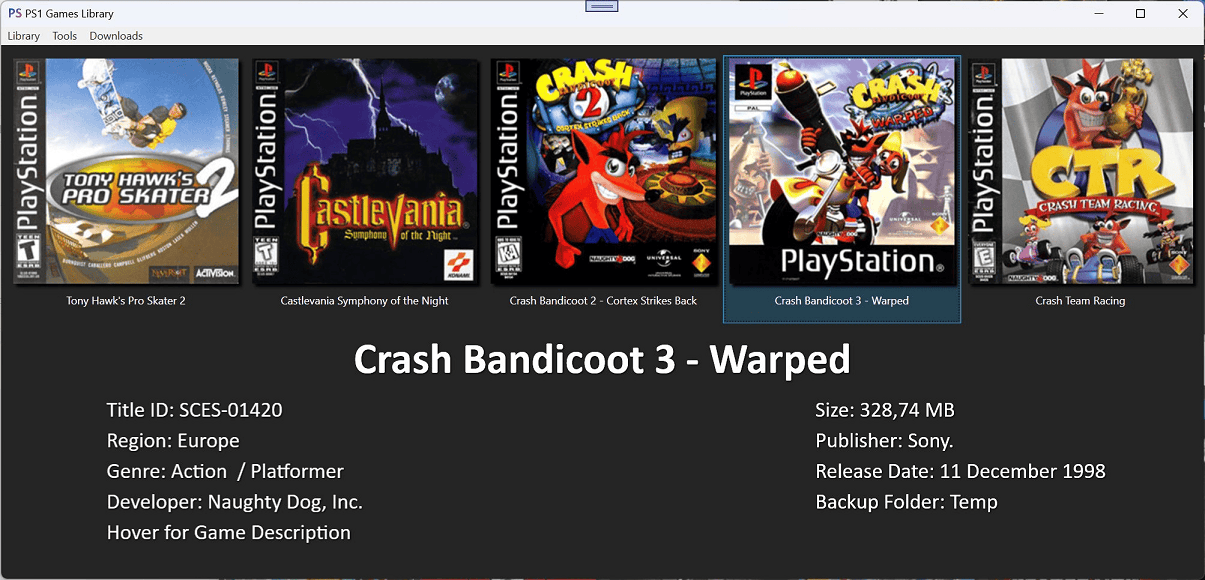
***Updated PS1 game library
***New games library interface
***Fixed extended Game ID lookup in .bin file
***Fixed loading some PS1 games
***Fixed a possible crash when loading games
***Improved loading covers (retrieving & loading)
*PS2
**Updated PS2 game library
***New games library interface
***Fixed loading some PS2 Game IDs
***Fixed a possible crash when loading games
***Improved loading covers (retrieving & loading)
*PS3
**Updated PS3 game library
***Added default PS1/PS2/PS3/PSP icons for games without icon
***New games library interface
***Added new PKG Browser & Downloader
***Improved loading time when adding games to the library
***It is now possible to load installed games on the PS3 HDD
****Menu -> Library -> Load games on PS3 HDD
*****- A PS3 IP address with Port needs to be set in the 'Settings' (x.x.x.x:21)
***Mount or Mount & Play installed games from the PS3 HDD
****Load games on PS3 HDD first
****Right click on the game in the library
****ISO Tools -> Mount / Mount & Play
***Added 'Settings' to save the PS3 IP & Port (saves & reloads automatically)
***Filter games in library
**Added new webMAN MOD features for PS3
***- Set the PS3 IP address with PORT in the 'Settings' (x.x.x.x:21 - use Port 21 as default)
****PS3NetSrv Utilities
*****Create folder structure (GAMES, PS3ISO, ...)
*****Manage virtual folders for ps3netsrv
*****Share a single folder
*****Share configured managed virtual folders
****Disc & Game Utilities
*****Play inserted disc
*****Eject inserted disc
*****Insert disc in tray
*****Exit game to XMB
*****Reload PS3 game
*****Toggle video recording (in-game)
*****Toggle in-game background music playback
****General Utilities
*****Rescan the games and refresh XML
*****Shutdown the PS3 console
*****Restart the PS3 console
*****Restart the PS3 console and allow scan content on startup
*****Restart the PS3 console and show the min version
*****Hard reboot
*****Reboot using VSH command
*****Open an URL on the PS3 web browser
****Download & Installation Utilities
*****Download a PKG from an URL to the PS3 HDD
*****Download a file from an URL to the PS3 HDD
*****Download & Install a PKG from an URL
*****Install a PKG from the PS3 HDD
*****Install a theme from the PS3 HDD
****Temperature Monitoring
*****Show system info on PS3
*****Web GUI for monitor temperatures in Celcius
*****Web GUI for monitor temperatures in Fahrenheit
**Updated PS3 Downloads
***Added PS3 Covers Pack download
***Added PS2/PSX Covers Pack download
***Added WM Theme downloads
***Updated prepISO download
***Updated PS2CONFIG download
***Updated PS2 Classics Launcher download
***Updated PSP Remasters Launcher download
***Updated PSP Minis Launcher download
***Updated ps3netsrv download
***Updated webMAN MOD Installer download
***Added .dkey download
***Added .key download
**Added new PS3 ISO Tool
***Create PS3 ISO using ps3netsrv
*PS4
***Updated PS4 game library
****New games library interface
****Param.sfo loading improved and fixed
****Added some missing PS4 game properties
*PS5
**Updated PS5 game library
***New games library interface
****Improved loading time when adding games to the library
****Fixed: Change game/app category
*PSP
**Updated PSP game library
***New games library interface
***Fixed some PSP PARAM.SFO values
*PS Vita
**Updated PS Vita game library
***New games library interface
***Added new PKG Browser & Downloader
***Fixed: Loading covers
***Fixed some PS Vita PARAM.SFO values
'''v13.6'''
*General
**New custom dialog for specific usage
**Changed color of some icons from blue to white
**Updated & added some new icons
**More PS5 tool shortcuts on the main window
**Main window now bolds the text of the selected console or handheld
*PS5
**PS5 Library now supports adding more backup folders
**Added new 'Settings' (accessible in the PS5 Library)
***Check for library updates
***Save your PS5 IP address and FTP port (re-open the library afterwards to reload changes)
***Library Options :
****Disable/Enable loading of icons
****Disable/Enable loading of backgrounds
****Disable/Enable file checks when loading backups
***Show klog Viewer
***Get (old) pub tools from a public GitHub repo (only displays help)
**Added new PS5 klog Viewer (available in the Settings)
***Listen to the klog port and receive output
***Highlight predefined OR own words with a color
***Change general font size of the RichTextBox
***Change the background and general font color of the RichTextBox
***Clear klog (RichTextBox content)
***Clear all highlight rules
***Reset the background and general font color to default
**Added new etaHEN Configurator
***Gets '/data/etaHEN/config.ini' and shows enabled/disabled settings
***Shows the last modification date & time of the cached file
***Change the value of available settings
***Upload back to the PS5
**Added PS5 Homebrew :
***PS5-Xplorer v1.00 by Lapy
**Updated PS5 Homebrew :
***etaHEN v1.4B by LM
***Itemzflow v1.05 by LM
'''v13.5'''
*General
**Some NuGet packages updated
***FluentFTP
***WinSCP
***Microsoft.Web.WebView2
*PS5 Library
**Slight performance increase for the games library
**New context menu action for games: "Browse assets"
**Game Assets Browser
***Quickly browse the selected game's asset files
***Loads .mp4, .webm, .png, .jpg, .ogg & .ttf files
***Plays or shows (currently) .mp4, .png, .jpg & .ttf files
**More tooltip infos
***Checks now if the game's eboot is signed
***Indicates if the required firmware of the game is not too high to be (currently) playable
***Now shows all content ids of a game from contentids.json
**Automatically saves & reloads your PS5 IP & Port when setting it in "Settings"
**Fix: Do not check for missing icon (icon0.png) on prosperopatches for NPXS apps
*PS5 Tools
**New Make fSELF tool to fake sign SELF files of created dumps
***Based on EchoStretch's Make_FSELF_PY3.bat & LightningMods updated make_fself by Flatz
***Fake signs dumped SELF files and creates a backup (.esbak) of the original file
**FTP Grabber fix: Change mouse cursor back after SELF files dump completed
*PS5 Game Patches
**Fix: SC package not downloadable due to certificate error
**Fix: If a pkg size could not be determinated the window would either crash or not add the .pkg to the queue
**Slow download fix
***The default download operation of CoreWebView2 did not cancel when supressing the default download dialog.
**Now loads already downloaded patches (must be in Downloads folder of PS Multi Tools)
**Merge patch packages after download by right clicking the "_sc.pkg"
***This can be done after all packages have been downloaded
***It creates a new folder with the patch base name (in the Downloads folder), places all packages of this patch in this folder and merges afterwards
**"Download State" and "Merge State" have been added to show the progress
***Shows if download [Not started / Started / Downloaded (not for resuming !)]
***Shows if packages of a game patch have been merged or if a merge is still required
**Now supports item sorting when clicking on the column header
'''v13.4'''
*New in PS Multi Tools
**PS5 game dumps are now checked and show you when hovering over the game icon if you still need some files (just an overview atm) or the if decryption of SELF files is still needed
**The context menu actions are now also available for applications
**More context menu actions for the PS5 games/apps library :
***Open game/app folder
***Change game/app category type
***Rename game/app "Title Name" (with a change default language option)
***Replace game/app icon
***Replace game/app background
***Add or replace game/app soundtrack
**Added Itemzflow by LightningMods v1.03 for PS5
**Minor bug fixes
'''v13.3'''
*New in PS Multi Tools
**Added context menu to the PS5 games library with following options :
***Copy To -> Copies the selected game to a destination drive or folder
***Play Soundtrack -> Plays the included at9 soundtrack of the game (if available)
***Check for updates -> Checks for available game patches
**Downloading of game patches is now possible within PS Multi Tools
***PKGs can be downloaded directly or added to a queue
***It is possible to download multiple .pkg files
**Minor bug fixes
'''v13.2'''
* Local backup folders of PS5 games & applications are now supported
* The PS5 game library has been completely redesigned
** New ListView design
** Shows more information
** The game/application title can be shown in different languages when hovering over the title (if present in param.json)
'''v13.1.1'''
*New in PS Multi Tools
**Added latest PS5 JAR Loader for 7.61 (no full exploit)
**Hosts & DNS Menu reorganized
***Added more hosts (Sleirsgoevy & Zecoxao)
***Added an alternative DNS (by Kameleon)
**More downloads added
***etaHEN (by LightningMods)
***etaHEN with cheats
***Homebrew Store (by LightningMods)
***PS5-Kstuff (by Sleirsgoevy)
**PS5 Game Patches (libhijacker) updated
*Fixes
**Offline usage fixes and adjustments
**Fixed: PS3 PUP Unpacker now opens the correct window
**Fixed: Crash or error when searching for PS5 game patches
**Fixed: PS5 PKG Builder did not accept a path with spaces
**Fixed: PSX XMB Installer Game Editor did crash when loading non existing data from PSXDatacenter
*Files updated on 10 Nov. 23
**Added missing strings.exe
**You can also get it from here: https://download.sysinternals.com/files/Strings.zip and add it manually to the main folder.
'''v13.1'''
*New in PS Multi Tools
**Updated Home screen, now shows frequently used tools for each console.
**"Check for updates" message removed -> Can be checked by clicking the new button in the status bar.
**PS5 Library: Patch source .pkg support
*New features for PS5 since the last release
**PS5 Notification Manager
***Supports table 'notification' with or without column 'title_icon'
**Clear the error history on the PS5
**PARAM.JSON Creator & editor
**GP5 Project Creator (requires tools in "\Tools\PS5")
**PKG Builder (requires tools in "\Tools\PS5")
**RCO Dumper over FTP
**RCO Extractor using sngre
**AT9<->WAV Converter (requires tools in "\Tools\PS5")
**FTP Grabber
**PS5 Game Patches Downloader
***Currently loads only patch list with information and can redirect to download page
**Unofficial game patches loader (libhijack fork of illusion)
**PKG Merger
*New features for PS4
**PKG Merger
*Other
**PS3 PUP Unpacker fix
'''v13.0.5'''
*New features for PS5
**Add the Internet Browser to the home menu for every profile with 1 click
***After the installation a shutdown is required. Boot into Safe Mode, from there choose 5. Clear cache and Rebuild Database -> 2. Rebuild Database
**Rip the content of discs over FTP
**Burn BR .iso images to Blu Ray discs
**FTP Browser is now working with FTPS5
**Now supports loading game & app infos over FTP
'''v13.0.2'''
* Fixes PKGInfo (usage in psmt-lib changed)
* PSP game library now clearly shows the selection of an item
* PS Vita game library now clearly shows the selection of an item
* The game/app title should now display correctly for PSP & Vita
* Menu option Library->"Open Downloads folder" is now working for all menus (if the Downloads folder exists)
'''v13.0.1'''
*Changes in PS Multi Tools v13.0.1
**Option Strict is now 'On'
**A library update is now completely optional
**A changelog with library changes will be now displayed after an update
**Added missing PKG Info context menu actions for PS3/PS4/PS Vita
*Changes in included PSMT Library v1.0.2
**Option Strict is now 'On'
**FTP Browser: Create new folder should work now
**WebMAN MOD updated to 1.47.45
**Added PS4 host links (Only displays links)
**PackageInfoWindow -> DownloadPackageInfoWindow (Loads infos from web with content ID)
**New PKGInfo window for PS3/PS4/PSV (Loads infos from .pkg)
**Other minor fixes and changes
'''v13'''
*General changes
**PS Multi Tools v13 is completely rewritten from scratch in WPF and uses now .NET Framework 4.8.1 (WinForms & .NET Framework 3.5 previously).
**The previous library "ps-menu" is now called "psmt-lib" and is now a shared library that can be used in your tools too (very limited previously).
**PS Multi Tools works now without the need/check for updates - if no update is available it will keep your current "psmt-lib.dll".
**MyPS & Bug Sender removed, please use GitHub for reporting bugs.
*PS1 changes
**Improved support for the PS1 console
**The backup manager supports now ".bin" files and reads the game code from it. Game art can now also be displayed. (.iso [not yet] & .bin are now supported)
**Merge BIN Tool
**Updated & New Downloads
*PS2 changes
**Improved support for the PS2 console
**Now includes PSX DVR tools and downloads
**The backup manager is now able to display more game informations including game art.
**Convert BIN/CUE to ISO
**PSX DVR XMB Games and Homebrew Installer
**Updated & New Downloads
*PS3 changes
**Improved support for the PS3 console
**The backup manager now supports ".iso" and ".pkg" files. (Backup folders with PS3_GAME, .iso & .pkg are now supported)
**The backup manager is now able to play the soundtrack of the selected game
**ISO Tools and operations are now available (Create, Extract, Split & Patch)
**Supports now ".tsv" files from NPS (Files need to be placed in the "Database" folder but you can also load the latest one within the app)
***This will unlock downloads for :
***Games
***Updates
***Demos
***DLCs
***Themes
***Avatars
**Create ".rap" files (Right-click on a download item)
**New PARAM.SFO Editor
**PUP Extractor/Unpacker
**dev_flash Extractor/Unpacker
**Read self for lv0, lv1ldr, lv2ldr, isoldr, appldr, EBOOT.BIN
**Decrypt, extract, encrypt and hexdump "Core_os"
**Fix Tar for 3.72+
**RCO Dumper
**PS2 Classics (not ready yet)
**Updated & New Downloads
*PS4
**Support for the PS4 console added for the first time
**The backup manager is able to load ".pkg" files and display informations about it, including game art & soundtrack
**USB Writer for ".img" files - useful for the "exfathax.img"
**PARAM.SFO Editor for PS4
**Payload Sender to send ".bin" payloads
**PKG Sender (Will be changed to "PS4 PKG Manager") to send and install ".pkg" files, it will also be able to view & uninstall installed pkgs on the PS4
**Simple PUP Unpacker for .DEC PUPS
**PS Classics (not ready yet)
**Exploit Host downloads for 4.05 - 9.00
**Emulator downloads
**Firmware downloads (System & Recovery)
**Homebrew downloads
**Windows Tools downloads
*PS5
**Support for the PS5 console added for the first time
**The backup manager is unavailable until ...
**Mast1c0re Sender to send ".elf" payloads and PS2 ".iso" games (including ".conf")
**Informations about available exploits
**Exploit download for 3.00 - 4.51, including the BD-JB ELF Loader v1.6.1
**Homebrew downloads (FTPS5, Mast1c0re Network ELF & Game Loader)
*PSP changes
**Improved support for the PSP console
**The backup manager now supports loading ".cso" files (Backup folders with PSP_GAME, .iso, .cso are now supported)
**Compress ".iso" files to ".cso"
**Convert ".iso" files to ".PBP" or ".PBP" to ".iso"
**Extract ".PBP" files
**Updated & New Downloads
*PS Vita changes
**Improved support for the PS Vita console
**The backup manager now supports loading PSV encrypted/decrypted game folders & ".pkg" files and displays informations about it, including game art
**Supports now ".tsv" files from NPS (Files need to be placed in the "Database" folder but you can also load the latest one within the app)
**This will unlock downloads for :
***Games
***Updates
***DLCs
***Themes
***Demos
**RCO Extractor
**Decrypt and extract ".pkg" files
**psvimgtools (not ready yet)
**EML File Generator (not ready yet)
**Updated & New Downloads
== External links ==
* Github - https://github.com/SvenGDK/PS-Multi-Tools
* GitHub - https://github.com/SvenGDK/PS-Multi-Tools
* PSMT Covers (PS1, PS2 & PS Vita) - https://github.com/SvenGDK/PSMT-Covers

Latest revision as of 05:08, 1 February 2026

PS Multi Tools
General
AuthorSvenGDK
TypePC Utilities
Version16.2
LicenseMixed
Last Updated2026/01/28
Links
Download
Website
Source

All-In-One Utility with tools & backup manager for PS1, PS2, PSX, PS3, PS4 & PS5, PSP & PS Vita.

The .NET 9 Desktop Runtime is required in order to run it.

Features

General

  • FTP Browser.
  • Downloader.

PS1

  • Convert BIN/CUE to ISO.
  • Merge BIN files.

PS2

  • Convert BIN/CUE to ISO.
  • CUE2POPS Converter.
  • ELF2KELF Wrapper.

PSX

  • HDD Partition Manager (Create partition, Remove partition (destructive), Change partition visibility).
  • Install PS2 homebrew and games on the internal PSX HDD.
  • Install PS1 games on the internal PSX HDD.
  • PS2 Game Partition Manager (Dump partition header, Change game title, flags, DMA).
  • XMB Files Explorer (XMB Tools):
    • Open a _system or xosd folder to load, view and edit its content.
    • Text Editor for .xml & .dic files with syntax highlighting.
    • Translate .dic & .xml files automatically in most languages.

PS3

  • Core_OS Tools.
  • Fix Tar Tool.
  • PARAM.SFO Editor.
  • ISO Tools:
    • Create an ISO of your backup folder.
    • Patch the ISO from 4.21 to 4.60.
    • Extract the content of an ISO.
    • Split the ISO in 4GB parts for FAT32 drives.
    • Decrypt an ISO using a decryption key or dkey file.
  • PKG Extractor.
  • PKG Infos Reader.
  • PUP Unpacker.
  • RCO Dumper.
  • SELF Reader.
  • webMAN MOD Features:
    • PS3NetSrv Utilities:
      • Create folder structure (GAMES, PS3ISO, ...).
      • Manage virtual folders for ps3netsrv.
      • Share a single folder.
      • Share configured managed virtual folders.
    • Disc & Game Utilities:
      • Play inserted disc.
      • Eject inserted disc.
      • Insert disc in tray.
      • Exit game to XMB.
      • Reload PS3 game.
      • Toggle video recording (in-game).
      • Toggle in-game background music playback.
    • General Utilities:
      • Rescan the games and refresh XML.
      • Shutdown the PS3 console.
      • Restart the PS3 console.
      • Restart the PS3 console and allow scan content on startup.
      • Restart the PS3 console and show the min version.
      • Hard reboot.
      • Reboot using VSH command.
      • Open an URL on the PS3 web browser.
    • Download & Installation Utilities:
      • Download a PKG from an URL to the PS3 HDD.
      • Download a file from an URL to the PS3 HDD.
      • Download & Install a PKG from an URL.
      • Install a PKG from the PS3 HDD.
      • Install a theme from the PS3 HDD.
    • Temperature Monitoring:
      • Web GUI for monitor temperatures in Celcius.
      • Web GUI for monitor temperatures in Fahrenheit.
    • Show system info on PS3.

PS4

  • Decrypted PUP Unpacker.
  • PARAM.SFO Editor.
  • Payload Sender.
  • PKG Extractor.
  • PKG Infos Reader.
  • PKG Merger.
  • PPPwn GUI.
  • PS1 Classics fPKG Creator.
  • PS2 Classics fPKG Creator.
  • PSP Classics fPKG Creator.
  • Show PSN Store Infos.
  • USB Exploit Writer.

PS5

  • Add the Internet Browser to the home menu for every profile with a simple click [APP.DB] (requires FTPS5 loaded first).
  • AT9 <-> WAV Audio Converter.
  • Burn Blu-Ray ISO images to Blu-Ray discs.
  • Clear the console's error history (requires running FTP server).
  • Console Notifications Manager [NOTIFICATION2.DB] (requires running FTP server).
  • Content Manager for the PS5 WebSrv of john-tornblom:
    • Homebrew Manager.
    • Game ROM Manager for games that use a roms folder.
    • Media Content Manager for homebrew that use a media folder.
  • etaHEN Configurator (requires running FTP server).
  • etaHEN Remote PKG Installer.
  • FTP Grabber:
  • Game Patches Downloader.
  • General ELF & BIN Payload Sender.
  • GP5 Project Creator.
  • Kernel Log Viewer.
  • Make fSELF tool to fake sign SELF files of created dumps:
    • Based on EchoStretch's Make_FSELF_PY3.bat & LightningMods updated make_fself by Flatz.
    • Option to downgrade the SDK version.
  • MANIFEST.JSON & PARAM.JSON File Creator & Editor.
  • Mast1c0re ELF Payload & PS2 ISO Sender.
  • Payload Builder.
  • PKG Builder (requires prospero-pub-cmd at \Tools\PS5\ ).
  • PKG Merger.
  • PKG Extractor:
    • Requires password.
    • Extract sc package metadata using pkgdec5.
  • Port Checking Utility.
  • SELF Decrypter GUI.
  • Shortcut PKG Creator.
  • RCO Dumper (requires running FTP server).
  • RCO Extractor.

PSP

  • CSO Decompressor.
  • ISO to CSO Converter.
  • PBP Packer/Unpacker.
  • PBP to ISO / ISO to PBP Converter.

PSVita

  • PKG Extractor.
  • PKG Infos Reader.
  • PS Vita PFS Tools (psvpfstools) GUI.
  • PSVIMAGE Tools (currently not working).
  • RCO Data Table Extractor.

Memory Cards

  • Add files and directories.
  • Browse the content of the PS2 Memory Cards.
  • Extract files from a PS2 Memory Card.
  • Format PS2 Memory Cards.
  • Install FMCB on PS2 Memory Cards.
  • Read PS2 Memory Card information.
  • Remove files and directories.

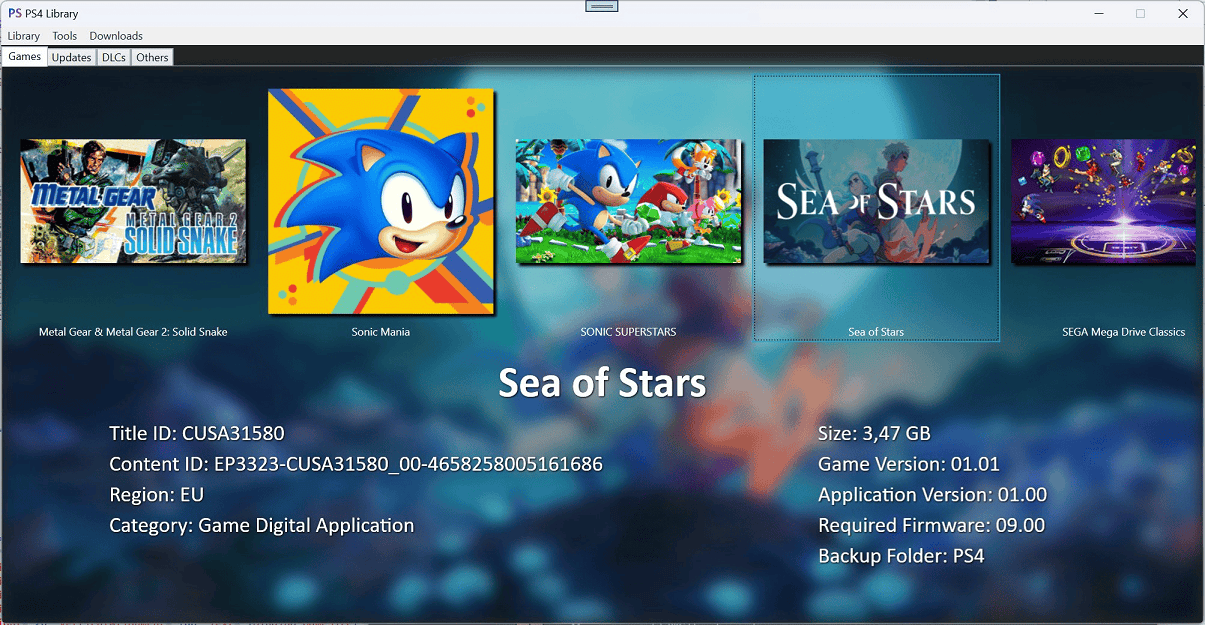
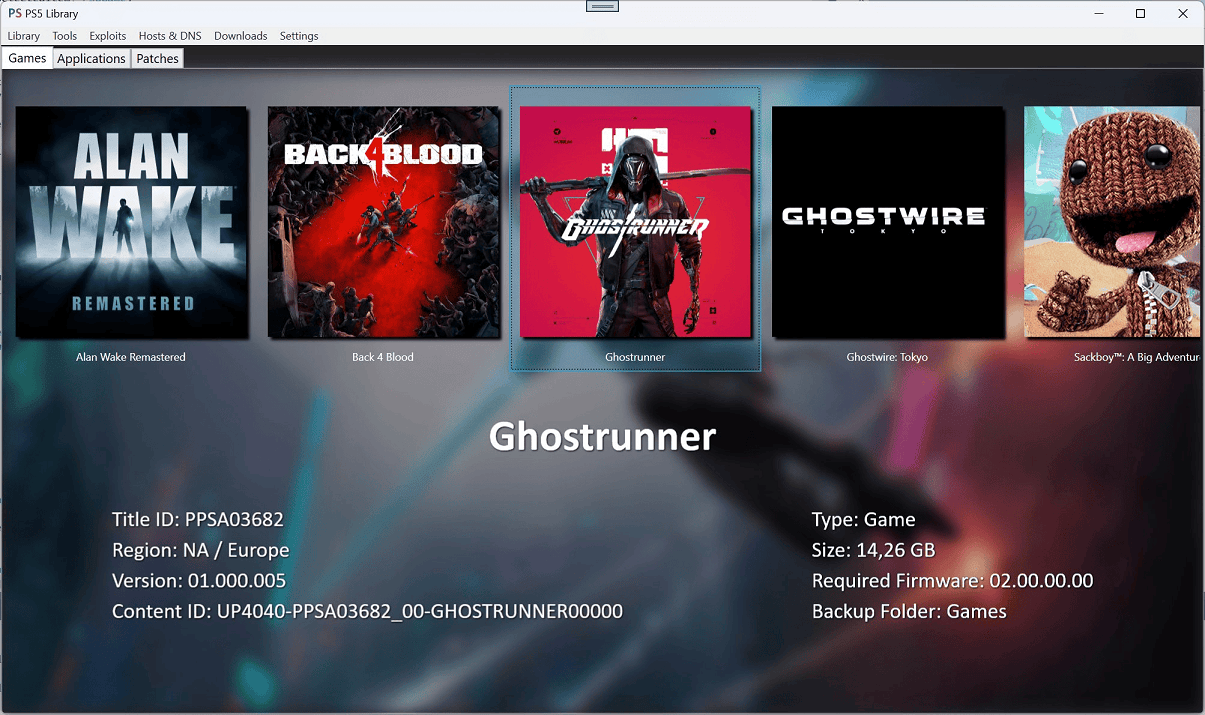
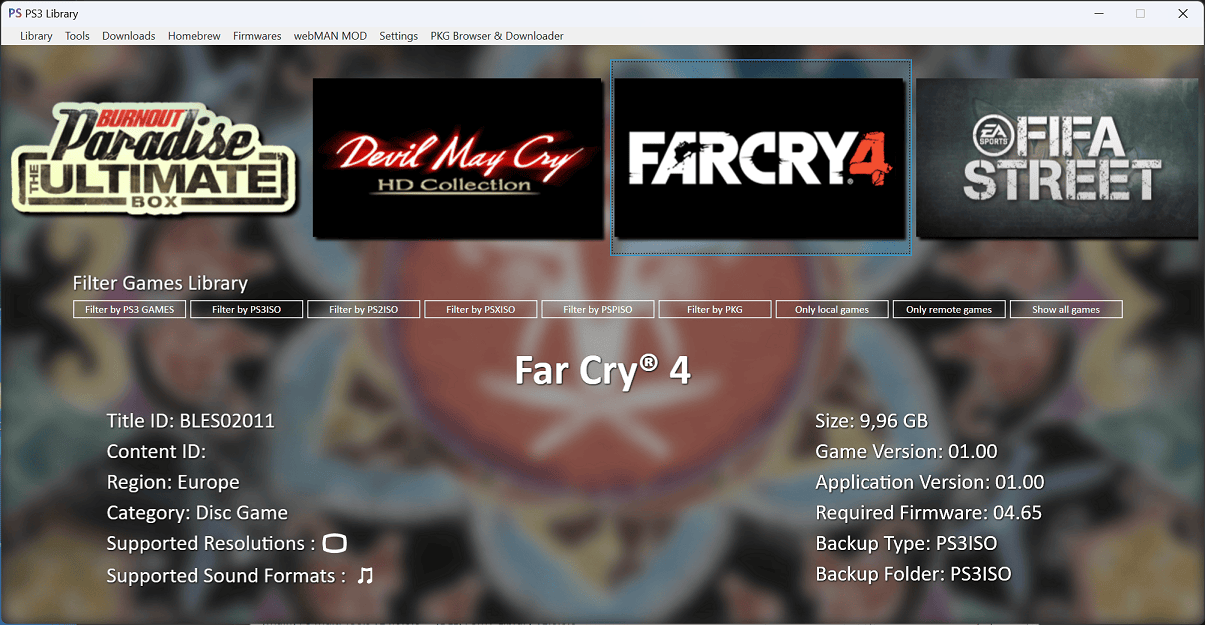
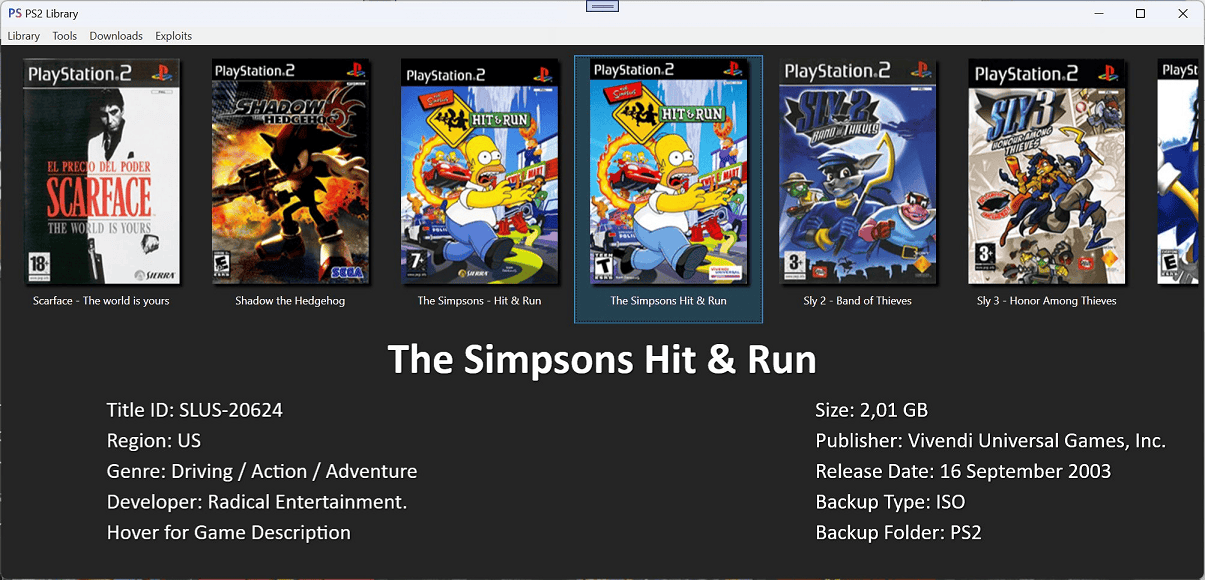
Screenshots
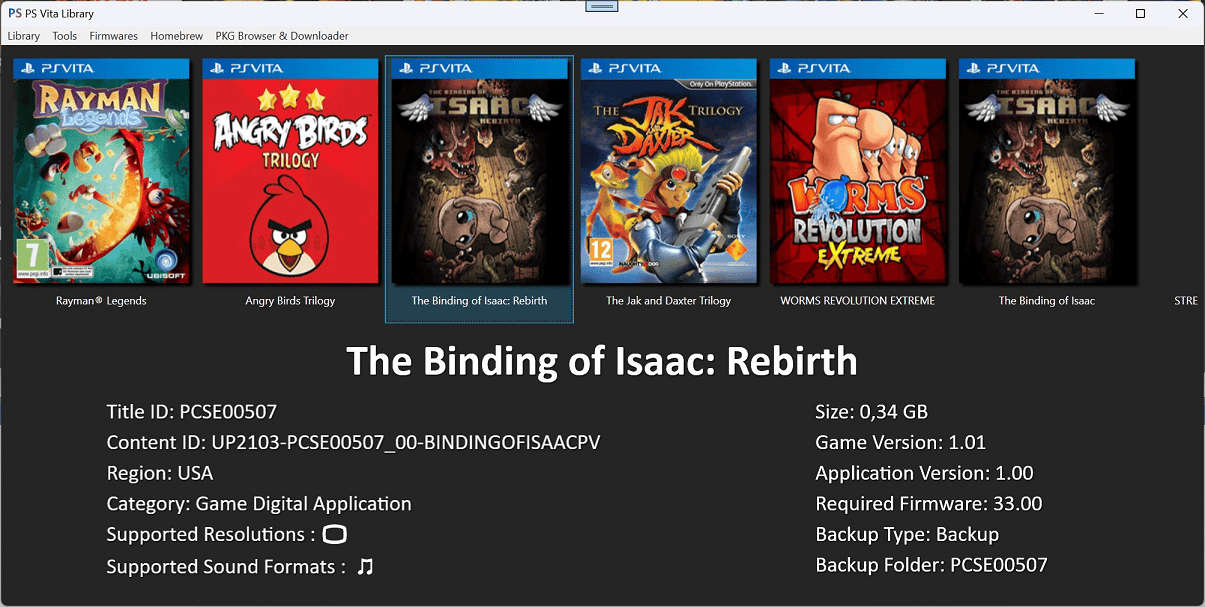
psmultitoolps42.png

psmultitoolps43.png

psmultitoolps44.png

psmultitoolps45.png

psmultitoolps46.png

psmultitoolps47.png

Media

PS Multi Tools App Released for PC | All in One Tool for PlayStation Consoles (BrutalSam)

Changelog

Complete changelog

History of PS(3) Multi Tools

  • Started in late 2010 as not open source project called "PS3 Multi Tools" (for PS3 only).
  • Added support for PS2 & PSP later around 2011-2013.
  • Added support for PS Vita around 2013-2015.
  • Development stopped in late 2016 with still no real support for the PS4.
  • Started from scratch early 2023 and added first support for PS4 & PS5.
  • First release of v13 with source code.

External links

Advertising: