
PS4Profile: Difference between revisions
From GameBrew
More actions
Created page with "{{Infobox PS4 Homebrews |title=PS4Profile |image=ps4profile.png |description=Allow PlayStation 4 console users to change their ID online easily and instantly. |author=Master-s |lastupdated=2024/01/27 |type=PC Utilities |version=2.2 |license=Mixed |download=https://dlhb.gamebrew.org/ps4homebrews/ps4profile.7z |website=https://www.biteyourconsole.net/2023/06/05/scena-ps4-rilasciato-ps4profile-v0-01/ |source=https://github.com/Master-s/PS4Profile |donation= }} {{#seo: |titl..." |
No edit summary |
||
| (2 intermediate revisions by one other user not shown) | |||
| Line 4: | Line 4: | ||
|description=Allow PlayStation 4 console users to change their ID online easily and instantly. | |description=Allow PlayStation 4 console users to change their ID online easily and instantly. | ||
|author=Master-s | |author=Master-s | ||
|lastupdated=2024/ | |lastupdated=2024/09/09 | ||
|type=PC Utilities | |type=PC Utilities | ||
|version=2. | |version=2.4 | ||
|license=Mixed | |license=Mixed | ||
|download=https://dlhb.gamebrew.org/ps4homebrews/ps4profile.7z | |download=https://dlhb.gamebrew.org/ps4homebrews/ps4profile.7z | ||
| Line 19: | Line 19: | ||
|image_alt=PS4Profile | |image_alt=PS4Profile | ||
}} | }} | ||
PS4Profile is a PC program that helps changing your PlayStation 4 online ID fast and easy. | |||
== | == User guide == | ||
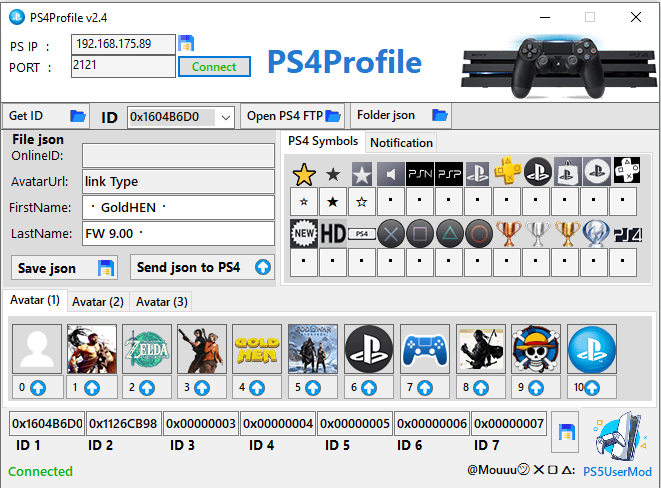
Customize your File json, then click "Save json" to save the online.json file. | |||
Find the correct IP address and port number from your PlayStation 4's network settings. | |||
Fill in the IP and port, click the "Open FTP" button to establish a connection with your PlayStation 4 console. | |||
https://dlhb.gamebrew.org/ps4homebrews/ps4profile-01.png | |||
Replace the online.json file in /system_data/priv/cache/profile/. | |||
https://dlhb.gamebrew.org/ps4homebrews/ | |||
==Screenshots== | |||
https://dlhb.gamebrew.org/ps4homebrews/images/ps4profile-01.png | |||
https://dlhb.gamebrew.org/ps4homebrews/ | https://dlhb.gamebrew.org/ps4homebrews/images/ps4profile-04.png | ||
https://dlhb.gamebrew.org/ps4homebrews/images/ps4profile-05.png | |||
==Changelog== | ==Changelog== | ||
''' | '''v2.4''' | ||
* Added: | |||
** PS5UserMod Program Link. | |||
'''v2.3''' | |||
* Added: | |||
** Avatars (4). | |||
** PS4 Symbols. | |||
** icons (2). | |||
'''v2.2''' | |||
* I added two versions of the PS4Profile and Avatars 21. | |||
'''v2.1b''' | |||
* I added two versions of the PS4Profile: | |||
** The first version is normal: PS4Profile. | |||
** The second version works with Debug: PS4Profile-Debug. | |||
'''v2.0''' | |||
*Added: | |||
** WinSCP Batch. | |||
** Get ID button Show users. | |||
** Copy profile\0x1 folder to files/backup folder using bat. | |||
'''v0.05''' | |||
*PS4Profile_v0.05. | |||
'''v0.04''' | |||
* Added: | |||
** Accounts from 1 to 7 accounts. | |||
** Avatars two new. | |||
'''v0.03''' | |||
* First Release. | * First Release. | ||
== External links == | == External links == | ||
* | * GitHub - https://github.com/Master-s/PS4Profile | ||
Latest revision as of 05:00, 10 June 2025
| PS4Profile | |
|---|---|
 | |
| General | |
| Author | Master-s |
| Type | PC Utilities |
| Version | 2.4 |
| License | Mixed |
| Last Updated | 2024/09/09 |
| Links | |
| Download | |
| Website | |
| Source | |
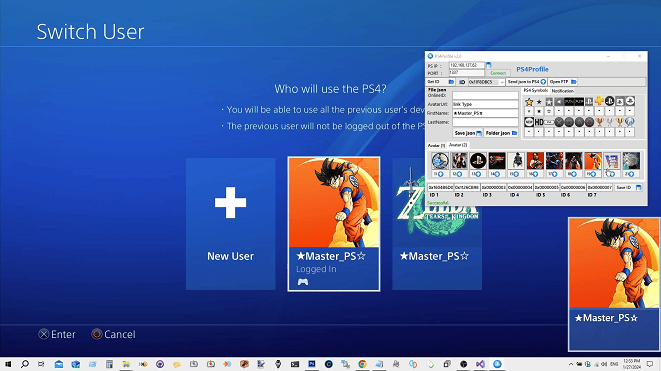
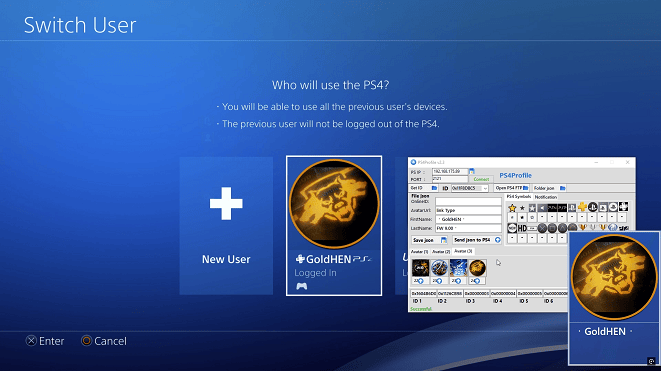
PS4Profile is a PC program that helps changing your PlayStation 4 online ID fast and easy.
User guide
Customize your File json, then click "Save json" to save the online.json file.
Find the correct IP address and port number from your PlayStation 4's network settings.
Fill in the IP and port, click the "Open FTP" button to establish a connection with your PlayStation 4 console.
Replace the online.json file in /system_data/priv/cache/profile/.
Screenshots
Changelog
v2.4
- Added:
- PS5UserMod Program Link.
v2.3
- Added:
- Avatars (4).
- PS4 Symbols.
- icons (2).
v2.2
- I added two versions of the PS4Profile and Avatars 21.
v2.1b
- I added two versions of the PS4Profile:
- The first version is normal: PS4Profile.
- The second version works with Debug: PS4Profile-Debug.
v2.0
- Added:
- WinSCP Batch.
- Get ID button Show users.
- Copy profile\0x1 folder to files/backup folder using bat.
v0.05
- PS4Profile_v0.05.
v0.04
- Added:
- Accounts from 1 to 7 accounts.
- Avatars two new.
v0.03
- First Release.