
NXMilk Switch: Difference between revisions
More actions
Created page with "{{Infobox Switch Homebrews |title=NXMilk |image=nxmilkswitch.png |description=NXMilk is a trivial audio player for Nintendo Switch. |author=proconsule |lastupdated=2024/02/18 |type=Media players |version=0.0.3 |license=Mixed |download=https://dlhb.gamebrew.org/switchhomebrews/nxmilkswitch.7z |website=https://gbatemp.net/threads/nxmilk-a-trivial-audio-player-for-switch.646603/ |source=https://github.com/proconsule/NXMilk |donation= }} {{#seo: |title=Switch Homebrew Apps (..." |
No edit summary |
||
| (14 intermediate revisions by 2 users not shown) | |||
| Line 2: | Line 2: | ||
|title=NXMilk | |title=NXMilk | ||
|image=nxmilkswitch.png | |image=nxmilkswitch.png | ||
|description= | |description=Switch audio player using ProjectM for visualizations. | ||
|author=proconsule | |author=proconsule | ||
|lastupdated= | |lastupdated=2025/08/29 | ||
|type=Media | |type=Media Players | ||
|version=0.0 | |version=0.4.0 | ||
|license=Mixed | |license=Mixed | ||
|download=https://dlhb.gamebrew.org/switchhomebrews/nxmilkswitch.7z | |download=https://dlhb.gamebrew.org/switchhomebrews/nxmilkswitch.7z | ||
| Line 19: | Line 19: | ||
|image_alt=NXMilk | |image_alt=NXMilk | ||
}} | }} | ||
NXMilk is | NXMilk is a trivial audio player for Nintendo Switch. It uses FFMpeg for audio decoding and projectM for the vis. The GUI is made with ImGui. | ||
This project started as a test class for new audio player for [[NXMP Switch|NXMP]]. | |||
== Features == | == Features == | ||
* Wide audio file format support | * Wide audio file format support. | ||
* Vis using projectM library | * Vis using projectM library. | ||
* Support Japanese,Chinese,Korean Cyrilic fonts | * Support Japanese, Chinese, Korean and Cyrilic fonts. | ||
* Can read from SD | * Can read from SD , USB storage , Network source, Image Files. | ||
=== Supported | * USB-DVD USB-BD Drive support using https://github.com/proconsule/libusbdvd , can read CD DVD BD | ||
== Installation == | |||
* Copy NXMilk.nro in a subfolder eg. /switch/NXMilk/ | |||
* (OPTIONAL) Copy milk files in /switch/NXMilk/presets/milk/ | |||
* (OPTIONAL) Copy texture files in /switch/NXMilk/presets/Textures/ | |||
* (OPTIONAL for better MIDI playback ) Copy timidity.conf and GUS patch files in /switch/NXMilk/timidity/ | |||
Edit Config file NXMilk.ini | |||
<pre>[AudioPlayer] | |||
startpath = /switch/NXMilk | |||
milkpresetspath = /switch/NXMilk/presets/milk/ | |||
milktexturespath = /switch/NXMilk/presets/Textures/ | |||
interfacehidesec = 10 | |||
usebuiltinpreset = true</pre> | |||
Since file extensions for audio file can be very "exotic" starting from version 0.1.0 enabled extension can be added also on config file | |||
<pre>[AudioPlayer] | |||
startpath = /switch/NXMilk | |||
milkpresetspath = /switch/NXMilk/presets/milk/ | |||
milktexturespath = /switch/NXMilk/presets/Textures/ | |||
interfacehidesec = 10 | |||
usebuiltinpreset = true | |||
enabled_extensions = .aac,.ac3,.wav</pre> | |||
=== Network === | |||
from version 0.2.0 NXMilk support network connections | |||
For SMB | |||
<pre>[Samba Test] | |||
server = 192.168.1.1 | |||
type = smb | |||
username = USERNAME | |||
password = PASSWORD | |||
path = SHAREPATH</pre> | |||
For ssh/sftp | |||
<pre>[SSH Test] | |||
server = 192.168.1.1 | |||
type = sftp | |||
username = USERNAME | |||
password = PASSWORD | |||
path = REMOTEPATH | |||
port = 22</pre> | |||
sftp can also use pub/priv key for auth | |||
<pre>[SSH Test] | |||
server = 192.168.1.1 | |||
type = sftp | |||
username = USERNAME | |||
path = REMOTEPATH | |||
pubkeypath = /switch/nxmp/sshkey/id_rsa.pub | |||
privkeypath = /switch/nxmp/sshkey/id_rsa | |||
port = 22</pre> | |||
NXMilk uses ffmpeg along with many other libraries so the supported files list is HUGE | |||
===Presets=== | |||
NXMilk has some builtin presets. Can be disabled setting to false the usebuiltinpreset option | |||
milkdrop presets to use: https://github.com/projectM-visualizer/presets-cream-of-the-crop | |||
== User guide == | |||
=== Supported files using ffmpeg === | |||
* MP3 support (with ID3 tag support) | * MP3 support (with ID3 tag support) | ||
* OGG support (with metadata support if present) | * OGG support (with metadata support if present) | ||
* FLAC support (with metadata support if present) | * FLAC support (with metadata support if present) | ||
=== Supported | * WAV support | ||
* AC3 support | |||
* AAC support | |||
* Many others (ffmpeg is great!) you can unfilter file extensions with config file ini | |||
=== Supported files using [https://lib.openmpt.org/libopenmpt/ libopenmpt] === | |||
* Composer 667 (.667) | * Composer 667 (.667) | ||
* Composer 669 / UNIS 669 (.669) | * Composer 669 / UNIS 669 (.669) | ||
* ASYLUM Music Format / Advanced Music Format (.amf / .dmf) | * ASYLUM Music Format / Advanced Music Format (.amf / .dmf) | ||
* | * Extreme's Tracker / Velvet Studio (.ams) | ||
* Composer 670 / CDFM (.c67) | * Composer 670 / CDFM (.c67) | ||
* Digi Booster Pro (.dbm) | * Digi Booster Pro (.dbm) | ||
| Line 44: | Line 117: | ||
* Digital Tracker / Digital Home Studio (.dtm) | * Digital Tracker / Digital Home Studio (.dtm) | ||
* Farandole Composer (.far) | * Farandole Composer (.far) | ||
* Davey W. | * Davey W. Taylor's FM Tracker (.fmt) | ||
* General Digital Music (.gdm) | * General Digital Music (.gdm) | ||
* Graoumf Tracker 1 (.gtk / .gt2) | * Graoumf Tracker 1 (.gtk / .gt2) | ||
| Line 73: | Line 146: | ||
* Mod's Grave (.wow) | * Mod's Grave (.wow) | ||
* Astroidea XMF (.xmf) | * Astroidea XMF (.xmf) | ||
=== Supported | |||
=== Supported files using [https://github.com/mcfiredrill/libgme libgme] === | |||
* AY ZX Spectrum/Amstrad CPC | * AY ZX Spectrum/Amstrad CPC | ||
* GBS Nintendo Game Boy | * GBS Nintendo Game Boy | ||
| Line 84: | Line 158: | ||
* VGM/VGZ Sega Master System/Mark III, Sega Genesis/Mega Drive,BBC Micro | * VGM/VGZ Sega Master System/Mark III, Sega Genesis/Mega Drive,BBC Micro | ||
=== Supported Files using libmodplug (https://github.com/Konstanty/libmodplug) === | === Supported Files using libmodplug ([https://github.com/Konstanty/libmodplug libmodplug]) === | ||
* Nearly all the formats supported by libopenmpt | * Nearly all the formats supported by libopenmpt | ||
* MIDI files (for better result you must use GUS patch file https://www.chocolate-doom.org/wiki/index.php/GUS) | * MIDI files (for better result you must use GUS patch file https://www.chocolate-doom.org/wiki/index.php/GUS) | ||
== | === Supported Disck Images === | ||
* | * CD-Audio (CUE/BIN) | ||
* ( | * ISO9660 | ||
* | |||
* | === Supported Files usign libarchive ([https://github.com/libarchive/libarchive libarchive]) === | ||
* RAR | |||
* ZIP | |||
* TAR.GZ | |||
* LHA | |||
== Controls == | |||
ZL/ZR - Previous/Next Preset | |||
L/R - Seek -/+ 5 seconds | |||
B - Stop | |||
Y - Disable projectM Vis | |||
Press Y to toogle between SD Card and USB. | |||
Limited Touch Support. | |||
'''USB:''' | |||
Y - Switch between SD card and USB | |||
==Screenshots== | == Screenshots == | ||
https://dlhb.gamebrew.org/switchhomebrews/nxmilkswitch-01.png | https://dlhb.gamebrew.org/switchhomebrews/nxmilkswitch-01.png | ||
https://dlhb.gamebrew.org/switchhomebrews/nxmilkswitch-02.png | https://dlhb.gamebrew.org/switchhomebrews/nxmilkswitch-02.png | ||
==Changelog== | == Changelog == | ||
'''v0.4.0''' | |||
* Updated libusbdvd to 0.0.7 (see release changelog) | |||
* Added Eject/Mount command for usbdvd | |||
* Now it should read all CD/DVD/BD | |||
'''v0.3.0''' | |||
* This version is a little milestone, using https://github.com/proconsule/libusbdvd nintendo switch can now read CD/DVD/BD. Is an WIP library | |||
* Added | |||
** USB-DVD USB-BD Drive support | |||
** ISO9660 with Joliet support | |||
** RockRidge support | |||
** UDF 1.02 support | |||
** Support CD-ROM DVD-ROM and BD-ROM (BD lack UDF 2.60 support) | |||
'''v0.2.0''' | |||
* Added | |||
** Network support (SSH/SMB/NFS) | |||
** CUE/BIN support (AUDIO CD Image playback) support also mixed mode image (data+audio) | |||
** ISO9660 support (CD/DVD image) | |||
** Archive support (RAR/ZIP/TAR.GZ) audio file inside an archive (fast inmemory seek for file < 100MB) | |||
** Added argv file playback for [https://github.com/ITotalJustice/sphaira sphaira] file assocation | |||
** Backlight On/Off for minimize power consumption | |||
* Changes | |||
** Changed milk builtin presets | |||
'''v0.1.0''' | |||
*Added | |||
** User defined file extensions (for exotic audio extensions, FFMpeg format support is huge) | |||
*Fixed | |||
** Local/usb switch (now return to startpath) | |||
* Changes | |||
** Updated libs (libusbhsfs,projectM,openmpt) | |||
** Changed usb behavior (from event to callback) | |||
** Fixed minor bugs | |||
'''v0.0.3''' | '''v0.0.3''' | ||
*Add support for Tracker files (.mod,.okt,.xm,.s3m) via libopenmpt (https://lib.openmpt.org/libopenmpt/) | * Add support for Tracker files (.mod,.okt,.xm,.s3m) via libopenmpt (https://lib.openmpt.org/libopenmpt/). | ||
'''v0.0.2''' | '''v0.0.2''' | ||
* First Release. | * First Release. | ||
== Libraries used in this | == Credits == | ||
* | Libraries used in this project: | ||
* | * FFMpeg https://ffmpeg.org/ | ||
* | * libusbhsfs https://github.com/DarkMatterCore/libusbhsfs | ||
* | * ImGui https://github.com/ocornut/imgui | ||
* | * projectM https://github.com/projectM-visualizer/projectm | ||
* | * libopenmpt https://lib.openmpt.org/libopenmpt/ | ||
* Many code parts are taken form | * libgme https://github.com/mcfiredrill/libgme | ||
* libmodplug https://github.com/Konstanty/libmodplug | |||
* Many code parts are taken form NXMP https://github.com/proconsule/nxmp | |||
Thanks to: | |||
* spkatsi @GBATemp forum for icons,banner, testing and suggestions | * spkatsi @GBATemp forum for icons,banner, testing and suggestions | ||
* Djakku @GBATemp for testing and suggestions | * Djakku @GBATemp for testing and suggestions | ||
== External links == | == External links == | ||
* | * GitHub - https://github.com/proconsule/NXMilk | ||
* GBAtemp - https://gbatemp.net/threads/nxmilk-a-trivial-audio-player-for-switch.646603/ | |||
Latest revision as of 03:07, 30 August 2025
| NXMilk | |
|---|---|
 | |
| General | |
| Author | proconsule |
| Type | Media Players |
| Version | 0.4.0 |
| License | Mixed |
| Last Updated | 2025/08/29 |
| Links | |
| Download | |
| Website | |
| Source | |
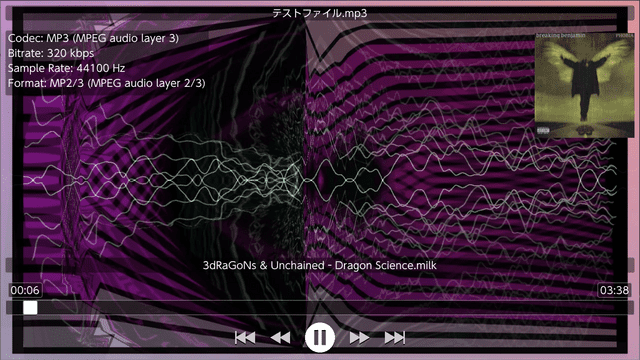
NXMilk is a trivial audio player for Nintendo Switch. It uses FFMpeg for audio decoding and projectM for the vis. The GUI is made with ImGui.
This project started as a test class for new audio player for NXMP.
Features
- Wide audio file format support.
- Vis using projectM library.
- Support Japanese, Chinese, Korean and Cyrilic fonts.
- Can read from SD , USB storage , Network source, Image Files.
- USB-DVD USB-BD Drive support using https://github.com/proconsule/libusbdvd , can read CD DVD BD
Installation
- Copy NXMilk.nro in a subfolder eg. /switch/NXMilk/
- (OPTIONAL) Copy milk files in /switch/NXMilk/presets/milk/
- (OPTIONAL) Copy texture files in /switch/NXMilk/presets/Textures/
- (OPTIONAL for better MIDI playback ) Copy timidity.conf and GUS patch files in /switch/NXMilk/timidity/
Edit Config file NXMilk.ini
[AudioPlayer]
startpath = /switch/NXMilk
milkpresetspath = /switch/NXMilk/presets/milk/
milktexturespath = /switch/NXMilk/presets/Textures/
interfacehidesec = 10
usebuiltinpreset = true
Since file extensions for audio file can be very "exotic" starting from version 0.1.0 enabled extension can be added also on config file
[AudioPlayer]
startpath = /switch/NXMilk
milkpresetspath = /switch/NXMilk/presets/milk/
milktexturespath = /switch/NXMilk/presets/Textures/
interfacehidesec = 10
usebuiltinpreset = true
enabled_extensions = .aac,.ac3,.wav
Network
from version 0.2.0 NXMilk support network connections
For SMB
[Samba Test]
server = 192.168.1.1
type = smb
username = USERNAME
password = PASSWORD
path = SHAREPATH
For ssh/sftp
[SSH Test]
server = 192.168.1.1
type = sftp
username = USERNAME
password = PASSWORD
path = REMOTEPATH
port = 22
sftp can also use pub/priv key for auth
[SSH Test]
server = 192.168.1.1
type = sftp
username = USERNAME
path = REMOTEPATH
pubkeypath = /switch/nxmp/sshkey/id_rsa.pub
privkeypath = /switch/nxmp/sshkey/id_rsa
port = 22
NXMilk uses ffmpeg along with many other libraries so the supported files list is HUGE
Presets
NXMilk has some builtin presets. Can be disabled setting to false the usebuiltinpreset option
milkdrop presets to use: https://github.com/projectM-visualizer/presets-cream-of-the-crop
User guide
Supported files using ffmpeg
- MP3 support (with ID3 tag support)
- OGG support (with metadata support if present)
- FLAC support (with metadata support if present)
- WAV support
- AC3 support
- AAC support
- Many others (ffmpeg is great!) you can unfilter file extensions with config file ini
Supported files using libopenmpt
- Composer 667 (.667)
- Composer 669 / UNIS 669 (.669)
- ASYLUM Music Format / Advanced Music Format (.amf / .dmf)
- Extreme's Tracker / Velvet Studio (.ams)
- Composer 670 / CDFM (.c67)
- Digi Booster Pro (.dbm)
- Digi Booster (.digi)
- X-Tracker (.dmf)
- DSIK (.dsm)
- Dynamic Studio (.dsm)
- Digital Symphony (.dsym)
- Digital Tracker / Digital Home Studio (.dtm)
- Farandole Composer (.far)
- Davey W. Taylor's FM Tracker (.fmt)
- General Digital Music (.gdm)
- Graoumf Tracker 1 (.gtk / .gt2)
- Ice Tracker / SoundTracker 2.6 (.ice / .st26)
- Imago Orpheus (.imf)
- Impulse Tracker Project (.itp) – legacy OpenMPT format with instruments stored in external files rather than directly in the module
- Jazz Jackrabbit 2 Music (.j2b)
- SoundTracker and compatible (.m15 / .stk)
- DigiTrakker (.mdl)
- OctaMED (.med)
- MO3 (.mo3)
- MadTracker 2 (.mt2)
- MultiTracker (.mtm)
- Psycho Pinball / Micro Machines 2 music format (.mus)
- Oktalyzer (.okt)
- OggMod-compressed XM files (.oxm)
- Epic Megagames MASI (.psm)
- Disorder Tracker 2 (.plm)
- ProTracker 3.6 IFF (.pt36)
- PolyTracker (.ptm)
- SoundFX / MultiMedia Sound (.sfx / .sfx2 / .mms)
- Scream Tracker 2 (.stm)
- Scream Tracker Music Interface Kit (.stx)
- Soundtracker Pro II (.stp)
- Symphonie / Symphonie Pro (.symmod)
- UltraTracker (.ult)
- Unreal Music (.umx) only from Unreal (Tournament 1), Deus Ex and Jazz Jackrabbit 3D
- Mod's Grave (.wow)
- Astroidea XMF (.xmf)
Supported files using libgme
- AY ZX Spectrum/Amstrad CPC
- GBS Nintendo Game Boy
- GYM Sega Genesis/Mega Drive
- HES NEC TurboGrafx-16/PC Engine
- KSS MSX Home Computer/other Z80 systems (doesn't support FM sound)
- NSF/NSFE Nintendo NES/Famicom (with VRC 6, Namco 106, and FME-7 sound)
- SAP Atari systems using POKEY sound chip
- SPC Super Nintendo/Super Famicom
- VGM/VGZ Sega Master System/Mark III, Sega Genesis/Mega Drive,BBC Micro
Supported Files using libmodplug (libmodplug)
- Nearly all the formats supported by libopenmpt
- MIDI files (for better result you must use GUS patch file https://www.chocolate-doom.org/wiki/index.php/GUS)
Supported Disck Images
- CD-Audio (CUE/BIN)
- ISO9660
Supported Files usign libarchive (libarchive)
- RAR
- ZIP
- TAR.GZ
- LHA
Controls
ZL/ZR - Previous/Next Preset
L/R - Seek -/+ 5 seconds
B - Stop
Y - Disable projectM Vis
Press Y to toogle between SD Card and USB.
Limited Touch Support.
USB:
Y - Switch between SD card and USB
Screenshots
Changelog
v0.4.0
- Updated libusbdvd to 0.0.7 (see release changelog)
- Added Eject/Mount command for usbdvd
- Now it should read all CD/DVD/BD
v0.3.0
- This version is a little milestone, using https://github.com/proconsule/libusbdvd nintendo switch can now read CD/DVD/BD. Is an WIP library
- Added
- USB-DVD USB-BD Drive support
- ISO9660 with Joliet support
- RockRidge support
- UDF 1.02 support
- Support CD-ROM DVD-ROM and BD-ROM (BD lack UDF 2.60 support)
v0.2.0
- Added
- Network support (SSH/SMB/NFS)
- CUE/BIN support (AUDIO CD Image playback) support also mixed mode image (data+audio)
- ISO9660 support (CD/DVD image)
- Archive support (RAR/ZIP/TAR.GZ) audio file inside an archive (fast inmemory seek for file < 100MB)
- Added argv file playback for sphaira file assocation
- Backlight On/Off for minimize power consumption
- Changes
- Changed milk builtin presets
v0.1.0
- Added
- User defined file extensions (for exotic audio extensions, FFMpeg format support is huge)
- Fixed
- Local/usb switch (now return to startpath)
- Changes
- Updated libs (libusbhsfs,projectM,openmpt)
- Changed usb behavior (from event to callback)
- Fixed minor bugs
v0.0.3
- Add support for Tracker files (.mod,.okt,.xm,.s3m) via libopenmpt (https://lib.openmpt.org/libopenmpt/).
v0.0.2
- First Release.
Credits
Libraries used in this project:
- FFMpeg https://ffmpeg.org/
- libusbhsfs https://github.com/DarkMatterCore/libusbhsfs
- ImGui https://github.com/ocornut/imgui
- projectM https://github.com/projectM-visualizer/projectm
- libopenmpt https://lib.openmpt.org/libopenmpt/
- libgme https://github.com/mcfiredrill/libgme
- libmodplug https://github.com/Konstanty/libmodplug
- Many code parts are taken form NXMP https://github.com/proconsule/nxmp
Thanks to:
- spkatsi @GBATemp forum for icons,banner, testing and suggestions
- Djakku @GBATemp for testing and suggestions