
Dodgin Diamond 2X Xbox: Difference between revisions
From GameBrew
More actions
No edit summary |
No edit summary |
||
| (12 intermediate revisions by the same user not shown) | |||
| Line 1: | Line 1: | ||
{{Infobox XBOX | {{Infobox XBOX Homebrews | ||
| title | |title=Dodgin Diamond 2X | ||
| image | |image=dd2x2.png | ||
| type | |description=An old school arcade shoot em up. Original by Juan J. Martínez. | ||
| version | |author=freakdave | ||
| | |lastupdated=2004/07/04 | ||
| | |type=Shooter | ||
|version=2 | |||
| download | |license=GPL-3.0 | ||
| source | |format=XBE | ||
|download=https://dlhb.gamebrew.org/xboxhomebrews/dd2x.7z?k33p0fil35 | |||
|website=http://freakdave.xbox-scene.com/ | |||
|source=https://dlhb.gamebrew.org/xboxhomebrews/dd2x.7z | |||
}} | }} | ||
Dodgin Diamond 2X is a port of [https://www.usebox.net/jjm/dd2/ Dodgin Diamond] by Juan J. Martínez. | |||
It is a little shoot'em up game aims to be an old school arcade game with low resolution graphics, top-down scroll action, energy based gameplay and different weapons with several levels of power. | |||
== | ==Controls== | ||
'''Menu:''' | |||
R/L - scroll down/up | |||
A - Select/change an option | |||
Back - Quit menu/options screen | |||
'''In game:''' | |||
D-Pad/Left-Stick - Steer your spaceship | |||
A - Shoot | |||
Start - Pause game | |||
Black - Return to menu | |||
Right-Stick Thumb - Take a screenshot (saved as screenshot.bmp in main game directory) | |||
==Screenshots== | |||
https://dlhb.gamebrew.org/xboxhomebrews/dd2x3.png | |||
https://dlhb.gamebrew.org/xboxhomebrews/dd2x4.png | |||
==Known issues== | |||
* Screen needs to be resized. | |||
* Levels are pretty hard to beat. | |||
freakdave | ==Changelog== | ||
'''v2''' | |||
* Added: The game is now started by a launcher. The options are as follows: | |||
**Start game. | |||
**Resize screen (Use the L/R Analogue sticks). | |||
** Set Flicker Filter (works only for the launcher at this time. Choose between 5 modes). | |||
**Press BLACK to shutdown the launcher and quit to Dashboard. | |||
* Added: Updated with the newest sources. Any gamepad issues should be fixed now.. | |||
* Added: Coop-Mode (2-Player mode). | |||
* Added: D-Pad controls. | |||
* Added: Game icon. | |||
* Changed: Return to the menu using BLACK. | |||
==External links== | |||
*Author's website - [https://web.archive.org/web/20120118014122/http://freakdave.xbox-scene.com/ http://freakdave.xbox-scene.com/] (archived) | |||
Latest revision as of 09:06, 28 January 2024
| Dodgin Diamond 2X | |
|---|---|
 | |
| General | |
| Author | freakdave |
| Type | Shooter |
| Version | 2 |
| License | GPL-3.0 |
| Last Updated | 2004/07/04 |
| Links | |
| Download | |
| Website | |
| Source | |
Dodgin Diamond 2X is a port of Dodgin Diamond by Juan J. Martínez.
It is a little shoot'em up game aims to be an old school arcade game with low resolution graphics, top-down scroll action, energy based gameplay and different weapons with several levels of power.
Controls
Menu:
R/L - scroll down/up
A - Select/change an option
Back - Quit menu/options screen
In game:
D-Pad/Left-Stick - Steer your spaceship
A - Shoot
Start - Pause game
Black - Return to menu
Right-Stick Thumb - Take a screenshot (saved as screenshot.bmp in main game directory)
Screenshots
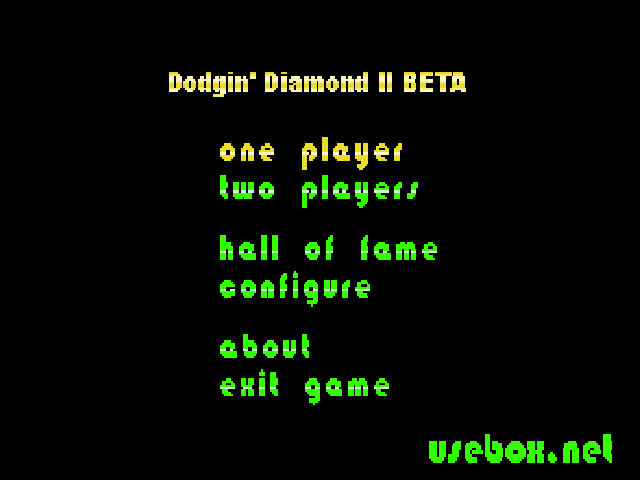
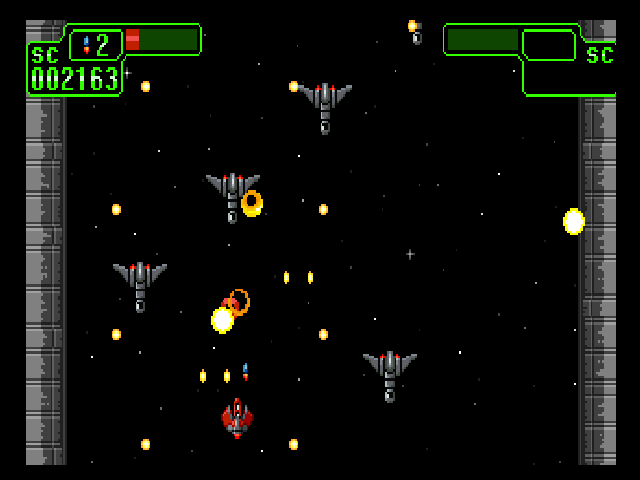
Known issues
- Screen needs to be resized.
- Levels are pretty hard to beat.
Changelog
v2
- Added: The game is now started by a launcher. The options are as follows:
- Start game.
- Resize screen (Use the L/R Analogue sticks).
- Set Flicker Filter (works only for the launcher at this time. Choose between 5 modes).
- Press BLACK to shutdown the launcher and quit to Dashboard.
- Added: Updated with the newest sources. Any gamepad issues should be fixed now..
- Added: Coop-Mode (2-Player mode).
- Added: D-Pad controls.
- Added: Game icon.
- Changed: Return to the menu using BLACK.
External links
- Author's website - http://freakdave.xbox-scene.com/ (archived)