
Carillon Waveform Editor GB: Difference between revisions
More actions
Created page with "{{Infobox GB Homebrews |title=Carillon Waveform Editor |image=carillonwaveformgb.png |description=Modified version of Carillon which includes a waveform editor for Channel 3. |author=Aleksi Eeben, nitro2k01 |lastupdated=2017/01/12 |type=Music Apps |version=1.2 |format=DMG, CGB |license=Mixed |download=https://dlhb.gamebrew.org/gbhomebrews/carillonwaveformgb.7z |website=https://blog.gg8.se/wordpress |source= |donation= }} {{#seo: |title= (Music Apps) - GameBrew |title_mod..." |
No edit summary |
||
| (4 intermediate revisions by the same user not shown) | |||
| Line 7: | Line 7: | ||
|type=Music Apps | |type=Music Apps | ||
|version=1.2 | |version=1.2 | ||
|license=Mixed | |license=Mixed | ||
|download=https://dlhb.gamebrew.org/gbhomebrews/ | |format=CGB | ||
|download=https://dlhb.gamebrew.org/gbhomebrews/carillon_wf.zip | |||
|website=https://blog.gg8.se/wordpress | |website=https://blog.gg8.se/wordpress | ||
}} | }} | ||
{{#seo: | {{#seo: | ||
|title= | |title=GameBrew | ||
|title_mode=append | |title_mode=append | ||
|image=carillonwaveformgb.png | |image=carillonwaveformgb.png | ||
| Line 41: | Line 39: | ||
B+Start - Paste the clipboard buffer to the current waveform | B+Start - Paste the clipboard buffer to the current waveform | ||
B+A - Clear current waveform | B+A - Clear current waveform (repeat multiple times to cycle through Carillon's default waveforms) | ||
==Screenshots== | ==Screenshots== | ||
Latest revision as of 10:19, 30 July 2024
| Carillon Waveform Editor | |
|---|---|
 | |
| General | |
| Author | Aleksi Eeben, nitro2k01 |
| Type | Music Apps |
| Version | 1.2 |
| License | Mixed |
| System | CGB |
| Last Updated | 2017/01/12 |
| Links | |
| Download | |
| Website | |
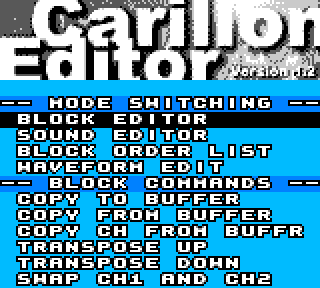
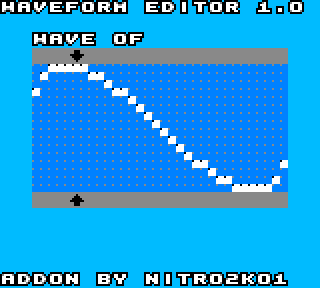
Modified version of Carillon Editor which includes a waveform editor for Channel 3.
Edits the 16 waveforms available to the editor. Available through a new menu option in the Carillon menu.
Controls
Select - Return to Carillon main menu
Start - Start/Stop playing the current waveform (updates automatically to any changes)
Left/Right - Move cursor left/right in waveform
A+Up/Down - Edit sample at cursor
A+Left/Right - Copy or "draw" the sample at the cursor left/right
B+Up/Down - Go to next/previous waveform
B+Select - Copy current waveform to Carillon's buffer (same buffer as in Carillon's menu so this corrupts anything in the buffer)
B+Start - Paste the clipboard buffer to the current waveform
B+A - Clear current waveform (repeat multiple times to cycle through Carillon's default waveforms)
Screenshots
External links
- Author's website - https://blog.gg8.se/wordpress