
Patcher64Plus Tool Wii: Difference between revisions
More actions
No edit summary |
|||
| (20 intermediate revisions by 2 users not shown) | |||
| Line 4: | Line 4: | ||
|description=The Patcher64+ Tool can switch to either Wii VC or Native mode. | |description=The Patcher64+ Tool can switch to either Wii VC or Native mode. | ||
|author=Admentus64 | |author=Admentus64 | ||
|lastupdated= | |lastupdated=2026/01/01 | ||
|type=PC Utilities | |type=PC Utilities | ||
|version= | |version=25.3.7 | ||
|license=GPL-3.0 | |license=GPL-3.0 | ||
|download=https:// | |download=https://github.com/Admentus64/Patcher64Plus-Tool/releases | ||
|website=https://www.emutalk.net/threads/patcher64-tool.57575/ | |website=https://www.emutalk.net/threads/patcher64-tool.57575/ | ||
|source=https://github.com/Admentus64/Patcher64Plus-Tool | |source=https://github.com/Admentus64/Patcher64Plus-Tool | ||
| | |donation=https://www.patreon.com/Admentus | ||
}} | }} | ||
{{#seo: | {{#seo: | ||
| Line 19: | Line 19: | ||
|image_alt=Patcher64Plus Tool | |image_alt=Patcher64Plus Tool | ||
}} | }} | ||
The Patcher64+ tool | <!--patcher64plustoolwii.7z--> | ||
The Patcher64+ tool is a program that initially designed for patching N64 ROMs (Virtual Console or Console copy) to include save states and other functionalities. However, it now supports NES and SNES consoles as well. | |||
The tool operates through a command-line interface and is coded in C++. Its primary function is to modify ROM files by introducing support for the 64Plus memory expansion and the Pro Action Replay (PAR) cheat code format. These modifications | The tool operates through a command-line interface and is coded in C++. Its primary function is to modify ROM files by introducing support for the 64Plus memory expansion and the Pro Action Replay (PAR) cheat code format. These modifications allows you to save the game progress and manipulate the game's behavior using cheat codes. | ||
==Features== | ==Features== | ||
*Patches ROM or Virtual Console WAD files with patches. | |||
* | *Can switch to either Wii VC or Native mode. | ||
* | *Wii VC mode handles VC WAD titles while Native mode handles ROM files directly. | ||
* | *Native mode skips most of the code used in Wii VC mode, which results in a faster patching. | ||
* Wii VC | *Supported ROM files can be found in .NES, .SFC, .SFM, .N64, .Z64 and .V64. | ||
* | *Only supports the N64, NES and SNES consoles currently. | ||
* | |||
=== | ==User guide== | ||
===What you need=== | |||
Requirements: | |||
* Own a copy of one of the supported US ROM or VC WAD files. | |||
* | * Any N64 ROM, NES ROM, SNES ROM or VC WAD game you own for Free Mode. | ||
* (Optional) Own a copy of a modified ROM for Custom Injection. | |||
* | * (Optional) A set of .bps (Flips), .ips (Flips), .xdelta (Xdelta), .vcdiff (Xdelta3) or .ppf3 (ApplyPPF3) Patch Files for Free BPS Patching. | ||
* | |||
* | |||
System requirements: | |||
* | * 64-bit. | ||
* | * PowerShell 5.1 or newer. | ||
* | * Windows 7 or newer. | ||
= | For Windows 7/8.1: | ||
* | *Download and install WMF 5.1 from [https://www.microsoft.com/en-us/download/details.aspx?id=54616 here] | ||
* | ** Windows 7: Win7AndW2K8R2-KB3191566-x64.zip | ||
** Windows 8.1: Win8.1AndW2K12R2-KB3191564-x64.msu | |||
*Initiate a reboot after the installation is done. Running the launcher will now work. | |||
*Optional: After installing WMF 5.1 and rebooting the system, download and install the latest PowerShell-x.y.z-win-x64.msi from [https://github.com/PowerShell/PowerShell/releases/latest here] and enable "Add Run with PowerShell 7 context menu" during installation. Right click the .ps1 file > Run with PowerShell 7. | |||
For Windows 10/11: | |||
*Run the launcher or right click the .ps1 file > Run with PowerShell. | |||
* PowerShell | |||
=== | ===How to use=== | ||
Launch the patcher by right-clicking and selecting "Run with PowerShell." | |||
* In the "Current Game Mode" tab, choose the console and game. Opt for "Free Game Selection" to freely inject or patch a ROM using a patch file for any Wii VC WAD file. | |||
* Drag and drop your WAD file or select it using the [...] button. | |||
Use checkboxes in the "Virtual Console - Patch Options" tab to apply specific patches to your Wii VC WAD game. Certain patch buttons automatically select corresponding checkboxes. | |||
* Apply and customize Redux and additional language options if available. | |||
* | * Optionally overwrite the Game/Channel Title and GameID by checking the checkbox, or follow default values set by the game patch buttons if unchecked. | ||
* | * The "Patch VC Emulator Only" option applies chosen fixes from the "Virtual Console - Patch Options" tab. Custom Channel Title and GameID are supported. | ||
* For custom ROM injection, set a ROM (.NES, .SFC, .SFM, .Z64, .N64, or .V64) by dragging and dropping or selecting it with the [...] button. | |||
* For free patching, set a patch file (.BPS, .IPS, .Xdelta, .VCDiff, or .PPF3) by dragging and dropping or selecting it with the [...] button. | |||
* Click a game patch button or press Inject ROM/Patch BPS. Wait for the patcher tool to finish. | |||
' | The patched ROM or WAD file is created in the original file's path, preserving the original. | ||
Keep in mind that: | |||
* | *Patching Majora's Mask, Super Smash Bros., Paper Mario requires their respective modes (not Free Mode), since both VC WAD titles have applied specific compression to their ROM and Boot DOL. | ||
*Free Mode and Inject ROM will not work with ROMs not meant for their console mode for the Wii's Virtual Console. | |||
*NES titles require the console mode to be set to NES mode due to their ROM file being stored differently. | |||
* | |||
* | |||
== | ===Options=== | ||
Options included: | Options included: | ||
* Change between Native Mode (uses regular ROM files) or Wii VC mode (uses .WAD files) | * Change between Native Mode (uses regular ROM files) or Wii VC mode (uses .WAD files) | ||
| Line 170: | Line 119: | ||
* Super Smash Bros. (SSB) | * Super Smash Bros. (SSB) | ||
* Mario Kart 64 (MK64) | * Mario Kart 64 (MK64) | ||
* Banjo | * Banjo*Kazooie (BK) | ||
* Bomberman Hero (BH) | * Bomberman Hero (BH) | ||
* GoldenEye 007 (GE) | * GoldenEye 007 (GE) | ||
| Line 195: | Line 144: | ||
Redux patches aim to enhance the base experience of the game, such improved game mechanics and some other quality of life changes. | Redux patches aim to enhance the base experience of the game, such improved game mechanics and some other quality of life changes. | ||
For example having items on dedicated buttons (D-Pad) for Ocarina of Time and Majora's Mask. | For example having items on dedicated buttons (D-Pad) for Ocarina of Time and Majora's Mask. | ||
Options offers smaller individual changes that can be applied individually from each other, such as Widescreen support. | Options offers smaller individual changes that can be applied individually from each other, such as Widescreen support. | ||
=== | ===Ocarina of Time Redux=== | ||
Ocarina of Time Redux ingame toggleable features: | Ocarina of Time Redux ingame toggleable features: | ||
* 30 FPS | * 30 FPS | ||
* D | * D*Pad support for mapping items to (disabled, single set or dual set) | ||
* D | * D*Pad layout (four different layouts) | ||
* Hide HUD (four different layouts) | * Hide HUD (four different layouts) | ||
* HUD layout (five different layouts) | * HUD layout (five different layouts) | ||
| Line 249: | Line 159: | ||
* No idle camera reset when standing still | * No idle camera reset when standing still | ||
* Keep equipped mask when changing areas | * Keep equipped mask when changing areas | ||
* Tri | * Tri*Swipe animation | ||
* Damage taken multiplier | * Damage taken multiplier | ||
* Unequip items from the C buttons | * Unequip items from the C buttons | ||
| Line 278: | Line 188: | ||
All of this can be customized like you want it to be. Turn it on or off at will. | All of this can be customized like you want it to be. Turn it on or off at will. | ||
These customizations work in combination with the regular non-Redux customizations. | These customizations work in combination with the regular non-Redux customizations. | ||
=== Majora's Redux === | ===Majora's Redux=== | ||
Majora's Redux customizable features: | Majora's Redux customizable features: | ||
* D | * D*Pad layout (disabled, hidden, left or right) | ||
* Faster block pushing | * Faster block pushing | ||
* Elegy of Emptiness speedup | * Elegy of Emptiness speedup | ||
| Line 302: | Line 213: | ||
All of this can be customized like you want it to be. Turn it on or off at will when patching. | All of this can be customized like you want it to be. Turn it on or off at will when patching. | ||
These customizations work in combination with the regular non-Redux customizations. | These customizations work in combination with the regular non-Redux customizations. | ||
== | ===Patch options=== | ||
Automatic: | |||
* | * Downgrade - Downgrade a ROM to the first revision if supported, but only works with No*Intro US ROMs. | ||
Checkboxes: | |||
* Enable Redux - Include the Redux patch into the selected patch. This checkbox is only shown if it is supported. | |||
* Enable Options - Allow for the customization of the ROM. This checkbox is only shown if it is supported. | |||
Buttons: | |||
* Select Options - Additional Options in general can be fully customized in here. | |||
* Patch Selected Option - Run the patching process. | |||
Select Options: | |||
* Main - Contains several options in general to customize. | |||
* Audiovisual - Contains graphics, music and sound related options to customize. | |||
* Difficulty - Contains difficulty*related options to customize. | |||
* Colors - Contains options in where HUD elements and ingame objects can be customized with different color schemes. | |||
* Equipment - Contains options to change the behaviour of equipable or usable items, such as ammunition. | |||
* Cutscenes - Contains cutscene* and skip*related options to customize, often to speed*up the flow of the game. | |||
* Redux - Additional Options that are require the Redux patch can be customized in here. | |||
* Language - Different languages can be customized in here, as well as specific options that are language*dependant. | |||
===VC patch options=== | |||
Checkboxes: | |||
*Remove All T64 - Remove all injected custom textures by the Virtual Console in the .T64 format. | |||
*Remove Filter - Remove the dark filter injected by the Virtual Console to display the original N64 gamma. | |||
*Expand Memory - Expands the available RAM memory, but invalidates existing AR/Gecko codes. | |||
*Remap D-Pad - Remap the D-Pad to their four D-Pad button directions instead of toggling the minimap. | |||
*Remap L Button - Remap L to its actual L button (e.g. for showing the interface in SM64). | |||
*Remap C-Down - Remap C-Down to toggle the minimap button. | |||
*Remap Z Button - Remap Z, ZL and ZR for toggling the minimap. | |||
*Leave D-Pad Up - Keep D-Pad for toggling the minimap. | |||
Buttons: | |||
*Patch VC Emulator Only - Only apply the VC Patch Options to the ROM, and nothing else. | |||
*Extract ROM Only - Only extract the ROM from the WAD and nothing else. Appears in the same folder as the WAD itself. | |||
==Screenshots== | |||
{| style="width: 80%; margin: 0em;" | |||
| | |||
https://dlhb.gamebrew.org/wiihomebrews/patcher64plustoolwii-01.jpg | |||
https://dlhb.gamebrew.org/wiihomebrews/patcher64plustoolwii-02.jpg | |||
https://dlhb.gamebrew.org/wiihomebrews/patcher64plustoolwii-03.jpg | |||
https://dlhb.gamebrew.org/wiihomebrews/patcher64plustoolwii-04.jpg | |||
https://dlhb.gamebrew.org/wiihomebrews/patcher64plustoolwii-05.jpg | |||
https://dlhb.gamebrew.org/wiihomebrews/patcher64plustoolwii-06.jpg | |||
https://dlhb.gamebrew.org/wiihomebrews/patcher64plustoolwii-07.jpg | |||
https://dlhb.gamebrew.org/wiihomebrews/patcher64plustoolwii-08.jpg | |||
https://dlhb.gamebrew.org/wiihomebrews/patcher64plustoolwii-09.jpg | |||
https://dlhb.gamebrew.org/wiihomebrews/patcher64plustoolwii-10.jpg | |||
|} | |||
''' | ==Changelog== | ||
* Added | ''' v25.3.7''' | ||
* Added new difficulty options for OoT ( | * Updated Mario Kart Amped to v3.0.0 | ||
* Updated New Master Quest to v2.2 | * Corrected InsertActor with ReplaceActor for Child Quest | ||
* Fixed issue with | * Added -UseBasicParsing to Invoke-WebRequest | ||
* Fixed | ''' v25.3.6''' | ||
* Fixed issue with not | * Add MK64DX v0.0.1 | ||
''' v25.3.5''' | |||
* Fix issues with Hide Sword & Hide Shield | |||
''' v25.3.4''' | |||
* Fixed issues with OoT Redux | |||
* Flare Dancer no longer randomizes increased health | |||
* Megaton Hammer damage type stays intact with "Weaker Swords" within Fire Temple | |||
* Fixed issue with Din's Fire and Nayru's Love not properly adjusting MP costs | |||
''' v25.3.3''' | |||
* Fixed API for setting weapon collisions | |||
* Fixed issue with Jabu-Jabu crashing after the time skip for Child Quest | |||
* Fixed issue getting stuck on the Hyrule Field drawbridge while on Epona | |||
* Updated Advanced Widescreen for OoT & MM for Inventory Editor alignment | |||
* Updated Blonde Alt hair colors for OoT & MM Link | |||
* Removed "Lost Woods Octorok" option for Child Quest | |||
''' v25.3.2''' | |||
* Fixed issues with Advanced WS for OoT Redux | |||
* Changed Sword Trail color option to allow setting both colors separately from each other | |||
* Hotfix Child Quest crashes on Gohma and Gerudo Guards | |||
''' v25.3.1''' | |||
* Updated Advanced WS for OoT and MM to fix debug loading messages, song effects and screen transitions | |||
'''v25.3.0''' | |||
* Merged previous versions of Child Quest for OoT into one ultimate version | |||
* Updated Child Quest with fixes and additions | |||
** Restored all missing cutscenes and events | |||
** Restored Epona | |||
** Restored every item and upgrade | |||
** Added new headers for scenes after the timeskip | |||
** Added new headers for Restored Zora's Domain and Restored Goron City | |||
** All songs are now learned in their intended locations instead of in chests | |||
** Biggoron Trading Sequence fully restored | |||
** Medigoron now allows to sell the Silver Sword after the Fire Temple | |||
** New Yellow Tektite enemy that stuns Link | |||
** Added new grottos to act as shortcuts to get through Hyrule faster | |||
** Added two new areas, ported over from Majora's Mask | |||
** Moved Ghost Shop to the new Road to Lake Hylia area | |||
** Improved Ocarina of Time Child Link Model | |||
** Optional Majora's Mask Child Link Model | |||
** Kakariko Well Crossbeam is destroyed after the Bongo Bongo Attack | |||
** Optional Restore Text option | |||
** Shifted injected Get Item models | |||
** Power Bracelet icons/textures instead of Gauntlets | |||
** Optional Censored Fire Temple music theme fixed | |||
** Logo and subtitle on title screen | |||
** Equipped strength level (as bracelets) and boots (as earrings) are shown | |||
** Dialogue fixes and improvements | |||
** Keep currently equipped item on B for cutscenes | |||
** Improvements to cutscenes | |||
** Silver Sword (one-handed Giant's Knife) changed to 4 -> 2 damage, won't break and has the Gilded Sword range | |||
** Gilded Sword (one-handed Biggoron Sword) changed to 4 -> 3 damage | |||
** Respective sword sheaths are now shown or hidden | |||
** Either the Bullet Bag or Quiver upgrade can be shown in equipment, Quiver takes priority | |||
** Adjusted title screen logo and intro | |||
* Added "Big Poe Hunting" option for OoT | |||
* Added "Pirates' Fortress Interior" option for MM | |||
* Added new tunic colors from Rando for OoT | |||
* Updated API support to set attack collision detection for OoT | |||
* Updated Scene Editor with additional API features support and fixes | |||
'''v25.1.6''' | |||
* Added extra progression flag for the OoT Redux Debug Menu | |||
* Removed and restored several "Harder Enemies" options for OoT | |||
* Fixed issue with having both the Zora Mask and Iron Boots equipped for OoT Redux | |||
* Fixed issue with being able to use certain items when you shouldn't in OoT Redux | |||
'''v25.1.5''' | |||
* Update Child Quest Pro to v1.0.2 (faster Scarecrow) | |||
'''v25.1.4''' | |||
* Updated Redux for OoT to show ammo for the Slingshot/Bow on the D-Pad | |||
* Fixed issue with losing sword when a different item is set to B for OoT Redux | |||
* Fixed issue with the "Reset Tool" button | |||
* Fixed issue with setting gamepath and modern GUI style | |||
* Fixed issue with vanilla Ice Cavern in Child Quest missing a Clear Block | |||
* Fixed issue with Child Quest Pro applying a text box change twice | |||
* Fixed issue with Child Quest making the Deku Tree be withered early | |||
'''v25.1.3''' | |||
* Removed "Lv2 Instant Charge" option for OoT | |||
* Removed "Hair Color" option for Child Quest | |||
* Fixed Equipment previews | |||
* Fixed "Four Digits Wallet" crash for OoT when above 999 Rupees | |||
'''v25.1.2''' | |||
* Added new button to check to update addons in the menu bar | |||
* Fixed issue with Switch Age debug menu option in background rendered scenes | |||
* Changed Harder Keese option for MM with an always false if-statement | |||
'''v25.1.1''' | |||
* Moved some ALttP patches to the patches addon | |||
* Fixed issue with reading music track replacements not in an author subfolder | |||
* Fixed issue with some GamePatch properties not properly resetting between changing patches | |||
* Fixed issue with "Enhanced Child Model Option" always showing by allowing base to -1 | |||
* Fixed issue with patching the Water Temple MQ duplicate door key flag | |||
* Fixed issue with Scene Editor GUI scene extractions | |||
'''v25.1.0''' | |||
* Added two new ROM hacks for ALttP | |||
* Added addon support for Patches with new and moves patches | |||
* Updated Harder Iron Kunckle for MM | |||
* Fixed several issues for OoT Redux | |||
* Fixed issue with list box selections not being saved | |||
* Fixed issue with "Royal Wallet" for MM not being defined as a Scene option | |||
'''v25.0.0''' | |||
*Added Lite Mode for hiding casual options from OoT & MM | |||
*Added new API functions to expose, exclude, force and default | |||
*Added dma_shift property to Patches.json | |||
*Added new "Ultimate Trial" patch option for OoT | |||
*Added several new options for OoT & MM | |||
*Added new "Fix Burn Smoke" option for SM64 | |||
*Added new patches for ALttP | |||
*Added new patches for SM | |||
*Overhauled several parts of the codebase | |||
*Renamed several functions and properties | |||
*Renamed Redux for TMC to Reborn | |||
*Changed boolean and int settings to be properly parsed instead of string | |||
*Changed how options are hidden/generated through new properties | |||
*Updated Gold Quest to v2.1a | |||
*Updated Master of Time to v1.1 | |||
*Updated Masked Quest to v4.4 | |||
*Updated Widescreen patch for MK64 | |||
*Updated tooltip and Redux descriptions for ALttP | |||
*Updated and added custom Link sprites for ALttP, including fixed gloves for the pink/blond hair versions | |||
*Updated Redux for OoT | |||
**Complete D-Pad overhaul | |||
**Progression Overlay | |||
**Debug Menu | |||
**Merged Unequip Item & Unequip Gear | |||
**Fixed Zora Mask ability | |||
**Fixed Mask of Truth swap | |||
**Fixed several texts | |||
*Updated Redux for MM | |||
**Progression Overlay | |||
**Music Track Display | |||
'''v24.0.0''' | |||
* Added new GBA console mode with new TMC game mode offering Redux & Additional Options | |||
* Added Zelda's Birthday for OoT | |||
* Added fourth wallet option for MM | |||
* Added Overworld Skyboxes option for MM | |||
* Added minigame difficulty options for OoT & MM | |||
* Added enemy difficulty options for OoT | |||
* Added external repo support for models and music | |||
* Increased Max Health for enemies in PM up to 255 | |||
* Updated Scene Editor | |||
* Updated ALttP Redux to 10.2.3 | |||
* Updated Quick Commands for ALttP to v2.2 | |||
* Changed compressed game patches to apply prior to Additional Options patching | |||
* Changed Dropdown Menu column alignment to an uneven index always | |||
* Changed patches JSON formatting to include patch and/or redux version | |||
* Fixed issues with sword-related Redux options for OoT | |||
* Fixed issue with Time Control not restricted in scenes where the Song of Time is restricted for MM | |||
* Fixed issue with Native or Wii VC patches not locking up | |||
* Fixed issue with item block when containing a badge in Ghost Town 1 for PM | |||
'''v23.4.0''' | |||
* Updated Redux for OoT with new options and fixes | |||
** Items on the D-Pad are bound to the slot rather than the item | |||
** Changed Options Menu and Minimap toggle to be on a short button release timer | |||
** Added support to change 30 FPS mode and the D-Pad Layout in the Pause Screen | |||
** Added D-Pad Layout tracking | |||
** Added FPS tracker when 30 FPS mode is enabled | |||
** Added new D-Pad Layout for cycling through gear while holding L | |||
** Added Mask Swap option (once the sidequest is completed) | |||
** Added Mask Abilities option | |||
** Added restoring the D-Pad Layout and last equipped mask upon loading the save slot | |||
** Fixed issue with default colors for Extra Ability Tunic being wrong | |||
** Fixed issue with Lens of Truth not properly unlocking on Redux with D-Pad | |||
** Fixed issues with restoring the last equipped mask | |||
** Fixed issues with Random Enemies and Inverse Aiming | |||
* Changed In-Game Menu Default Options to also apply with In-Game Menu options disabled | |||
* Changed fishing options for OoT to partly apply without Redux | |||
* Added Pause Screen Options Menu text prompt | |||
* Added Short Chest Opening option for MM<br /> | |||
'''v23.3.9''' | |||
* Fixed issue with Custom Text not working for OoT and MM | |||
* Updated Smash Remix to v1.5.2 | |||
'''v23.3.8''' | |||
* Added female voice for MM Child Link (Melee Zelda) by Mickey Saeed | |||
'''v23.3.7''' | |||
* Merged fishing options for OoT | |||
* Added map toggle delay timer with L for MM Redux | |||
* Fixed issue with custom Kokiri Tunic color for MM | |||
* Fixed issue with Long Chest animation for MM Redux | |||
'''v23.3.6''' | |||
* Added option to fix the N64 logo, like in Rev 1 and newer | |||
* Updated Smash Remix to v1.5.1 | |||
'''v23.3.5''' | |||
* Updated New Master Quest to v2.8 | |||
* Fixed issue with Right-Side D-Pad not working for MM Redux | |||
'''v23.3.4''' | |||
* Removed the Dungeon Fixes option for OoT Child Quest | |||
* Fixed Zora's Fountain skybox with the Overworld Skyboxes option for OoT | |||
'''v23.3.3''' | |||
* Added new HUD button option for OoT/MM | |||
* Fixed crash with MM Redux on Wii VC | |||
* Fixed issue with Water Temple locked door | |||
'''v23.3.2''' | |||
* Changed Stalchild to have a maximum of 4x HP for MM Master Quest | |||
* Fixed issue with the Game Path not properly resetting when the path is invalid | |||
* Fixed issue with Text Box changes for Enable Ammo for MM not recognizing | |||
* Fixed issue with GC Scheme option for the Ocarina Icons option text boxes for MM | |||
* Fixed Inverse Aim option for MM | |||
'''v23.3.1''' | |||
* Updated New Master Quest to v2.7 | |||
* Fixed issue with MM Redux not being able to close the Bomber's Notebook | |||
'''v23.3.0''' | |||
* Updated Redux for MM with new options and fixes | |||
* Updated Fierce Deity Anywhere for MM option with usable Sword Beam attack against most enemies | |||
* Changed Wii VC mode to show all options (but locked) for optimal performance | |||
* Removed Advanced Widescreen for Majora's Mask: Master Quest | |||
'''v23.0.0''' | |||
* Added new OoT ROM hack: Child Quest Classic | |||
* Added new MM ROM hack: The Legend of Zelda Revival | |||
* Added new OoT Redux feature: Arrow Toggle (toggle magic arrow types with R) | |||
* Added new OoT Redux feature: Enemy HP Display (text display) | |||
* Added new OoT Redux feature: Chest Contents (different types for items) | |||
* Added new OoT Redux feature: Random Enemies (add HP and sub-type for enemies) | |||
* Added default menu options for OoT Redux | |||
* Added new GI Model replacements for OoT equipment options | |||
* Added new Power Bracelet option for OoT | |||
* Added new Scene Editor API features and fixes | |||
* Changed detection for patches with missing scripts or patches | |||
* Fixed several issues with OoT Redux | |||
'''v22.0.0''' | |||
* Overhauled entire GUI design to be and fit single window format | |||
* Added new "Current Floor Icon" option for OoT | |||
* Added Safe Options setting | |||
* Added extended support for listboxes | |||
* Added dynamic options when switching between Wii VC mode | |||
* Added fallback URL for the auto-updater | |||
* Added two more option presets | |||
* Added support for JPG images for OoT & MM option previews | |||
* Added previews for chests, small crates and pots for OoT & MM | |||
* Revamped Previews into their own window | |||
* Revamped Settings window with better design | |||
* Revamped windows to be toggleable with the same button and stay open | |||
* Revamped patching logic concerning active windows | |||
* Optimized booting up the patcher | |||
* Changed GUI design to be a fixed size | |||
* Changed menu toolbar with new menu items | |||
* Changed Update Window to no longer freeze | |||
* Changed Save Slot options for OoT into listboxes | |||
* Changed Speedup options for OoT into listboxes | |||
* Changed language selection for OoT and MM into a dropdown | |||
* Changed not patching VC Remap Controls when set to default preset | |||
* Changed Create BPS option into two separate options | |||
* Changed "Visible Gerudo Tent" option to have the correct bridge in the Child Era | |||
* Changed Path Buttons to save the last folder path if it still exists | |||
* Changed direct Scene Editor patching to not shift unless set as argument | |||
* Corrected checking for ROM hack specific option values for OoT | |||
* Removed Hide Sword and Hide Shield options for OoT & MM | |||
* Removed Additional Options Panels support | |||
* Fixed issues with Ammo Capacity and Item Drops Quantity options for OoT | |||
* Fixed issue with whole Dialogue Text options not being patched when not applying other text changes | |||
* Fixed issues with running the Patcher64+ Tool through Wine in Linux or Mac | |||
* Fixed inserting objects without actor list for Scene Editor | |||
''' | '''v21.0.0''' | ||
* | * Added Map Settings and Scene Settings properties for the Scene Editor | ||
* Added " | * Added new Hide Sword and Hide Shield options for OoT & MM | ||
* | * Added new Starting Dungeon Item options | ||
* Fixed | * Added presets for MM | ||
* Fixed | * Added custom model filtering for OoT & MM | ||
* | * Added new tunic colors for OoT using Extra Abilties (Redux) | ||
* Fixed issue with | * Added new "Oceanside Spider House" option for MM to complete it on any day | ||
* Added new Hylian Shield texture designs | |||
* Added Transition Actors support for the Scene Editor | |||
* Added new debug option to refresh scripts before being called | |||
* Changed how equipment name replacements for the dialogue are applied | |||
* Changed several options for OoT and MM to utilize the Scene Editor | |||
* Changed how the object limit for maps are extended | |||
* Changed default behaviour for the Hair Color option for OoT | |||
* Merged "Difficulty" and "Scenes" tabs for OoT | |||
* Updated Smash Remix to 1.4.1 | |||
* Fixed several Scene Editor issues | |||
* Fixed dropdown options for OoT presets being the wrong setting | |||
* Fixed some OoT color options not setting correctly | |||
* Fixed aligment of the Equipment tab for OoT | |||
* Fixed not being able to update patched ROM file if in use | |||
* Removed visible Child Megaton Hammer option (custom model now instead) | |||
'''v20.4.2''' | |||
* Added No Symbol option textures for Deku & Hylian Shields | |||
* Added missing equipment icons | |||
* Updated credits | |||
* Restored Master of Time back to the previous version | |||
'''v20.4.1''' | |||
* Added new button color presets for OoT & MM | |||
* Changed error log messages to show in red | |||
* Streamlined the Language Options patching | |||
* CheckLanguageOptions function has been removed | |||
* Improved logic and error handling for patching custom models | |||
* Fixed Inverted Time with 30 FPS for MM | |||
* Fixed issue with scrolling being broken for the "Additional Options" window | |||
* Fixed Remap Control not showing | |||
* Fixed issue with OoT Debug ROM options not properly generating | |||
* Fixed issue with Free Mode | |||
'''v20.4.0''' | |||
* Added Project Base patches for SM | |||
* Added Zelda's Adventure Port patch for LA | |||
* Added new options for MM | |||
* Added new "Faster Armos Pushing" option for OoT | |||
* Added new "Have Invincible Jump" option for SM64 | |||
* Added "No Music" patches for Zelda 1 and SM | |||
* Replaced Button Sizes for OoT & MM with Button Scaling | |||
* Updated OoT & MM Redux with new options and fixes | |||
* Updated Master of Time patch for OoT | |||
* Updated Scene Editor with new preliminary changes for later down the road | |||
* Fixed issue with Redux not locking as should when switching games | |||
'''v20.3.2''' | '''v20.3.2''' | ||
* Updated Auto-Updater | * Updated Auto-Updater. | ||
'''v20.3.1''' | '''v20.3.1''' | ||
* Updated Redux for LA | * Updated Redux for LA. | ||
* Updated downgrading / upgrading for LA | * Updated downgrading / upgrading for LA. | ||
* Fixed several minor issues | * Fixed several minor issues. | ||
'''v20.3.0''' | '''v20.3.0''' | ||
* Revisions is now automatically picked for selected patch | * Revisions is now automatically picked for selected patch. | ||
* Added Keep Cache option for decompressed & downgraded N64 Zelda ROMs | * Added Keep Cache option for decompressed & downgraded N64 Zelda ROMs. | ||
* Overhauled GamePatch & GameRev JSON specifications | * Overhauled GamePatch & GameRev JSON specifications. | ||
* Overhauled downgrading | * Overhauled downgrading. | ||
* Overhauled filepath for Redux patching | * Overhauled filepath for Redux patching. | ||
* Overhauled saving options and switching between presets | * Overhauled saving options and switching between presets. | ||
* Adjusted Additional Options GUI for several OoT ROM hacks | * Adjusted Additional Options GUI for several OoT ROM hacks. | ||
* Added upgrading from OoT Rev 0 to OoT GC MQ Debug | * Added upgrading from OoT Rev 0 to OoT GC MQ Debug. | ||
* Added new options for OoT | * Added new options for OoT. | ||
* Added new debug options to indivually prevent header changes for ROM / WAD | * Added new debug options to indivually prevent header changes for ROM / WAD. | ||
* Updated ALttP Redux to v10.2.2 | * Updated ALttP Redux to v10.2.2. | ||
* Removed Kakariko Shortcut option for ALttP (default with Redux now) | * Removed Kakariko Shortcut option for ALttP (default with Redux now). | ||
* Fixed multiplying bytes with a factor less than 1 ending up to be 0 | * Fixed multiplying bytes with a factor less than 1 ending up to be 0. | ||
* Fixed issue with showing and hiding VC panel | * Fixed issue with showing and hiding VC panel. | ||
* Fixed issue with disabling updating addons | * Fixed issue with disabling updating addons. | ||
* Removed several "duplicate" patches | * Removed several "duplicate" patches. | ||
'''v20.2.7''' | '''v20.2.7''' | ||
* Updated New Master Quest to v1.9 | * Updated New Master Quest to v1.9. | ||
'''v20.2.6''' | '''v20.2.6''' | ||
* Added support for .zobj model patching for OoT & MM | * Added support for .zobj model patching for OoT & MM. | ||
* Added new shield textures for OoT | * Added new shield textures for OoT. | ||
'''v20.2.5''' | '''v20.2.5''' | ||
* Improved and optimized Redux for OoT | * Improved and optimized Redux for OoT. | ||
'''v20.2.4''' | '''v20.2.4''' | ||
* Fixed VC controls not remapping | * Fixed VC controls not remapping. | ||
* Fixed Bombchu Drops for OoT | * Fixed Bombchu Drops for OoT. | ||
* Fixed No Heart Drops for The Sealed Palace | * Fixed No Heart Drops for The Sealed Palace. | ||
* Added new Sword Health option for OoT | * Added new Sword Health option for OoT. | ||
* Removed Bombchu capacity | * Removed Bombchu capacity. | ||
'''v20.2.3''' | '''v20.2.3''' | ||
* Added more Additional Options for TSP | * Added more Additional Options for TSP. | ||
'''v20.2.2''' | '''v20.2.2''' | ||
* Added Additional Options for TSP | * Added Additional Options for TSP. | ||
* Corrected patch for TSP | * Corrected patch for TSP. | ||
* Fixed issue with ALttP Redux | * Fixed issue with ALttP Redux. | ||
'''v20.2.1''' | '''v20.2.1''' | ||
* Added ROM hacks for OoT | * Added ROM hacks for OoT. | ||
* Moved TML to Debug MQ PAL instead of Rev0 US | * Moved TML to Debug MQ PAL instead of Rev0 US. | ||
* Added Additional Options for NMQ | * Added Additional Options for NMQ. | ||
* Changed generation of options for patches | * Changed generation of options for patches. | ||
* Changed generation of DMA Table for decompressed input ROMs for patches | * Changed generation of DMA Table for decompressed input ROMs for patches. | ||
'''v20.2.0''' | '''v20.2.0''' | ||
* Updated the OoT Redux Options Menu with a new design | * Updated the OoT Redux Options Menu with a new design. | ||
* Updated Redux for SM, Zelda 1 and ALttP | * Updated Redux for SM, Zelda 1 and ALttP. | ||
* Added new Pot, Chest, Rupee and Button designs for OoT & MM | * Added new Pot, Chest, Rupee and Button designs for OoT & MM. | ||
* Fixed issue with duplicate items for dropdown menus | * Fixed issue with duplicate items for dropdown menus. | ||
'''v20.1.1''' | '''v20.1.1''' | ||
* Made the new options menu for OoT Redux adjustable into several tiers | * Made the new options menu for OoT Redux adjustable into several tiers. | ||
'''v20.1.0''' | '''v20.1.0''' | ||
* Renamed Actor Editor to Scene Editor | * Renamed Actor Editor to Scene Editor. | ||
* Added MM support for Scene Editor | * Added MM support for Scene Editor. | ||
* Added support for selective scene patching for Scene Editor | * Added support for selective scene patching for Scene Editor. | ||
* Added support for non-shifting scene patching for Scene Editor | * Added support for non-shifting scene patching for Scene Editor. | ||
* Added new options for OoT & MM | * Added new options for OoT & MM. | ||
* Added presets for OoT | * Added presets for OoT. | ||
* Added new ROM hack for SMW | * Added new ROM hack for SMW. | ||
* Updated Redux for OoT with new options | * Updated Redux for OoT with new options. | ||
* Updated Master of Time HUD button sizes | * Updated Master of Time HUD button sizes. | ||
* Updated Majora's Mask HUD button previews | * Updated Majora's Mask HUD button previews. | ||
* Updated Xbox preset color for B button for OoT & MM | * Updated Xbox preset color for B button for OoT & MM. | ||
* Updated Hooting Time for MK64 | * Updated Hooting Time for MK64. | ||
* Updated options for SM | * Updated options for SM. | ||
* Updated Custom Header tooltip with new warning for texture packs and save files | * Updated Custom Header tooltip with new warning for texture packs and save files. | ||
* Changed how special symbols for text are parsed in the GUI | * Changed how special symbols for text are parsed in the GUI. | ||
* Changed actor coordinates into signed integer values rather than hex values | * Changed actor coordinates into signed integer values rather than hex values. | ||
* Fixed issues with the Scene Editor | * Fixed issues with the Scene Editor. | ||
* Fixed some issues with Redux for OoT | * Fixed some issues with Redux for OoT. | ||
* Fixed some issues with patching SNES ROM titles in Wii VC mode | * Fixed some issues with patching SNES ROM titles in Wii VC mode. | ||
'''v20.0.4''' | '''v20.0.4''' | ||
* Added new options for MK64 | * Added new options for MK64. | ||
* Added new patch for ALttP | * Added new patch for ALttP. | ||
* Fixed issue with loading checksum for non-exist WAD or ROM | * Fixed issue with loading checksum for non-exist WAD or ROM. | ||
* Fixed issue with setting the default color for Tael | * Fixed issue with setting the default color for Tael. | ||
'''v20.0.3''' | '''v20.0.3''' | ||
* Removed several broken options for OoT | * Removed several broken options for OoT. | ||
'''v20.0.2''' | '''v20.0.2''' | ||
* Restored Masked Quest version | * Restored Masked Quest version. | ||
* Re-arranged layout for some gameplay options for OoT | * Re-arranged layout for some gameplay options for OoT. | ||
* Merged hide individual C buttons into single option for OoT | * Merged hide individual C buttons into single option for OoT. | ||
* Updated SM64 Split-Screen Multi-Player | * Updated SM64 Split-Screen Multi-Player. | ||
* Fixing issue with changing Link's Speed for OoT | * Fixing issue with changing Link's Speed for OoT. | ||
'''v20.0.1''' | '''v20.0.1''' | ||
* Added Info window for Text Editor | * Added Info window for Text Editor. | ||
* Added Link Name option for OoT & MM | * Added Link Name option for OoT & MM. | ||
* Added new "Yeet" Action Prompt option for OoT & MM | * Added new "Yeet" Action Prompt option for OoT & MM. | ||
* Added new text label for "Red Shield" for OoT | * Added new text label for "Red Shield" for OoT. | ||
* Added new Kamek option for MK64 | * Added new Kamek option for MK64. | ||
* Added Italian translation patch for SM64 | * Added Italian translation patch for SM64. | ||
* Added Zelda 1 Port patch for LA | * Added Zelda 1 Port patch for LA. | ||
* Changed Fairy Name options to be locked when unusable or disabled | * Changed Fairy Name options to be locked when unusable or disabled. | ||
* Changed Multi-Quest dungeon patching for Actor Editor | * Changed Multi-Quest dungeon patching for Actor Editor. | ||
* Updated "Info" Navi prompt for OoT | * Updated "Info" Navi prompt for OoT. | ||
* Updated Smash Remix to v1.3.0 | * Updated Smash Remix to v1.3.0. | ||
* Updated ALttP Redux to v10.1 and added new additional options | * Updated ALttP Redux to v10.1 and added new additional options. | ||
* Fixed issue with Kokiri Sword not being renamable for OoT | * Fixed issue with Kokiri Sword not being renamable for OoT. | ||
* Fixed issue with Giant's Knife and Biggoron Sword not being renamable as the other | * Fixed issue with Giant's Knife and Biggoron Sword not being renamable as the other. | ||
* Fixed issue with "Razor Sword" being named "Razord Sword" for OoT | * Fixed issue with "Razor Sword" being named "Razord Sword" for OoT. | ||
* Fixed issue with Bombchu Capacity not being set properly | * Fixed issue with Bombchu Capacity not being set properly. | ||
* Fixed positioning of GUI elements | * Fixed positioning of GUI elements. | ||
* Fixed issue with options for Link's Awakening not generating | * Fixed issue with options for Link's Awakening not generating. | ||
* Fixed issue with Text Editor command conversions | * Fixed issue with Text Editor command conversions. | ||
'''v20.0.0''' | '''v20.0.0''' | ||
* Added new Easter Egg option for OoT & MM for Tier 3 Patreons | * Added new Easter Egg option for OoT & MM for Tier 3 Patreons. | ||
* Added Actor Editor for OoT (with support for MQ and Ura too) | * Added Actor Editor for OoT (with support for MQ and Ura too). | ||
* Added new PM options | * Added new PM options. | ||
* Added support for patching "Additional Options" presets as patches | * Added support for patching "Additional Options" presets as patches. | ||
* Added new features for the Text Editor | * Added new features for the Text Editor. | ||
* Added new Item Drop options for OoT & MM | * Added new Item Drop options for OoT & MM. | ||
* Added new glitch fixes options for OoT | * Added new glitch fixes options for OoT. | ||
* Added new options for MK64 | * Added new options for MK64. | ||
* Added new graphics option for Smash 64 | * Added new graphics option for Smash 64. | ||
* Added new equipment options for OoT | * Added new equipment options for OoT. | ||
* Moved several options around, and adjusted options window sizes for some games | * Moved several options around, and adjusted options window sizes for some games. | ||
* Fixed Pot's Challenge for OoT | * Fixed Pot's Challenge for OoT. | ||
* Fixed issue with OoT Text Editor commands | * Fixed issue with OoT Text Editor commands. | ||
* Fixed issue with checking hashes | * Fixed issue with checking hashes. | ||
* Fixed game mode label not refreshing during changing game modes | * Fixed game mode label not refreshing during changing game modes. | ||
* Fixed issue with not properly getting the patch for the correct revision | * Fixed issue with not properly getting the patch for the correct revision. | ||
* Fixed title for Fairy's Fountain for English Map Select translation | * Fixed title for Fairy's Fountain for English Map Select translation. | ||
* Changed auto-correction for numeric text fields | * Changed auto-correction for numeric text fields. | ||
* Changed GUI to be locked when changing generating GUI options | * Changed GUI to be locked when changing generating GUI options. | ||
* Changed dropdown menus and sliders to be no longer affected by the mouse's scrolling wheel | * Changed dropdown menus and sliders to be no longer affected by the mouse's scrolling wheel. | ||
'''v19.2.1''' | '''v19.2.1''' | ||
* Unmerged non-Redux Hide HUD options | * Unmerged non-Redux Hide HUD options. | ||
* Fixed Easier Fishing and split them into more options | * Fixed Easier Fishing and split them into more options. | ||
'''v19.2.0''' | '''v19.2.0''' | ||
* Brought back Master Quest for MM again, with Additional Options + Redux support | * Brought back Master Quest for MM again, with Additional Options + Redux support. | ||
'''v19.1.13''' | '''v19.1.13''' | ||
* Reworked Paper Mario Hard Mode options | * Reworked Paper Mario Hard Mode options. | ||
* Removed Pots Challenge | * Removed Pots Challenge. | ||
'''v19.1.12''' | '''v19.1.12''' | ||
* Added new Deku Shield option | * Added new Deku Shield option. | ||
* Fixed issue with Arrow Toggling for OoT | * Fixed issue with Arrow Toggling for OoT. | ||
* Fixed issue with 4x and 5x HP for some OoT bosses being too high | * Fixed issue with 4x and 5x HP for some OoT bosses being too high. | ||
* Fixed issue with Lost Woods Octorok not being patched | * Fixed issue with Lost Woods Octorok not being patched. | ||
* Fixed issue with copying save files | * Fixed issue with copying save files. | ||
* Fixed issue with expanding Expansion Pak for Wii VC when not supported | * Fixed issue with expanding Expansion Pak for Wii VC when not supported. | ||
* Fixed issue with Hookshot Anything for OoT | * Fixed issue with Hookshot Anything for OoT. | ||
* Fixed issue with Pots not changing textures | * Fixed issue with Pots not changing textures. | ||
* Fixed issue with Resume Last Area for Adult Link (also for MoT) | * Fixed issue with Resume Last Area for Adult Link (also for MoT). | ||
* Removed Skullkid Ocarina option for OoT | * Removed Skullkid Ocarina option for OoT. | ||
* Merged non-Redux Hide HUD options | * Merged non-Redux Hide HUD options. | ||
'''v19.1.11''' | '''v19.1.11''' | ||
* Fixed issue with downgrading for MM | * Fixed issue with downgrading for MM. | ||
'''v19.1.10''' | '''v19.1.10''' | ||
* Added SM64: Termina Invasion | * Added SM64: Termina Invasion. | ||
* Updated Auto-Updater | * Updated Auto-Updater. | ||
* Corrected Additional Options GUI for several titles | * Corrected Additional Options GUI for several titles. | ||
'''v19.1.9''' | '''v19.1.9''' | ||
* Added three new BK ROM hacks | * Added three new BK ROM hacks. | ||
* Fixed Text Editor bug with replaced < and > letters | * Fixed Text Editor bug with replaced < and > letters. | ||
'''v19.1.8''' | '''v19.1.8''' | ||
* Minimap toggle for MM Redux now acts as in vanilla if all L button options are disabled | * Minimap toggle for MM Redux now acts as in vanilla if all L button options are disabled. | ||
* More Ocarina Icons fixes (fixes Termina Field issue, unusable Zora Guitar in houses) | * More Ocarina Icons fixes (fixes Termina Field issue, unusable Zora Guitar in houses). | ||
* Several minor fixes | * Several minor fixes. | ||
* Removed Master Quest and associated options for MM for Additional Options | * Removed Master Quest and associated options for MM for Additional Options. | ||
'''v19.1.7''' | '''v19.1.7''' | ||
* Reworked name options for Tatl, Tael and Navi | * Reworked name options for Tatl, Tael and Navi. | ||
* Several minor fixes | * Several minor fixes. | ||
* Fixed Zora Guitar not being usable | * Fixed Zora Guitar not being usable. | ||
* Ocarina Icons reverts back to the Ocarina of Time item when saving (for when using a ROM without Ocarina Icons) | * Ocarina Icons reverts back to the Ocarina of Time item when saving (for when using a ROM without Ocarina Icons). | ||
'''v19.1.6''' | '''v19.1.6''' | ||
* Updated Gold Deku Pipes Icon (by ShadowOne333) | * Updated Gold Deku Pipes Icon (by ShadowOne333). | ||
* Added new fairy colors | * Added new fairy colors. | ||
* Fixed issue with 30 FPS being enabled for MM Redux | * Fixed issue with 30 FPS being enabled for MM Redux. | ||
'''v19.1.5''' | '''v19.1.5''' | ||
* Updated "Ocarina Icons" option with alternative icon option | * Updated "Ocarina Icons" option with alternative icon option. | ||
'''v19.1.4''' | '''v19.1.4''' | ||
* Fixed issue with Wii VC controls remapping | * Fixed issue with Wii VC controls remapping. | ||
* Fixed issue with OoT Redux HUD layout | * Fixed issue with OoT Redux HUD layout. | ||
* Fixed issue with OoT Additional Options generation | * Fixed issue with OoT Additional Options generation. | ||
'''v19.1.3''' | '''v19.1.3''' | ||
* Improved "Area Title Cards" option for MM | * Improved "Area Title Cards" option for MM. | ||
* Changed encoding for script files | * Changed encoding for script files. | ||
* Fixed some issues with the Text Editor | * Fixed some issues with the Text Editor. | ||
'''v19.1.2''' | '''v19.1.2''' | ||
* Fixed issue with "Additional Options" not generating properly for some games | * Fixed issue with "Additional Options" not generating properly for some games. | ||
'''v19.1.1''' | '''v19.1.1''' | ||
* Added new "Area Title Cards" option for MM | * Added new "Area Title Cards" option for MM. | ||
* Fixed several issues with Redux | * Fixed several issues with Redux. | ||
'''v19.1.0''' | '''v19.1.0''' | ||
* Added ingame remapable D-Pad actions | * Added ingame remapable D-Pad actions. | ||
* Added Redux for several OoT ROM hacks | * Added Redux for several OoT ROM hacks. | ||
* Added Pots Challenge for OoT + several ROM hacks | * Added Pots Challenge for OoT + several ROM hacks. | ||
* Added new HUD texture replacements | * Added new HUD texture replacements. | ||
* Added new Redux options for OoT & MM | * Added new Redux options for OoT & MM. | ||
* Updated Redux for OoT & MM | * Updated Redux for OoT & MM. | ||
* Updated the Ocarina Icons option for MM | * Updated the Ocarina Icons option for MM. | ||
* Updated Smash Remix to v1.2.0 | * Updated Smash Remix to v1.2.0. | ||
* Updated saving patcher settings | * Updated saving patcher settings. | ||
* Changed how options are being generated | * Changed how options are being generated. | ||
* Removed Redux Plus patches | * Removed Redux Plus patches. | ||
* Removed interface modes | * Removed interface modes. | ||
* Fixed Easier Fishing (OoT) and Fierce Deity Anywhere (MM) options | * Fixed Easier Fishing (OoT) and Fierce Deity Anywhere (MM) options. | ||
* Fixed Text Editor issues | * Fixed Text Editor issues. | ||
'''v19.0.1''' | '''v19.0.1''' | ||
* Added some new options related to the Bombs / Bomb Bag for OoT | * Added some new options related to the Bombs / Bomb Bag for OoT. | ||
* Updated and added new capacity and quantity options for OoT | * Updated and added new capacity and quantity options for OoT. | ||
* Removed Bomb Bag capacity limits for OoT and MM | * Removed Bomb Bag capacity limits for OoT and MM. | ||
* Fix issue with patching language options for MoT and D&D | * Fix issue with patching language options for MoT and D&D. | ||
'''v19.0.0''' | '''v19.0.0''' | ||
* Overhauled text editor for improved performances and new posibilities | * Overhauled text editor for improved performances and new posibilities. | ||
* Added multi-language support for the text editor | * Added multi-language support for the text editor. | ||
* Added several new options for OoT & MM | * Added several new options for OoT & MM. | ||
* Added Redux support for MoT & D&D (rev0) | * Added Redux support for MoT & D&D (rev0). | ||
* Added new "Malon's Master of Time" dialogue option to MoT | * Added new "Malon's Master of Time" dialogue option to MoT. | ||
* Added more "Additional Options for MoT" | * Added more "Additional Options for MoT". | ||
* Added "Additional Options" support for D&D (rev0) | * Added "Additional Options" support for D&D (rev0). | ||
* Added several new Redux options for OoT (Rainbow Colors? We got you covered!) | * Added several new Redux options for OoT (Rainbow Colors? We got you covered!). | ||
* Added scrolling bars for Additional Options | * Added scrolling bars for Additional Options. | ||
* Updated OoT Redux with plenty new features (Mask on D-Pad Right for Child Link, hurray!) | * Updated OoT Redux with plenty new features (Mask on D-Pad Right for Child Link, hurray!). | ||
* Updated MM Redux (Debug Map Select works again, hurray!) | * Updated MM Redux (Debug Map Select works again, hurray!). | ||
* Updated widescreen patches for OoT & MM | * Updated widescreen patches for OoT & MM. | ||
* Updated Patches.json with new specifications | * Updated Patches.json with new specifications. | ||
* Updated the widescreen patch for Rev0 and Rev2 | * Updated the widescreen patch for Rev0 and Rev2. | ||
* Updated Gold Quest | * Updated Gold Quest. | ||
* Updated Redux for Super Metroid | * Updated Redux for Super Metroid. | ||
* Changed how Redux is patched | * Changed how Redux is patched. | ||
* Changed how ROM hacks are having Additional Options patches | * Changed how ROM hacks are having Additional Options patches. | ||
* Changed how Redux features are being applied and reverted | * Changed how Redux features are being applied and reverted. | ||
* Split several options from Redux to be optional for OoT & MM | * Split several options from Redux to be optional for OoT & MM. | ||
* Fixed text patching issues for MoT | * Fixed text patching issues for MoT. | ||
* Fixed custom sequences not being accepted when using the max size limit | * Fixed custom sequences not being accepted when using the max size limit. | ||
* Fixed issue with ammo values not properly converted to hex values | * Fixed issue with ammo values not properly converted to hex values. | ||
* Fixed issue with health below 3 max hearts not properly resetting when dying | * Fixed issue with health below 3 max hearts not properly resetting when dying. | ||
* Fixed plenty of others bugs (and likely introduced some new ones... | * Fixed plenty of others bugs (and likely introduced some new ones..). | ||
* Fixed issue with setting ROM title | * Fixed issue with setting ROM title. | ||
* Fixed issues with the text editor | * Fixed issues with the text editor. | ||
* Fixed various other issues | * Fixed various other issues. | ||
'''v18.0.9''' | '''v18.0.9''' | ||
* Added two new Easy Mode options for MM | * Added two new Easy Mode options for MM. | ||
'''v18.0.8''' | '''v18.0.8''' | ||
* Added new "No Takkuri Steal" option for MM | * Added new "No Takkuri Steal" option for MM. | ||
* Added more missing enemies and boss phases for the increase HP options for MM | * Added more missing enemies and boss phases for the increase HP options for MM. | ||
'''v18.0.7''' | '''v18.0.7''' | ||
* Split Faster Block Pushing option for OoT | * Split Faster Block Pushing option for OoT. | ||
* Fixed issues with Wii VC patching | * Fixed issues with Wii VC patching. | ||
* Fixed issues with 3x HP for some baddies | * Fixed issues with 3x HP for some baddies. | ||
* Fixed GQ Rev0 issues | * Fixed GQ Rev0 issues. | ||
* Fixed issue with "Allow Warp Songs" and "Allow Farore's Wind" for OoT | * Fixed issue with "Allow Warp Songs" and "Allow Farore's Wind" for OoT. | ||
'''v18.0.6''' | '''v18.0.6''' | ||
* Added support for extracting a clean script through the Text Editor when using ROMs | * Added support for extracting a clean script through the Text Editor when using ROMs. | ||
'''v18.0.5''' | '''v18.0.5''' | ||
* Added new ROM hacks for BK | * Added new ROM hacks for BK. | ||
'''v18.0.4''' | '''v18.0.4''' | ||
* Revamped checksum verification for NES patching | * Revamped checksum verification for NES patching. | ||
* Fixed typos for Zelda I and Zelda II Additional Options | * Fixed typos for Zelda I and Zelda II Additional Options. | ||
* Fixed issue with GFX and Animated Tiles options for Zelda I | * Fixed issue with GFX and Animated Tiles options for Zelda I. | ||
'''v18.0.3''' | '''v18.0.3''' | ||
* Added iQue patches for OoT and SM64 | * Added iQue patches for OoT and SM64. | ||
* Fixed issue with checksum not updating and being accessible | * Fixed issue with checksum not updating and being accessible. | ||
'''v18.0.2''' | '''v18.0.2''' | ||
* Added new Rupee Icon(s) color options | * Added new Rupee Icon(s) color options. | ||
* Fixed issues with new GUI modes | * Fixed issues with new GUI modes. | ||
'''v18.0.1''' | '''v18.0.1''' | ||
* Added Rev2 Widescreen patches for OoT and Gold Quest | * Added Rev2 Widescreen patches for OoT and Gold Quest. | ||
* Removed "Lite" and "Streamlined" GUI modes and added "Simplified" GUI mode | * Removed "Lite" and "Streamlined" GUI modes and added "Simplified" GUI mode. | ||
'''v18.0.0''' | '''v18.0.0''' | ||
* Added new Text Editor for OoT & MM | * Added new Text Editor for OoT & MM. | ||
* Added Shop Model Tunic colors for OoT (by Username0713) | * Added Shop Model Tunic colors for OoT (by Username0713). | ||
* Added new "Recovery" options for OoT | * Added new "Recovery" options for OoT. | ||
* Added new "Remove Magic Quick Spin" option for OoT | * Added new "Remove Magic Quick Spin" option for OoT. | ||
* Added new "No Bottled Fairies" option for OoT | * Added new "No Bottled Fairies" option for OoT. | ||
* Added dialogue changes for changed equipment names | * Added dialogue changes for changed equipment names. | ||
* Added new split customization for the Easier Minigames option | * Added new split customization for the Easier Minigames option. | ||
* Added extended functionality to dropdown menus | * Added extended functionality to dropdown menus. | ||
* Removed "Hide Equipment" option for OoT | * Removed "Hide Equipment" option for OoT. | ||
* Overhauled patching dialogue | * Overhauled patching dialogue. | ||
* Improved patching dialogue options by utilizing the text editor | * Improved patching dialogue options by utilizing the text editor. | ||
* Fixed typos | * Fixed typos. | ||
* Fixed a bunch of options for OoT & MM not getting patched in correctly | * Fixed a bunch of options for OoT & MM not getting patched in correctly. | ||
* Fixed incorrect rewards for the Bombchu Bowling Minigame for the Easier Minigames option | * Fixed incorrect rewards for the Bombchu Bowling Minigame for the Easier Minigames option. | ||
'''v17.4.0 (preparation update for v18.0.0)''' | '''v17.4.0 (preparation update for v18.0.0)''' | ||
* Initial Overhaul for the upcomming v18.0.0 Text Editor update | * Initial Overhaul for the upcomming v18.0.0 Text Editor update. | ||
* Added new "Side Backflip" option for OoT (by Username0713) | * Added new "Side Backflip" option for OoT (by Username0713). | ||
* Added new "Style" options for OoT & MM (by Third M) | * Added new "Style" options for OoT & MM (by Third M). | ||
* Fixed issue with patching custom music sequences | * Fixed issue with patching custom music sequences. | ||
* Fixed crash issues when trying to buy items in Gold Quest Remix | * Fixed crash issues when trying to buy items in Gold Quest Remix. | ||
* Fixed several other minor issues | * Fixed several other minor issues. | ||
* Fixed Gold Quest Remix bugs and crashes | * Fixed Gold Quest Remix bugs and crashes. | ||
* Overhauled "Additional Options" layouts for OoT, GQ, MoT & MM | * Overhauled "Additional Options" layouts for OoT, GQ, MoT & MM. | ||
* Improved overall performance | * Improved overall performance. | ||
'''v17.3.6''' | '''v17.3.6''' | ||
* Adjusted "Additional Options" Advanced Mode window sizes for OoT, GQ & MoT | * Adjusted "Additional Options" Advanced Mode window sizes for OoT, GQ & MoT. | ||
'''v17.3.5''' | '''v17.3.5''' | ||
* Added Gold Quest support for Additional Options | * Added Gold Quest support for Additional Options. | ||
* Added new "Always Advance" option for MK64 | * Added new "Always Advance" option for MK64. | ||
* Added missing preview icon for The Missing Link HUD Button (large) | * Added missing preview icon for The Missing Link HUD Button (large). | ||
* Updated JSON date for languages | * Updated JSON date for languages. | ||
'''v17.3.4''' | '''v17.3.4''' | ||
* Added new "Remove Crouch Stab" option for OoT & MM | * Added new "Remove Crouch Stab" option for OoT & MM. | ||
* Fixed issue with patching OoT & MM HUD in Beginner Mode | * Fixed issue with patching OoT & MM HUD in Beginner Mode. | ||
* Fixed issue with patches ordering in Streamlined mode | * Fixed issue with patches ordering in Streamlined mode. | ||
* Fixed issue with resetting options | * Fixed issue with resetting options. | ||
* Fixed patching in music in Lite & Streamlined modes | * Fixed patching in music in Lite & Streamlined modes. | ||
* Fixed double-patching options when switching patches | * Fixed double-patching options when switching patches. | ||
'''v17.3.3''' | '''v17.3.3''' | ||
* Replaced midi previewer | * Replaced midi previewer. | ||
* Removed "Resume From Last Area" option for Master of Time | * Removed "Resume From Last Area" option for Master of Time. | ||
* Fixed checking default value for patching | * Fixed checking default value for patching. | ||
'''v17.3.2''' | '''v17.3.2''' | ||
* Added more initial setup for text editor (lookup dialogue directly rather than scanning through whole) | * Added more initial setup for text editor (lookup dialogue directly rather than scanning through whole). | ||
* Improved performance when swapping out ROM / WAD files while retaining the same mode | * Improved performance when swapping out ROM / WAD files while retaining the same mode. | ||
* Fixed issue with Redux options not disabling properly | * Fixed issue with Redux options not disabling properly. | ||
'''v17.3.1''' | '''v17.3.1''' | ||
* Fixed issue with HUD previews not updating in Streamlined mode | * Fixed issue with HUD previews not updating in Streamlined mode. | ||
* Fixed issue with not removing the colors tab for Master of Time in Streamlined mode | * Fixed issue with not removing the colors tab for Master of Time in Streamlined mode. | ||
* Fixed issue with not showing or hiding several sound effect options | * Fixed issue with not showing or hiding several sound effect options. | ||
* Changed behaviour for Widescreen checkboxes for OoT & MM | * Changed behaviour for Widescreen checkboxes for OoT & MM. | ||
* Removed "Point Filtering" option for OoT | * Removed "Point Filtering" option for OoT. | ||
'''v17.3.0''' | '''v17.3.0''' | ||
* Added new Interface Mode: Streamlined | * Added new Interface Mode: Streamlined. | ||
* Added settings files for patches with their own options customization | * Added settings files for patches with their own options customization. | ||
* Added new Additional Options for OoT (ported from Gold Quest) | * Added new Additional Options for OoT (ported from Gold Quest). | ||
* Added new "Chests" option for OoT & MM | * Added new "Chests" option for OoT & MM. | ||
* Added new location options for OoT | * Added new location options for OoT. | ||
* Added Additional Options for Master of Time | * Added Additional Options for Master of Time. | ||
* Added Dawn & Dusk, The Missing Link & Gold Quest equipment and HUD texture options | * Added Dawn & Dusk, The Missing Link & Gold Quest equipment and HUD texture options. | ||
* Added alternate Navi prompts | * Added alternate Navi prompts. | ||
* Added file and language checking for several text options | * Added file and language checking for several text options. | ||
* Added Gold Quest Tunic options | * Added Gold Quest Tunic options. | ||
* Added new "Save" tab for OoT for Additional Options | * Added new "Save" tab for OoT for Additional Options. | ||
* Added a new option for OoT MQ Debug, MK64 & Zelda II | * Added a new option for OoT MQ Debug, MK64 & Zelda II. | ||
* Added new patch for SM64 | * Added new patch for SM64. | ||
* Split Iron Shield option into two separate options | * Split Iron Shield option into two separate options. | ||
* Updated Russian, Brazilian Portuguese, Polish and Simplified Chinese for OoT & MM | * Updated Russian, Brazilian Portuguese, Polish and Simplified Chinese for OoT & MM. | ||
* Improved GUI generation optimization | * Improved GUI generation optimization. | ||
* Fixed issue with patching ROM hacks (such as Star Road on Wii VC) | * Fixed issue with patching ROM hacks (such as Star Road on Wii VC). | ||
* Fixed issue with tab generation | * Fixed issue with tab generation. | ||
* Fixed issue with clearing log files | * Fixed issue with clearing log files. | ||
'''v17.2.8''' | '''v17.2.8''' | ||
* Fixed "No Recovery Hearts" option for MM | * Fixed "No Recovery Hearts" option for MM. | ||
* Changed that selecting "No Recovery Hearts" will also set their restore value to 0 | * Changed that selecting "No Recovery Hearts" will also set their restore value to 0. | ||
* Changed that selecting "0x Recovery" no longer prevents Recovery Hearts from dropping | * Changed that selecting "0x Recovery" no longer prevents Recovery Hearts from dropping. | ||
* Changed Invoke-WebRequest with UseBasicParsing (#1) | * Changed Invoke-WebRequest with UseBasicParsing (#1). | ||
'''v17.2.7''' | '''v17.2.7''' | ||
* Added Twilight Princess magic bar | * Added Twilight Princess magic bar. | ||
'''v17.2.6''' | '''v17.2.6''' | ||
* Fixed issue with "MM Pause Screen Colors" for OoT without Redux | * Fixed issue with "MM Pause Screen Colors" for OoT without Redux. | ||
* Fixed tooltip for "Lives" for SM64 | * Fixed tooltip for "Lives" for SM64. | ||
'''v17.2.5''' | '''v17.2.5''' | ||
* Added OS info and check | * Added OS info and check. | ||
* Changed logging to have a max of 10 log files | * Changed logging to have a max of 10 log files. | ||
* Changed logging to only create a new log per date (reruns are added to today's log file) | * Changed logging to only create a new log per date (reruns are added to today's log file). | ||
'''v17.2.4''' | '''v17.2.4''' | ||
* Added new "Gold Quest" ROM hack for OoT | * Added new "Gold Quest" ROM hack for OoT. | ||
* Improved detection for downgrading | * Improved detection for downgrading. | ||
* Changed some GameIDs and titles for patches | * Changed some GameIDs and titles for patches. | ||
'''v17.2.3''' | '''v17.2.3''' | ||
* Updated Redux for "A Link to the Past" to v9.3 | * Updated Redux for "A Link to the Past" to v9.3. | ||
* Updated Auto-Updater | * Updated Auto-Updater. | ||
* Fixed Rupee Quantity options for OoT | * Fixed Rupee Quantity options for OoT. | ||
[https://github.com/Admentus64/Patcher64Plus-Tool/blob/master/Info/Changelog.txt Release notes.] | |||
==Credits== | ==Credits== | ||
* Admentus (Testing and Coding of Patcher64+ Tool) | * Admentus (Testing and Coding of Patcher64+ Tool). | ||
* Bighead (Initial PowerShell patcher, Hi-DPI Mode) | * Bighead (Initial PowerShell patcher, Hi-DPI Mode). | ||
* GhostlyDark (Model Preview Renders, D-Pad Icon, Testing and Assistance) | * GhostlyDark (Model Preview Renders, D-Pad Icon, Testing and Assistance). | ||
* ShadowOne333 (Testing and Assistance) | * ShadowOne333 (Testing and Assistance). | ||
[https://github.com/Admentus64/Patcher64Plus-Tool/blob/master/Info/Credits.txt Complete Credits list]. | |||
==External | ==External links== | ||
* GitHub - https://github.com/Admentus64/Patcher64Plus-Tool | |||
* EmuTalk - https://www.emutalk.net/threads/patcher64-tool.57575/ | * EmuTalk - https://www.emutalk.net/threads/patcher64-tool.57575/ | ||
Latest revision as of 04:45, 4 January 2026
| Patcher64Plus Tool | |
|---|---|
 | |
| General | |
| Author | Admentus64 |
| Type | PC Utilities |
| Version | 25.3.7 |
| License | GPL-3.0 |
| Last Updated | 2026/01/01 |
| Links | |
| Download | |
| Website | |
| Source | |
| Support Author | |
The Patcher64+ tool is a program that initially designed for patching N64 ROMs (Virtual Console or Console copy) to include save states and other functionalities. However, it now supports NES and SNES consoles as well.
The tool operates through a command-line interface and is coded in C++. Its primary function is to modify ROM files by introducing support for the 64Plus memory expansion and the Pro Action Replay (PAR) cheat code format. These modifications allows you to save the game progress and manipulate the game's behavior using cheat codes.
Features
- Patches ROM or Virtual Console WAD files with patches.
- Can switch to either Wii VC or Native mode.
- Wii VC mode handles VC WAD titles while Native mode handles ROM files directly.
- Native mode skips most of the code used in Wii VC mode, which results in a faster patching.
- Supported ROM files can be found in .NES, .SFC, .SFM, .N64, .Z64 and .V64.
- Only supports the N64, NES and SNES consoles currently.
User guide
What you need
Requirements:
- Own a copy of one of the supported US ROM or VC WAD files.
- Any N64 ROM, NES ROM, SNES ROM or VC WAD game you own for Free Mode.
- (Optional) Own a copy of a modified ROM for Custom Injection.
- (Optional) A set of .bps (Flips), .ips (Flips), .xdelta (Xdelta), .vcdiff (Xdelta3) or .ppf3 (ApplyPPF3) Patch Files for Free BPS Patching.
System requirements:
- 64-bit.
- PowerShell 5.1 or newer.
- Windows 7 or newer.
For Windows 7/8.1:
- Download and install WMF 5.1 from here
- Windows 7: Win7AndW2K8R2-KB3191566-x64.zip
- Windows 8.1: Win8.1AndW2K12R2-KB3191564-x64.msu
- Initiate a reboot after the installation is done. Running the launcher will now work.
- Optional: After installing WMF 5.1 and rebooting the system, download and install the latest PowerShell-x.y.z-win-x64.msi from here and enable "Add Run with PowerShell 7 context menu" during installation. Right click the .ps1 file > Run with PowerShell 7.
For Windows 10/11:
- Run the launcher or right click the .ps1 file > Run with PowerShell.
How to use
Launch the patcher by right-clicking and selecting "Run with PowerShell."
- In the "Current Game Mode" tab, choose the console and game. Opt for "Free Game Selection" to freely inject or patch a ROM using a patch file for any Wii VC WAD file.
- Drag and drop your WAD file or select it using the [...] button.
Use checkboxes in the "Virtual Console - Patch Options" tab to apply specific patches to your Wii VC WAD game. Certain patch buttons automatically select corresponding checkboxes.
- Apply and customize Redux and additional language options if available.
- Optionally overwrite the Game/Channel Title and GameID by checking the checkbox, or follow default values set by the game patch buttons if unchecked.
- The "Patch VC Emulator Only" option applies chosen fixes from the "Virtual Console - Patch Options" tab. Custom Channel Title and GameID are supported.
- For custom ROM injection, set a ROM (.NES, .SFC, .SFM, .Z64, .N64, or .V64) by dragging and dropping or selecting it with the [...] button.
- For free patching, set a patch file (.BPS, .IPS, .Xdelta, .VCDiff, or .PPF3) by dragging and dropping or selecting it with the [...] button.
- Click a game patch button or press Inject ROM/Patch BPS. Wait for the patcher tool to finish.
The patched ROM or WAD file is created in the original file's path, preserving the original.
Keep in mind that:
- Patching Majora's Mask, Super Smash Bros., Paper Mario requires their respective modes (not Free Mode), since both VC WAD titles have applied specific compression to their ROM and Boot DOL.
- Free Mode and Inject ROM will not work with ROMs not meant for their console mode for the Wii's Virtual Console.
- NES titles require the console mode to be set to NES mode due to their ROM file being stored differently.
Options
Options included:
- Change between Native Mode (uses regular ROM files) or Wii VC mode (uses .WAD files)
- Change between Consoles
- Change Game Mode for a different set of included patches
- Patch a ROM or Wii VC WAD file with one of the included patches in their respective game mode
- Patch a ROM or Wii VC WAD file with a custom BPS/IPS/Xdelta/VCDiff/PPF3 patch file
Wii VC Mode exclusive options incude:
- Inject a custom ROM into a Wii VC WAD
- Only patch the Wii VC WAD with the chosen selected modifications
- Extract the ROM contained within the Wii VC WAD only
Popular ROM hacks for many games among others but not limited to are featured such as:
- The Legend of Zelda: Dawn & Dusk
- The Legend of Zelda: The Missing Link
- The Legend of Zelda: Master of Time
- Super Mario: Star Road
- Super Mario: The Last Impact
- Super Mario 3D Land
- OverKart 64
- Paper Mario: Hard Mode
- Super Smash Bros. Remix
- Banjo Kazooie: Cut Throat Coast
- Tag Anywhere patch for Donkey Kong 64
- Super Mario World: Invictus
- Kaizo Mario World
The following games have support for Redux which allows for many quality of life enhancements:
- The Legend of Zelda: Ocarina of Time (OoT)
- The Legend of Zelda: Majora's Mask (MM)
- The Legend of Zelda (TLoZ)
- Zelda II: The Adventure of Link (TAoL)
- The Legend of Zelda: A Link to the Past (ALttP)
- The Legend of Zelda: Link's Awakening DX (LADX)
- Super Metroid (SM)
The following games have support for Additional Options which allows you to customize the game as you want it:
- The Legend of Zelda: Ocarina of Time (OoT)
- The Legend of Zelda: Majora's Mask (MM)
- Super Mario 64 (SM64)
- Paper Mario (PM)
- Super Smash Bros. (SSB)
- Mario Kart 64 (MK64)
- Banjo*Kazooie (BK)
- Bomberman Hero (BH)
- GoldenEye 007 (GE)
- The Legend of Zelda: A Link to the Past (ALttP)
- Super Metroid (SM)
- The Legend of Zelda (TLoZ)
- Zelda II: The Adventure of Link (TAoL)
- The Legend of Zelda: Link's Awakening DX (LADX)
Some ROM Hacks for many multiple games also support Additional Options, so this feature isn't just limited to the original vanilla game. This includes ROM hacks such Dawn & Dusk, Gold Quest, Master of Time, Paper Mario: Hard Mode, Super Mario: Star Road and more.
Ocarina of Time and Majora's Mask also have support for different languages, and includes the following:
- English (OoT, MM)
- German (OoT, MM)
- French (OoT, MM)
- Spanish (OoT, MM)
- Brazilian Portuguese (OoT, MM)
- Italian (OoT)
- Polish (OoT, MM)
- Russian (OoT, MM)
- Japanese (OoT)
- Simplified Chinese (OoT)
Redux patches aim to enhance the base experience of the game, such improved game mechanics and some other quality of life changes.
For example having items on dedicated buttons (D-Pad) for Ocarina of Time and Majora's Mask.
Options offers smaller individual changes that can be applied individually from each other, such as Widescreen support.
Ocarina of Time Redux
Ocarina of Time Redux ingame toggleable features:
- 30 FPS
- D*Pad support for mapping items to (disabled, single set or dual set)
- D*Pad layout (four different layouts)
- Hide HUD (four different layouts)
- HUD layout (five different layouts)
- Inverse aim
- No idle camera reset when standing still
- Keep equipped mask when changing areas
- Tri*Swipe animation
- Damage taken multiplier
- Unequip items from the C buttons
- Unequip gear (swords, shields, tunics)
- Equip item to B button
- Toggle between previously obtained items (Fairy Ocarina, Giant's Knife, Hookshot)
- Crouch stab fix for normal damage
- Swords dealing one less point of damage
- Earn new abilities when obtaining Spiritual Stones and Medallion
- Rupee drain that drains your rupees and then your hearts over time
- Fog distance
- Inventory editor
- Infinite cheats
The following Redux features can be turned on or off during patching:
- Turning on or off the ingame options menu
- Skip cutscenes
- Run faster with the Bunny Hood
- Bombchus drop as regular item pickups
- Easier fishing
- Rupee icon color adjusts based on set wallet
- Ice Arrows have Blue Fire properties
- Show game progress in File Select
- Visual icon indicator for the Stone of Agony
- Rainbow colors
- Different colors for buttons, the rupee icons, interface, boomerang, bombchu trail and text cursors
- Other speedups and fixes
All of this can be customized like you want it to be. Turn it on or off at will.
These customizations work in combination with the regular non-Redux customizations.
Majora's Redux
Majora's Redux customizable features:
- D*Pad layout (disabled, hidden, left or right)
- Faster block pushing
- Elegy of Emptiness speedup
- Disable crit wiggle (randomly move when criticially injured)
- Use Ocarina of Time when standing underwater
- Control flow of time with quick buttons
- Summon an Elegy of Emptiness statue without playing the song
- Ocarina icons based on transformed form
- 30 FPS
- HUD toggle
- Unequip items from the C buttons
- Equip items on the B button
- Change to previously obtained swords & shields
- Skip talking to the Clock Town guard when done once
- Climb everything
- Inventory editor
- Infinite cheats
- Different colors for buttons and the interface
All of this can be customized like you want it to be. Turn it on or off at will when patching.
These customizations work in combination with the regular non-Redux customizations.
Patch options
Automatic:
- Downgrade - Downgrade a ROM to the first revision if supported, but only works with No*Intro US ROMs.
Checkboxes:
- Enable Redux - Include the Redux patch into the selected patch. This checkbox is only shown if it is supported.
- Enable Options - Allow for the customization of the ROM. This checkbox is only shown if it is supported.
Buttons:
- Select Options - Additional Options in general can be fully customized in here.
- Patch Selected Option - Run the patching process.
Select Options:
- Main - Contains several options in general to customize.
- Audiovisual - Contains graphics, music and sound related options to customize.
- Difficulty - Contains difficulty*related options to customize.
- Colors - Contains options in where HUD elements and ingame objects can be customized with different color schemes.
- Equipment - Contains options to change the behaviour of equipable or usable items, such as ammunition.
- Cutscenes - Contains cutscene* and skip*related options to customize, often to speed*up the flow of the game.
- Redux - Additional Options that are require the Redux patch can be customized in here.
- Language - Different languages can be customized in here, as well as specific options that are language*dependant.
VC patch options
Checkboxes:
- Remove All T64 - Remove all injected custom textures by the Virtual Console in the .T64 format.
- Remove Filter - Remove the dark filter injected by the Virtual Console to display the original N64 gamma.
- Expand Memory - Expands the available RAM memory, but invalidates existing AR/Gecko codes.
- Remap D-Pad - Remap the D-Pad to their four D-Pad button directions instead of toggling the minimap.
- Remap L Button - Remap L to its actual L button (e.g. for showing the interface in SM64).
- Remap C-Down - Remap C-Down to toggle the minimap button.
- Remap Z Button - Remap Z, ZL and ZR for toggling the minimap.
- Leave D-Pad Up - Keep D-Pad for toggling the minimap.
Buttons:
- Patch VC Emulator Only - Only apply the VC Patch Options to the ROM, and nothing else.
- Extract ROM Only - Only extract the ROM from the WAD and nothing else. Appears in the same folder as the WAD itself.
Screenshots
|
|
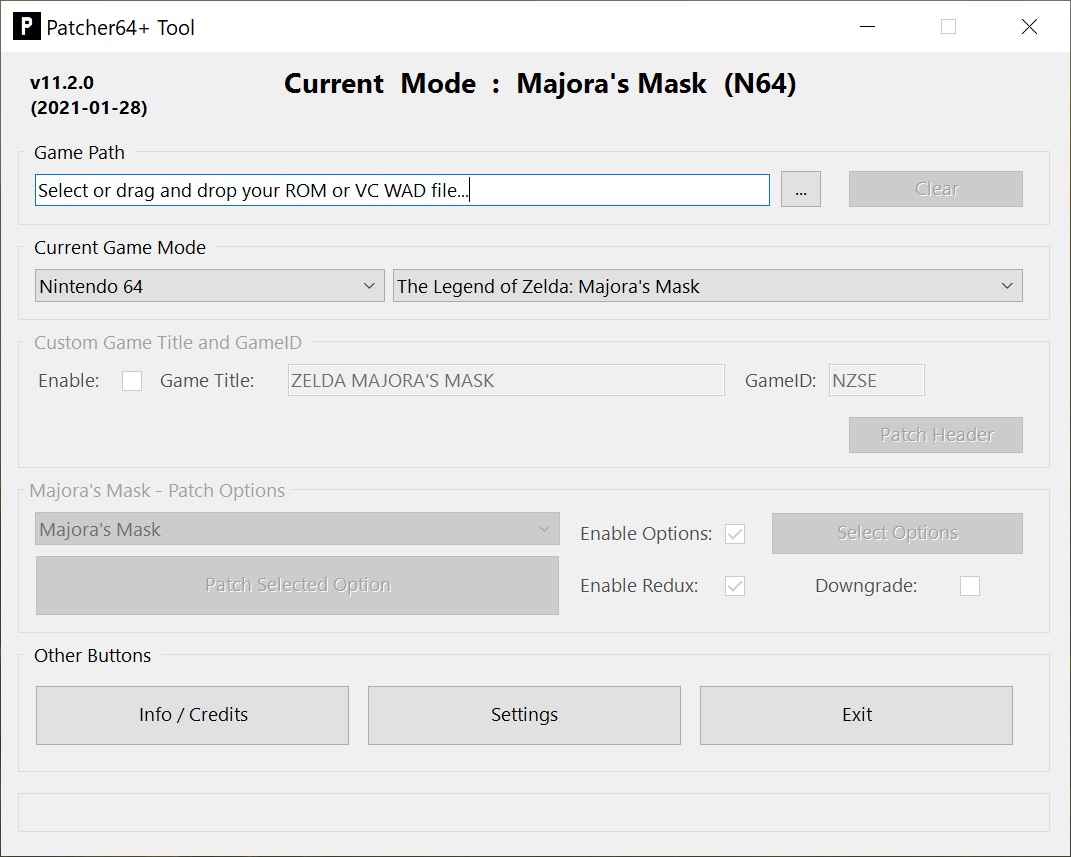
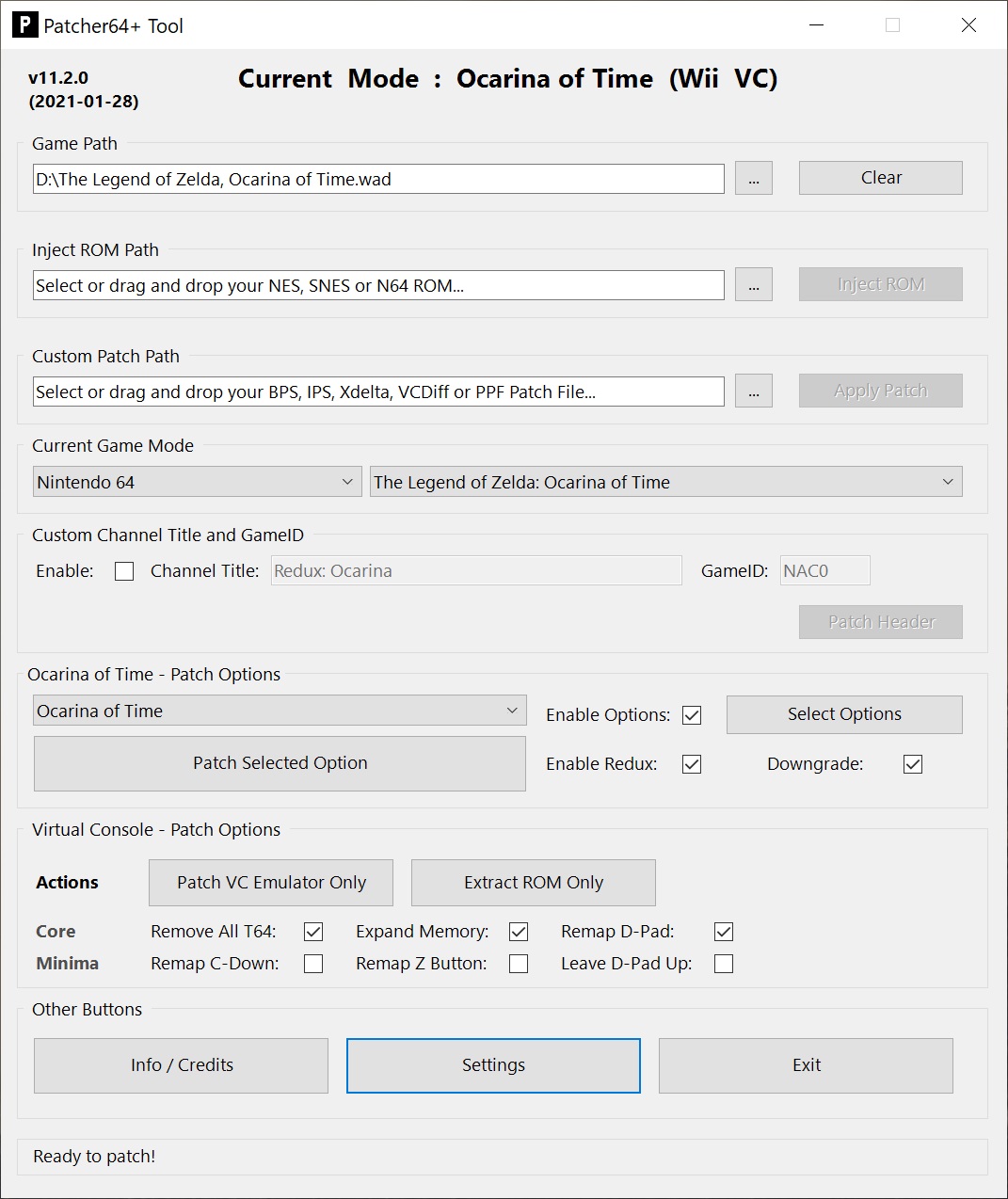
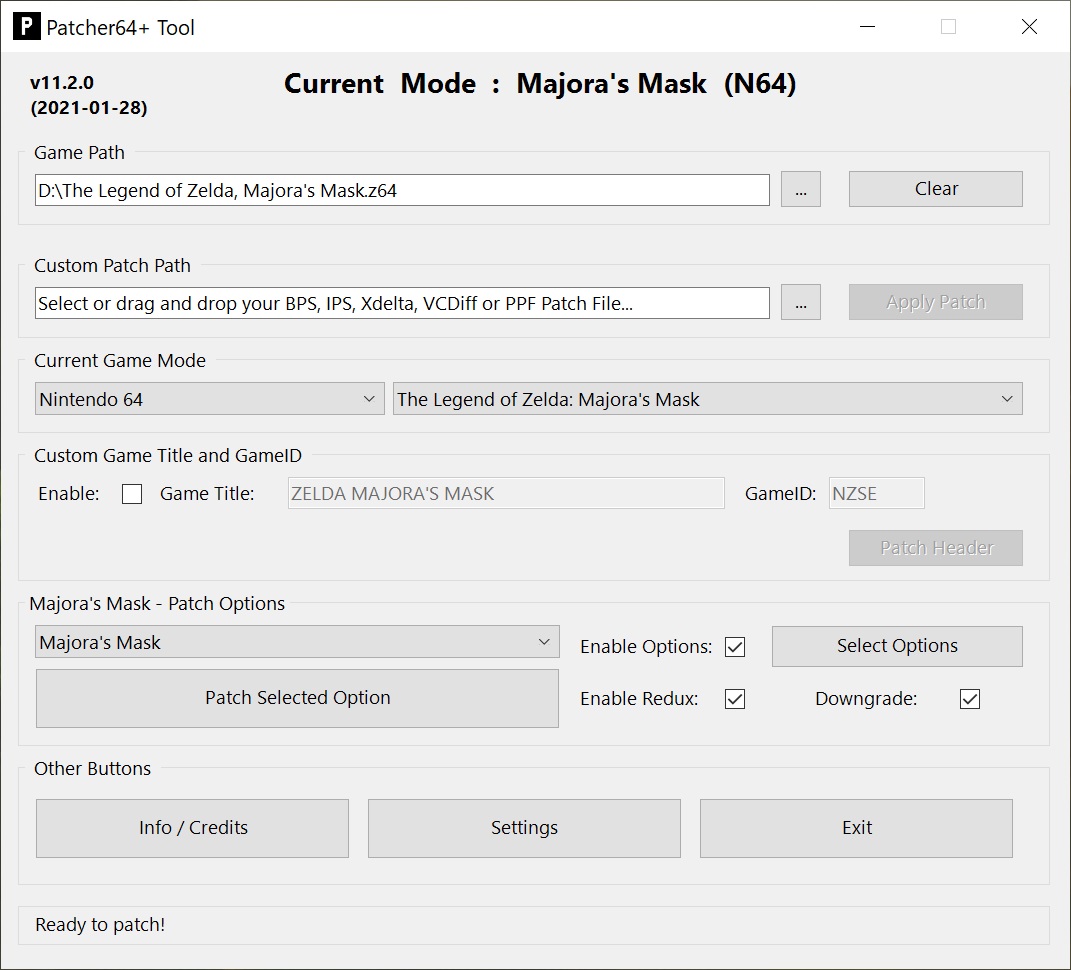
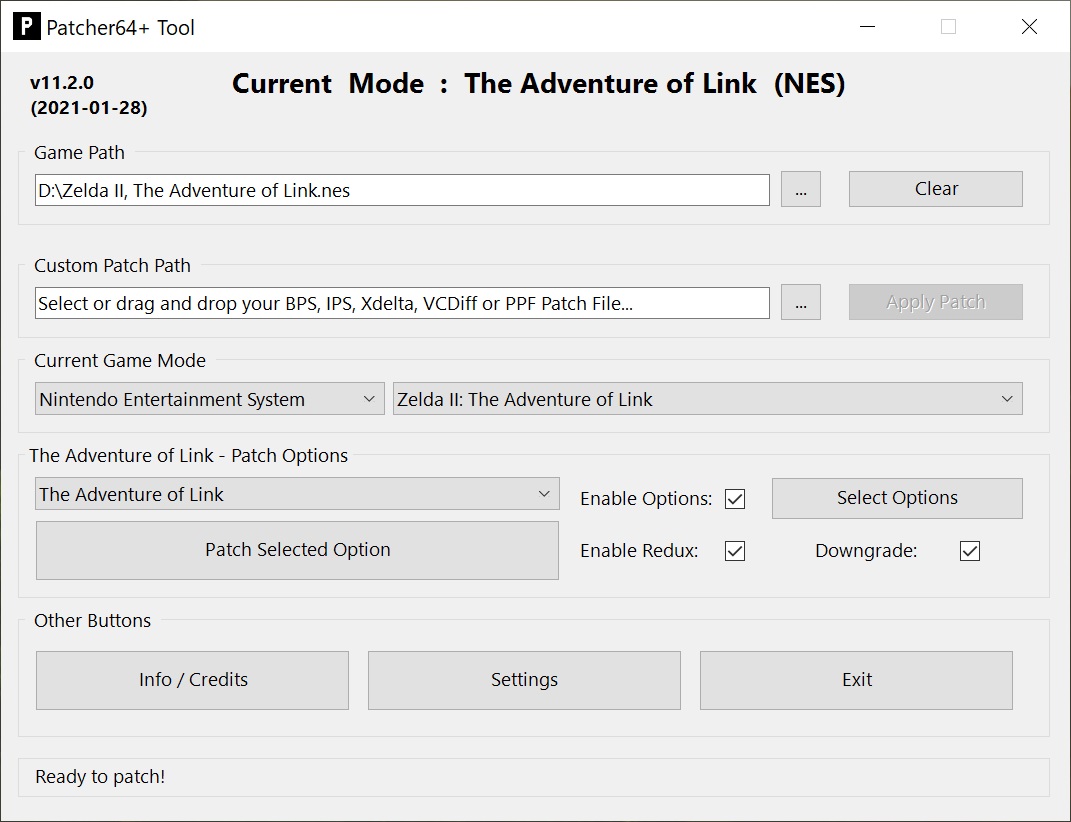
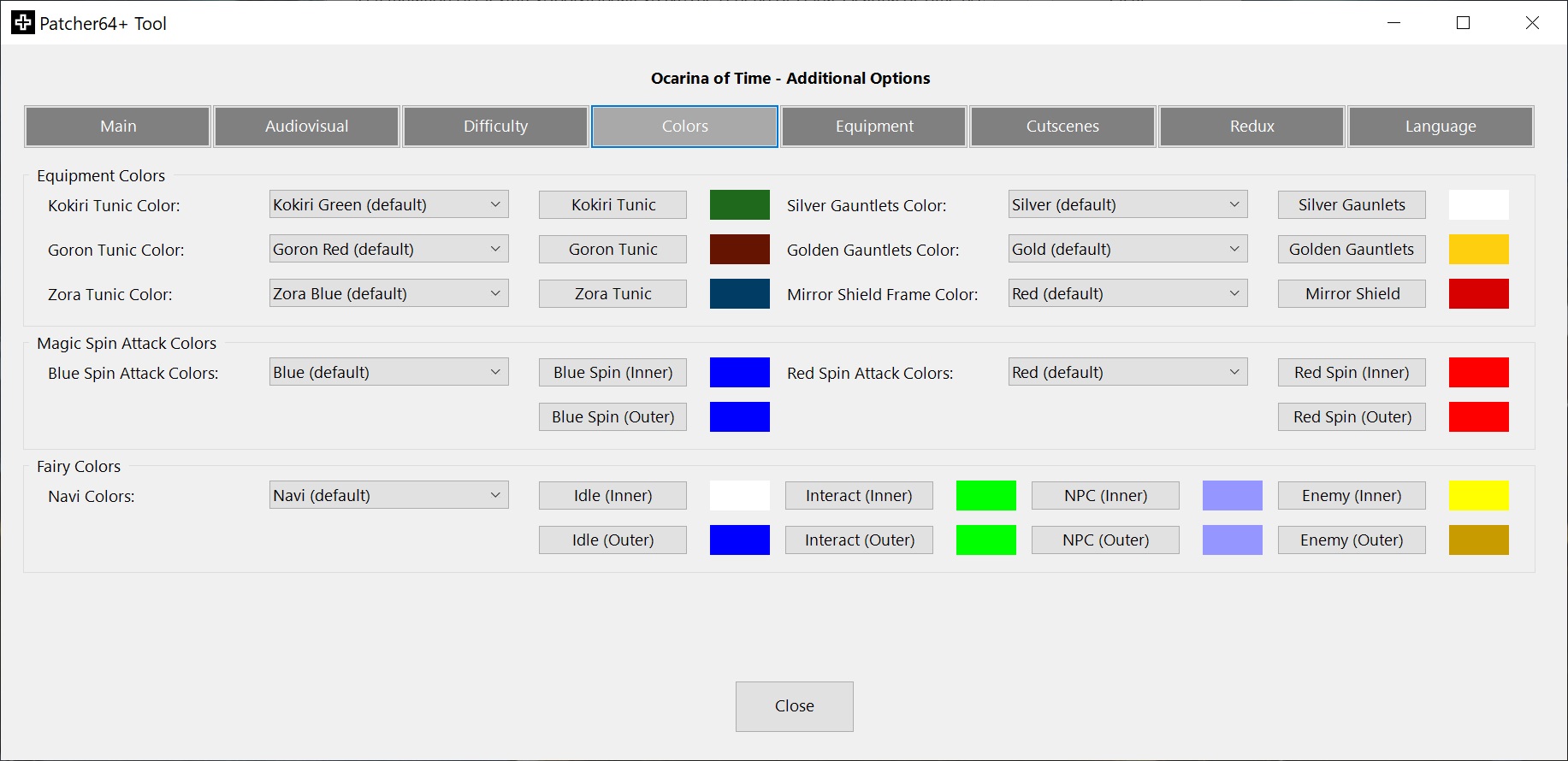
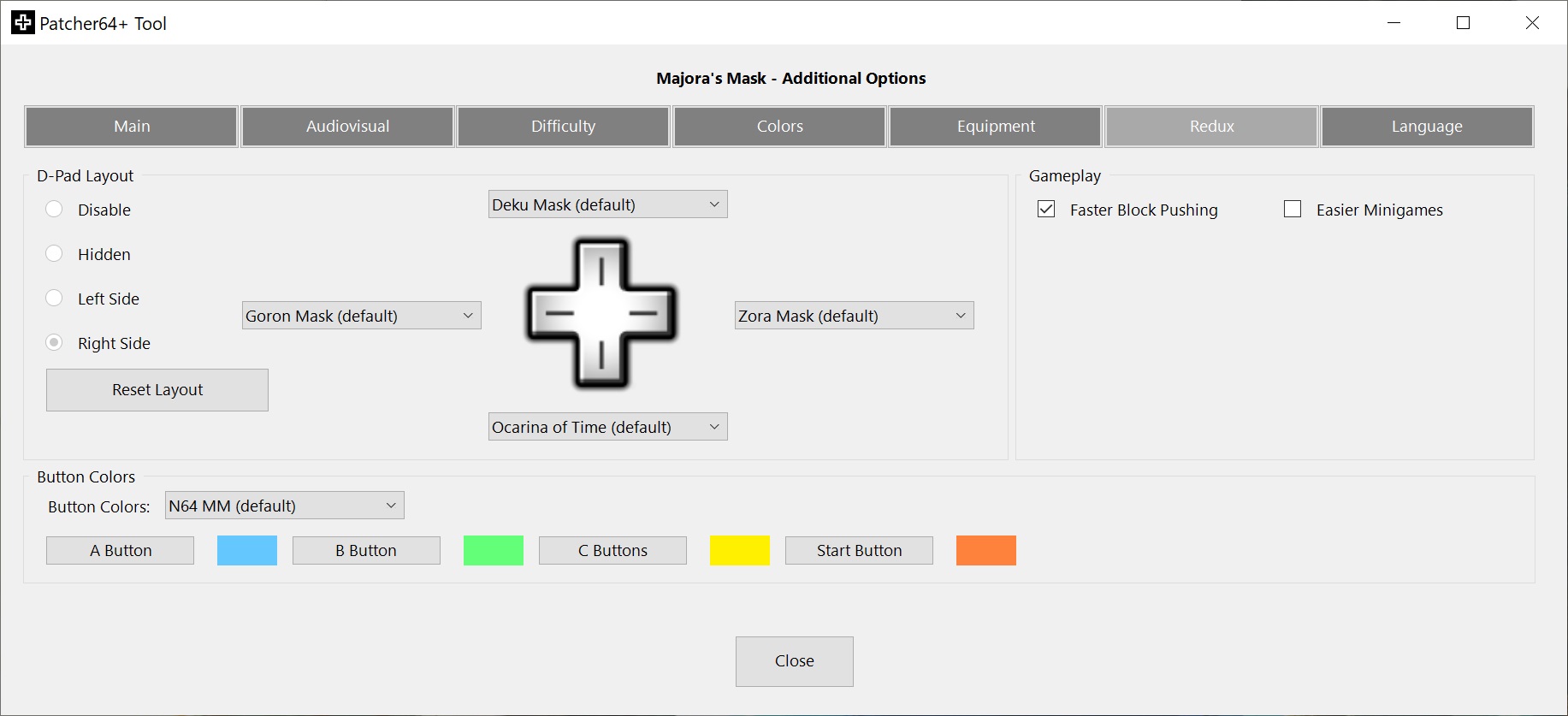
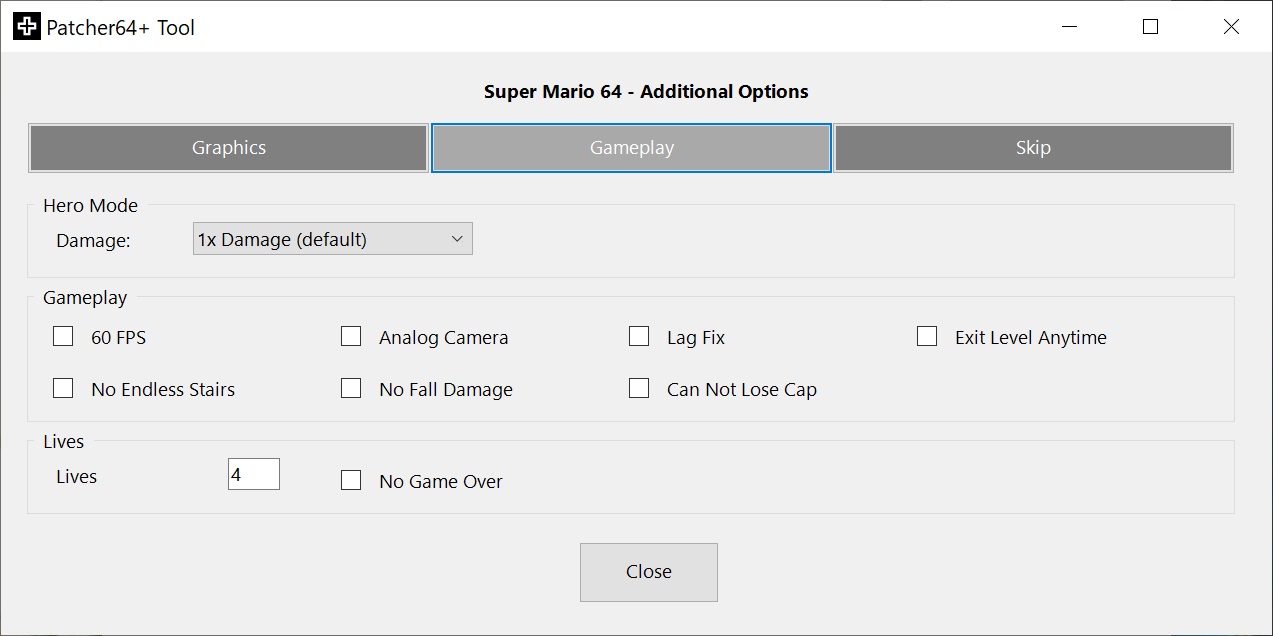
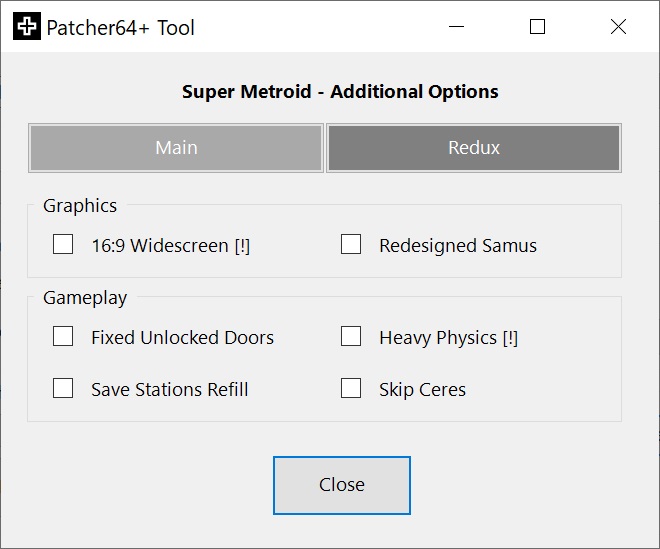
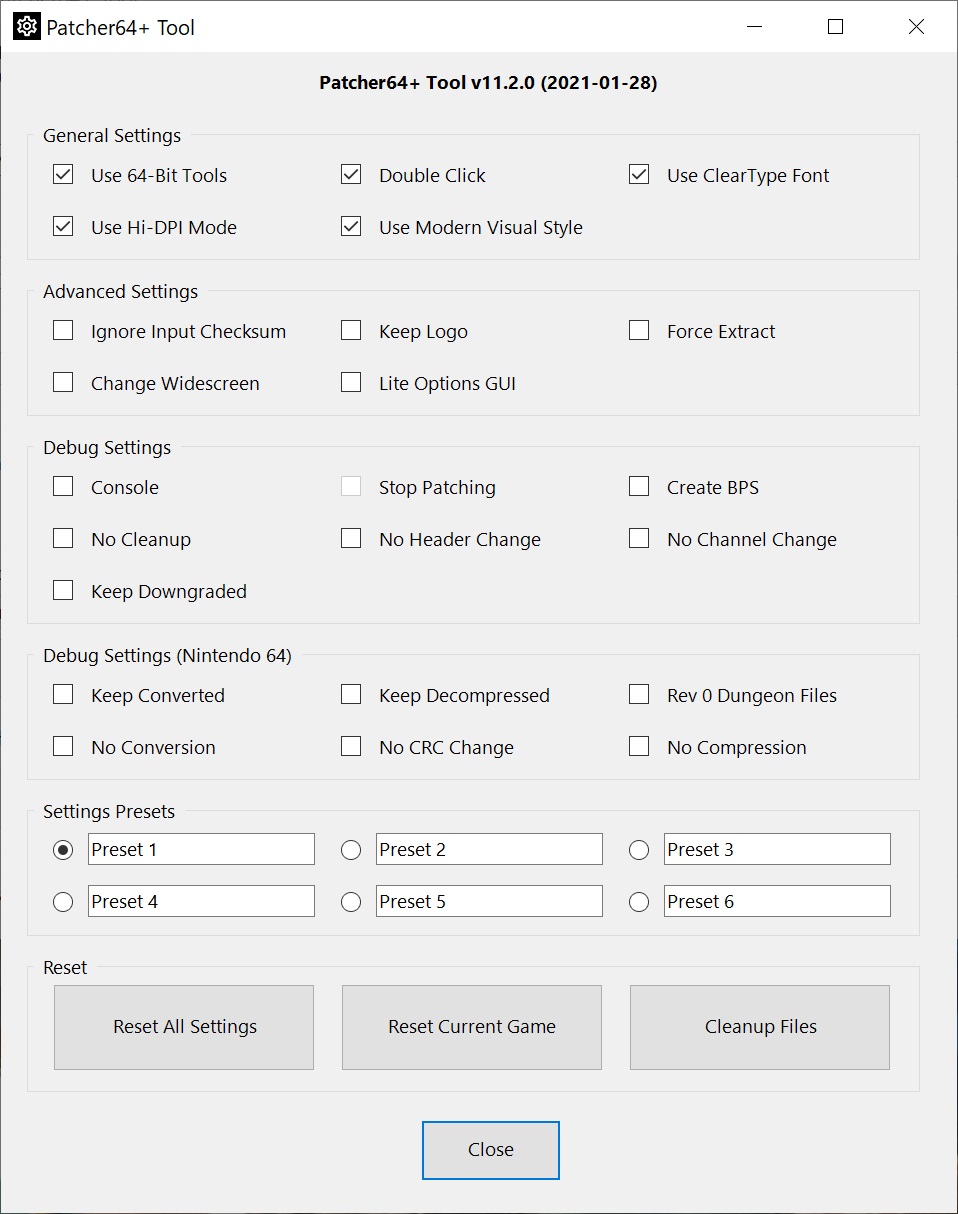
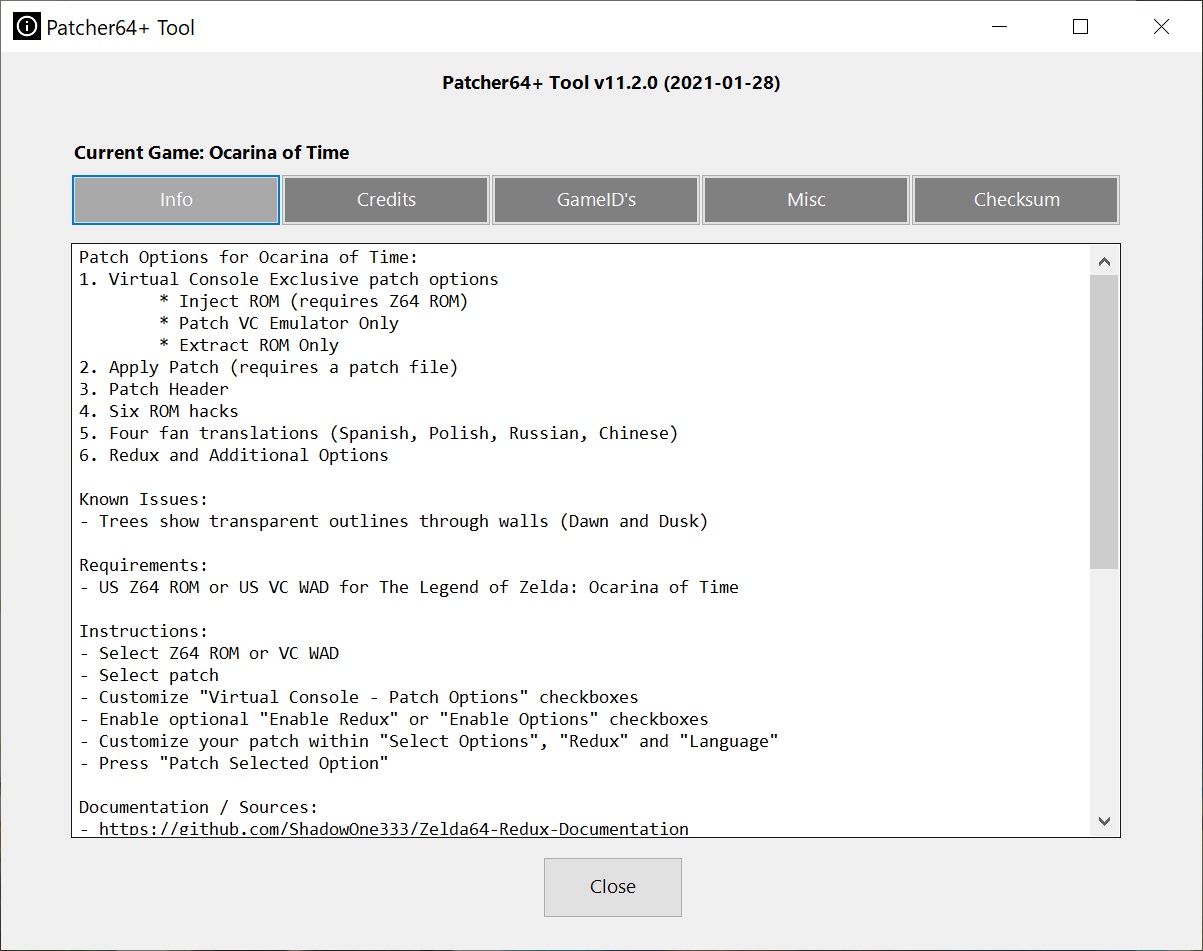
Changelog
v25.3.7
- Updated Mario Kart Amped to v3.0.0
- Corrected InsertActor with ReplaceActor for Child Quest
- Added -UseBasicParsing to Invoke-WebRequest
v25.3.6
- Add MK64DX v0.0.1
v25.3.5
- Fix issues with Hide Sword & Hide Shield
v25.3.4
- Fixed issues with OoT Redux
- Flare Dancer no longer randomizes increased health
- Megaton Hammer damage type stays intact with "Weaker Swords" within Fire Temple
- Fixed issue with Din's Fire and Nayru's Love not properly adjusting MP costs
v25.3.3
- Fixed API for setting weapon collisions
- Fixed issue with Jabu-Jabu crashing after the time skip for Child Quest
- Fixed issue getting stuck on the Hyrule Field drawbridge while on Epona
- Updated Advanced Widescreen for OoT & MM for Inventory Editor alignment
- Updated Blonde Alt hair colors for OoT & MM Link
- Removed "Lost Woods Octorok" option for Child Quest
v25.3.2
- Fixed issues with Advanced WS for OoT Redux
- Changed Sword Trail color option to allow setting both colors separately from each other
- Hotfix Child Quest crashes on Gohma and Gerudo Guards
v25.3.1
- Updated Advanced WS for OoT and MM to fix debug loading messages, song effects and screen transitions
v25.3.0
- Merged previous versions of Child Quest for OoT into one ultimate version
- Updated Child Quest with fixes and additions
- Restored all missing cutscenes and events
- Restored Epona
- Restored every item and upgrade
- Added new headers for scenes after the timeskip
- Added new headers for Restored Zora's Domain and Restored Goron City
- All songs are now learned in their intended locations instead of in chests
- Biggoron Trading Sequence fully restored
- Medigoron now allows to sell the Silver Sword after the Fire Temple
- New Yellow Tektite enemy that stuns Link
- Added new grottos to act as shortcuts to get through Hyrule faster
- Added two new areas, ported over from Majora's Mask
- Moved Ghost Shop to the new Road to Lake Hylia area
- Improved Ocarina of Time Child Link Model
- Optional Majora's Mask Child Link Model
- Kakariko Well Crossbeam is destroyed after the Bongo Bongo Attack
- Optional Restore Text option
- Shifted injected Get Item models
- Power Bracelet icons/textures instead of Gauntlets
- Optional Censored Fire Temple music theme fixed
- Logo and subtitle on title screen
- Equipped strength level (as bracelets) and boots (as earrings) are shown
- Dialogue fixes and improvements
- Keep currently equipped item on B for cutscenes
- Improvements to cutscenes
- Silver Sword (one-handed Giant's Knife) changed to 4 -> 2 damage, won't break and has the Gilded Sword range
- Gilded Sword (one-handed Biggoron Sword) changed to 4 -> 3 damage
- Respective sword sheaths are now shown or hidden
- Either the Bullet Bag or Quiver upgrade can be shown in equipment, Quiver takes priority
- Adjusted title screen logo and intro
- Added "Big Poe Hunting" option for OoT
- Added "Pirates' Fortress Interior" option for MM
- Added new tunic colors from Rando for OoT
- Updated API support to set attack collision detection for OoT
- Updated Scene Editor with additional API features support and fixes
v25.1.6
- Added extra progression flag for the OoT Redux Debug Menu
- Removed and restored several "Harder Enemies" options for OoT
- Fixed issue with having both the Zora Mask and Iron Boots equipped for OoT Redux
- Fixed issue with being able to use certain items when you shouldn't in OoT Redux
v25.1.5
- Update Child Quest Pro to v1.0.2 (faster Scarecrow)
v25.1.4
- Updated Redux for OoT to show ammo for the Slingshot/Bow on the D-Pad
- Fixed issue with losing sword when a different item is set to B for OoT Redux
- Fixed issue with the "Reset Tool" button
- Fixed issue with setting gamepath and modern GUI style
- Fixed issue with vanilla Ice Cavern in Child Quest missing a Clear Block
- Fixed issue with Child Quest Pro applying a text box change twice
- Fixed issue with Child Quest making the Deku Tree be withered early
v25.1.3
- Removed "Lv2 Instant Charge" option for OoT
- Removed "Hair Color" option for Child Quest
- Fixed Equipment previews
- Fixed "Four Digits Wallet" crash for OoT when above 999 Rupees
v25.1.2
- Added new button to check to update addons in the menu bar
- Fixed issue with Switch Age debug menu option in background rendered scenes
- Changed Harder Keese option for MM with an always false if-statement
v25.1.1
- Moved some ALttP patches to the patches addon
- Fixed issue with reading music track replacements not in an author subfolder
- Fixed issue with some GamePatch properties not properly resetting between changing patches
- Fixed issue with "Enhanced Child Model Option" always showing by allowing base to -1
- Fixed issue with patching the Water Temple MQ duplicate door key flag
- Fixed issue with Scene Editor GUI scene extractions
v25.1.0
- Added two new ROM hacks for ALttP
- Added addon support for Patches with new and moves patches
- Updated Harder Iron Kunckle for MM
- Fixed several issues for OoT Redux
- Fixed issue with list box selections not being saved
- Fixed issue with "Royal Wallet" for MM not being defined as a Scene option
v25.0.0
- Added Lite Mode for hiding casual options from OoT & MM
- Added new API functions to expose, exclude, force and default
- Added dma_shift property to Patches.json
- Added new "Ultimate Trial" patch option for OoT
- Added several new options for OoT & MM
- Added new "Fix Burn Smoke" option for SM64
- Added new patches for ALttP
- Added new patches for SM
- Overhauled several parts of the codebase
- Renamed several functions and properties
- Renamed Redux for TMC to Reborn
- Changed boolean and int settings to be properly parsed instead of string
- Changed how options are hidden/generated through new properties
- Updated Gold Quest to v2.1a
- Updated Master of Time to v1.1
- Updated Masked Quest to v4.4
- Updated Widescreen patch for MK64
- Updated tooltip and Redux descriptions for ALttP
- Updated and added custom Link sprites for ALttP, including fixed gloves for the pink/blond hair versions
- Updated Redux for OoT
- Complete D-Pad overhaul
- Progression Overlay
- Debug Menu
- Merged Unequip Item & Unequip Gear
- Fixed Zora Mask ability
- Fixed Mask of Truth swap
- Fixed several texts
- Updated Redux for MM
- Progression Overlay
- Music Track Display
v24.0.0
- Added new GBA console mode with new TMC game mode offering Redux & Additional Options
- Added Zelda's Birthday for OoT
- Added fourth wallet option for MM
- Added Overworld Skyboxes option for MM
- Added minigame difficulty options for OoT & MM
- Added enemy difficulty options for OoT
- Added external repo support for models and music
- Increased Max Health for enemies in PM up to 255
- Updated Scene Editor
- Updated ALttP Redux to 10.2.3
- Updated Quick Commands for ALttP to v2.2
- Changed compressed game patches to apply prior to Additional Options patching
- Changed Dropdown Menu column alignment to an uneven index always
- Changed patches JSON formatting to include patch and/or redux version
- Fixed issues with sword-related Redux options for OoT
- Fixed issue with Time Control not restricted in scenes where the Song of Time is restricted for MM
- Fixed issue with Native or Wii VC patches not locking up
- Fixed issue with item block when containing a badge in Ghost Town 1 for PM
v23.4.0
- Updated Redux for OoT with new options and fixes
- Items on the D-Pad are bound to the slot rather than the item
- Changed Options Menu and Minimap toggle to be on a short button release timer
- Added support to change 30 FPS mode and the D-Pad Layout in the Pause Screen
- Added D-Pad Layout tracking
- Added FPS tracker when 30 FPS mode is enabled
- Added new D-Pad Layout for cycling through gear while holding L
- Added Mask Swap option (once the sidequest is completed)
- Added Mask Abilities option
- Added restoring the D-Pad Layout and last equipped mask upon loading the save slot
- Fixed issue with default colors for Extra Ability Tunic being wrong
- Fixed issue with Lens of Truth not properly unlocking on Redux with D-Pad
- Fixed issues with restoring the last equipped mask
- Fixed issues with Random Enemies and Inverse Aiming
- Changed In-Game Menu Default Options to also apply with In-Game Menu options disabled
- Changed fishing options for OoT to partly apply without Redux
- Added Pause Screen Options Menu text prompt
- Added Short Chest Opening option for MM
v23.3.9
- Fixed issue with Custom Text not working for OoT and MM
- Updated Smash Remix to v1.5.2
v23.3.8
- Added female voice for MM Child Link (Melee Zelda) by Mickey Saeed
v23.3.7
- Merged fishing options for OoT
- Added map toggle delay timer with L for MM Redux
- Fixed issue with custom Kokiri Tunic color for MM
- Fixed issue with Long Chest animation for MM Redux
v23.3.6
- Added option to fix the N64 logo, like in Rev 1 and newer
- Updated Smash Remix to v1.5.1
v23.3.5
- Updated New Master Quest to v2.8
- Fixed issue with Right-Side D-Pad not working for MM Redux
v23.3.4
- Removed the Dungeon Fixes option for OoT Child Quest
- Fixed Zora's Fountain skybox with the Overworld Skyboxes option for OoT
v23.3.3
- Added new HUD button option for OoT/MM
- Fixed crash with MM Redux on Wii VC
- Fixed issue with Water Temple locked door
v23.3.2
- Changed Stalchild to have a maximum of 4x HP for MM Master Quest
- Fixed issue with the Game Path not properly resetting when the path is invalid
- Fixed issue with Text Box changes for Enable Ammo for MM not recognizing
- Fixed issue with GC Scheme option for the Ocarina Icons option text boxes for MM
- Fixed Inverse Aim option for MM
v23.3.1
- Updated New Master Quest to v2.7
- Fixed issue with MM Redux not being able to close the Bomber's Notebook
v23.3.0
- Updated Redux for MM with new options and fixes
- Updated Fierce Deity Anywhere for MM option with usable Sword Beam attack against most enemies
- Changed Wii VC mode to show all options (but locked) for optimal performance
- Removed Advanced Widescreen for Majora's Mask: Master Quest
v23.0.0
- Added new OoT ROM hack: Child Quest Classic
- Added new MM ROM hack: The Legend of Zelda Revival
- Added new OoT Redux feature: Arrow Toggle (toggle magic arrow types with R)
- Added new OoT Redux feature: Enemy HP Display (text display)
- Added new OoT Redux feature: Chest Contents (different types for items)
- Added new OoT Redux feature: Random Enemies (add HP and sub-type for enemies)
- Added default menu options for OoT Redux
- Added new GI Model replacements for OoT equipment options
- Added new Power Bracelet option for OoT
- Added new Scene Editor API features and fixes
- Changed detection for patches with missing scripts or patches
- Fixed several issues with OoT Redux
v22.0.0
- Overhauled entire GUI design to be and fit single window format
- Added new "Current Floor Icon" option for OoT
- Added Safe Options setting
- Added extended support for listboxes
- Added dynamic options when switching between Wii VC mode
- Added fallback URL for the auto-updater
- Added two more option presets
- Added support for JPG images for OoT & MM option previews
- Added previews for chests, small crates and pots for OoT & MM
- Revamped Previews into their own window
- Revamped Settings window with better design
- Revamped windows to be toggleable with the same button and stay open
- Revamped patching logic concerning active windows
- Optimized booting up the patcher
- Changed GUI design to be a fixed size
- Changed menu toolbar with new menu items
- Changed Update Window to no longer freeze
- Changed Save Slot options for OoT into listboxes
- Changed Speedup options for OoT into listboxes
- Changed language selection for OoT and MM into a dropdown
- Changed not patching VC Remap Controls when set to default preset
- Changed Create BPS option into two separate options
- Changed "Visible Gerudo Tent" option to have the correct bridge in the Child Era
- Changed Path Buttons to save the last folder path if it still exists
- Changed direct Scene Editor patching to not shift unless set as argument
- Corrected checking for ROM hack specific option values for OoT
- Removed Hide Sword and Hide Shield options for OoT & MM
- Removed Additional Options Panels support
- Fixed issues with Ammo Capacity and Item Drops Quantity options for OoT
- Fixed issue with whole Dialogue Text options not being patched when not applying other text changes
- Fixed issues with running the Patcher64+ Tool through Wine in Linux or Mac
- Fixed inserting objects without actor list for Scene Editor
v21.0.0
- Added Map Settings and Scene Settings properties for the Scene Editor
- Added new Hide Sword and Hide Shield options for OoT & MM
- Added new Starting Dungeon Item options
- Added presets for MM
- Added custom model filtering for OoT & MM
- Added new tunic colors for OoT using Extra Abilties (Redux)
- Added new "Oceanside Spider House" option for MM to complete it on any day
- Added new Hylian Shield texture designs
- Added Transition Actors support for the Scene Editor
- Added new debug option to refresh scripts before being called
- Changed how equipment name replacements for the dialogue are applied
- Changed several options for OoT and MM to utilize the Scene Editor
- Changed how the object limit for maps are extended
- Changed default behaviour for the Hair Color option for OoT
- Merged "Difficulty" and "Scenes" tabs for OoT
- Updated Smash Remix to 1.4.1
- Fixed several Scene Editor issues
- Fixed dropdown options for OoT presets being the wrong setting
- Fixed some OoT color options not setting correctly
- Fixed aligment of the Equipment tab for OoT
- Fixed not being able to update patched ROM file if in use
- Removed visible Child Megaton Hammer option (custom model now instead)
v20.4.2
- Added No Symbol option textures for Deku & Hylian Shields
- Added missing equipment icons
- Updated credits
- Restored Master of Time back to the previous version
v20.4.1
- Added new button color presets for OoT & MM
- Changed error log messages to show in red
- Streamlined the Language Options patching
- CheckLanguageOptions function has been removed
- Improved logic and error handling for patching custom models
- Fixed Inverted Time with 30 FPS for MM
- Fixed issue with scrolling being broken for the "Additional Options" window
- Fixed Remap Control not showing
- Fixed issue with OoT Debug ROM options not properly generating
- Fixed issue with Free Mode
v20.4.0
- Added Project Base patches for SM
- Added Zelda's Adventure Port patch for LA
- Added new options for MM
- Added new "Faster Armos Pushing" option for OoT
- Added new "Have Invincible Jump" option for SM64
- Added "No Music" patches for Zelda 1 and SM
- Replaced Button Sizes for OoT & MM with Button Scaling
- Updated OoT & MM Redux with new options and fixes
- Updated Master of Time patch for OoT
- Updated Scene Editor with new preliminary changes for later down the road
- Fixed issue with Redux not locking as should when switching games
v20.3.2
- Updated Auto-Updater.
v20.3.1
- Updated Redux for LA.
- Updated downgrading / upgrading for LA.
- Fixed several minor issues.
v20.3.0
- Revisions is now automatically picked for selected patch.
- Added Keep Cache option for decompressed & downgraded N64 Zelda ROMs.
- Overhauled GamePatch & GameRev JSON specifications.
- Overhauled downgrading.
- Overhauled filepath for Redux patching.
- Overhauled saving options and switching between presets.
- Adjusted Additional Options GUI for several OoT ROM hacks.
- Added upgrading from OoT Rev 0 to OoT GC MQ Debug.
- Added new options for OoT.
- Added new debug options to indivually prevent header changes for ROM / WAD.
- Updated ALttP Redux to v10.2.2.
- Removed Kakariko Shortcut option for ALttP (default with Redux now).
- Fixed multiplying bytes with a factor less than 1 ending up to be 0.
- Fixed issue with showing and hiding VC panel.
- Fixed issue with disabling updating addons.
- Removed several "duplicate" patches.
v20.2.7
- Updated New Master Quest to v1.9.
v20.2.6
- Added support for .zobj model patching for OoT & MM.
- Added new shield textures for OoT.
v20.2.5
- Improved and optimized Redux for OoT.
v20.2.4
- Fixed VC controls not remapping.
- Fixed Bombchu Drops for OoT.
- Fixed No Heart Drops for The Sealed Palace.
- Added new Sword Health option for OoT.
- Removed Bombchu capacity.
v20.2.3
- Added more Additional Options for TSP.
v20.2.2
- Added Additional Options for TSP.
- Corrected patch for TSP.
- Fixed issue with ALttP Redux.
v20.2.1
- Added ROM hacks for OoT.
- Moved TML to Debug MQ PAL instead of Rev0 US.
- Added Additional Options for NMQ.
- Changed generation of options for patches.
- Changed generation of DMA Table for decompressed input ROMs for patches.
v20.2.0
- Updated the OoT Redux Options Menu with a new design.
- Updated Redux for SM, Zelda 1 and ALttP.
- Added new Pot, Chest, Rupee and Button designs for OoT & MM.
- Fixed issue with duplicate items for dropdown menus.
v20.1.1
- Made the new options menu for OoT Redux adjustable into several tiers.
v20.1.0
- Renamed Actor Editor to Scene Editor.
- Added MM support for Scene Editor.
- Added support for selective scene patching for Scene Editor.
- Added support for non-shifting scene patching for Scene Editor.
- Added new options for OoT & MM.
- Added presets for OoT.
- Added new ROM hack for SMW.
- Updated Redux for OoT with new options.
- Updated Master of Time HUD button sizes.
- Updated Majora's Mask HUD button previews.
- Updated Xbox preset color for B button for OoT & MM.
- Updated Hooting Time for MK64.
- Updated options for SM.
- Updated Custom Header tooltip with new warning for texture packs and save files.
- Changed how special symbols for text are parsed in the GUI.
- Changed actor coordinates into signed integer values rather than hex values.
- Fixed issues with the Scene Editor.
- Fixed some issues with Redux for OoT.
- Fixed some issues with patching SNES ROM titles in Wii VC mode.
v20.0.4
- Added new options for MK64.
- Added new patch for ALttP.
- Fixed issue with loading checksum for non-exist WAD or ROM.
- Fixed issue with setting the default color for Tael.
v20.0.3
- Removed several broken options for OoT.
v20.0.2
- Restored Masked Quest version.
- Re-arranged layout for some gameplay options for OoT.
- Merged hide individual C buttons into single option for OoT.
- Updated SM64 Split-Screen Multi-Player.
- Fixing issue with changing Link's Speed for OoT.
v20.0.1
- Added Info window for Text Editor.
- Added Link Name option for OoT & MM.
- Added new "Yeet" Action Prompt option for OoT & MM.
- Added new text label for "Red Shield" for OoT.
- Added new Kamek option for MK64.
- Added Italian translation patch for SM64.
- Added Zelda 1 Port patch for LA.
- Changed Fairy Name options to be locked when unusable or disabled.
- Changed Multi-Quest dungeon patching for Actor Editor.
- Updated "Info" Navi prompt for OoT.
- Updated Smash Remix to v1.3.0.
- Updated ALttP Redux to v10.1 and added new additional options.
- Fixed issue with Kokiri Sword not being renamable for OoT.
- Fixed issue with Giant's Knife and Biggoron Sword not being renamable as the other.
- Fixed issue with "Razor Sword" being named "Razord Sword" for OoT.
- Fixed issue with Bombchu Capacity not being set properly.
- Fixed positioning of GUI elements.
- Fixed issue with options for Link's Awakening not generating.
- Fixed issue with Text Editor command conversions.
v20.0.0
- Added new Easter Egg option for OoT & MM for Tier 3 Patreons.
- Added Actor Editor for OoT (with support for MQ and Ura too).
- Added new PM options.
- Added support for patching "Additional Options" presets as patches.
- Added new features for the Text Editor.
- Added new Item Drop options for OoT & MM.
- Added new glitch fixes options for OoT.
- Added new options for MK64.
- Added new graphics option for Smash 64.
- Added new equipment options for OoT.
- Moved several options around, and adjusted options window sizes for some games.
- Fixed Pot's Challenge for OoT.
- Fixed issue with OoT Text Editor commands.
- Fixed issue with checking hashes.
- Fixed game mode label not refreshing during changing game modes.
- Fixed issue with not properly getting the patch for the correct revision.
- Fixed title for Fairy's Fountain for English Map Select translation.
- Changed auto-correction for numeric text fields.
- Changed GUI to be locked when changing generating GUI options.
- Changed dropdown menus and sliders to be no longer affected by the mouse's scrolling wheel.
v19.2.1
- Unmerged non-Redux Hide HUD options.
- Fixed Easier Fishing and split them into more options.
v19.2.0
- Brought back Master Quest for MM again, with Additional Options + Redux support.
v19.1.13
- Reworked Paper Mario Hard Mode options.
- Removed Pots Challenge.
v19.1.12
- Added new Deku Shield option.
- Fixed issue with Arrow Toggling for OoT.
- Fixed issue with 4x and 5x HP for some OoT bosses being too high.
- Fixed issue with Lost Woods Octorok not being patched.
- Fixed issue with copying save files.
- Fixed issue with expanding Expansion Pak for Wii VC when not supported.
- Fixed issue with Hookshot Anything for OoT.
- Fixed issue with Pots not changing textures.
- Fixed issue with Resume Last Area for Adult Link (also for MoT).
- Removed Skullkid Ocarina option for OoT.
- Merged non-Redux Hide HUD options.
v19.1.11
- Fixed issue with downgrading for MM.
v19.1.10
- Added SM64: Termina Invasion.
- Updated Auto-Updater.
- Corrected Additional Options GUI for several titles.
v19.1.9
- Added three new BK ROM hacks.
- Fixed Text Editor bug with replaced < and > letters.
v19.1.8
- Minimap toggle for MM Redux now acts as in vanilla if all L button options are disabled.
- More Ocarina Icons fixes (fixes Termina Field issue, unusable Zora Guitar in houses).
- Several minor fixes.
- Removed Master Quest and associated options for MM for Additional Options.
v19.1.7
- Reworked name options for Tatl, Tael and Navi.
- Several minor fixes.
- Fixed Zora Guitar not being usable.
- Ocarina Icons reverts back to the Ocarina of Time item when saving (for when using a ROM without Ocarina Icons).
v19.1.6
- Updated Gold Deku Pipes Icon (by ShadowOne333).
- Added new fairy colors.
- Fixed issue with 30 FPS being enabled for MM Redux.
v19.1.5
- Updated "Ocarina Icons" option with alternative icon option.
v19.1.4
- Fixed issue with Wii VC controls remapping.
- Fixed issue with OoT Redux HUD layout.
- Fixed issue with OoT Additional Options generation.
v19.1.3
- Improved "Area Title Cards" option for MM.
- Changed encoding for script files.
- Fixed some issues with the Text Editor.
v19.1.2
- Fixed issue with "Additional Options" not generating properly for some games.
v19.1.1
- Added new "Area Title Cards" option for MM.
- Fixed several issues with Redux.
v19.1.0
- Added ingame remapable D-Pad actions.
- Added Redux for several OoT ROM hacks.
- Added Pots Challenge for OoT + several ROM hacks.
- Added new HUD texture replacements.
- Added new Redux options for OoT & MM.
- Updated Redux for OoT & MM.
- Updated the Ocarina Icons option for MM.
- Updated Smash Remix to v1.2.0.
- Updated saving patcher settings.
- Changed how options are being generated.
- Removed Redux Plus patches.
- Removed interface modes.
- Fixed Easier Fishing (OoT) and Fierce Deity Anywhere (MM) options.
- Fixed Text Editor issues.
v19.0.1
- Added some new options related to the Bombs / Bomb Bag for OoT.
- Updated and added new capacity and quantity options for OoT.
- Removed Bomb Bag capacity limits for OoT and MM.
- Fix issue with patching language options for MoT and D&D.
v19.0.0
- Overhauled text editor for improved performances and new posibilities.
- Added multi-language support for the text editor.
- Added several new options for OoT & MM.
- Added Redux support for MoT & D&D (rev0).
- Added new "Malon's Master of Time" dialogue option to MoT.
- Added more "Additional Options for MoT".
- Added "Additional Options" support for D&D (rev0).
- Added several new Redux options for OoT (Rainbow Colors? We got you covered!).
- Added scrolling bars for Additional Options.
- Updated OoT Redux with plenty new features (Mask on D-Pad Right for Child Link, hurray!).
- Updated MM Redux (Debug Map Select works again, hurray!).
- Updated widescreen patches for OoT & MM.
- Updated Patches.json with new specifications.
- Updated the widescreen patch for Rev0 and Rev2.
- Updated Gold Quest.
- Updated Redux for Super Metroid.
- Changed how Redux is patched.
- Changed how ROM hacks are having Additional Options patches.
- Changed how Redux features are being applied and reverted.
- Split several options from Redux to be optional for OoT & MM.
- Fixed text patching issues for MoT.
- Fixed custom sequences not being accepted when using the max size limit.
- Fixed issue with ammo values not properly converted to hex values.
- Fixed issue with health below 3 max hearts not properly resetting when dying.
- Fixed plenty of others bugs (and likely introduced some new ones..).
- Fixed issue with setting ROM title.
- Fixed issues with the text editor.
- Fixed various other issues.
v18.0.9
- Added two new Easy Mode options for MM.
v18.0.8
- Added new "No Takkuri Steal" option for MM.
- Added more missing enemies and boss phases for the increase HP options for MM.
v18.0.7
- Split Faster Block Pushing option for OoT.
- Fixed issues with Wii VC patching.
- Fixed issues with 3x HP for some baddies.
- Fixed GQ Rev0 issues.
- Fixed issue with "Allow Warp Songs" and "Allow Farore's Wind" for OoT.
v18.0.6
- Added support for extracting a clean script through the Text Editor when using ROMs.
v18.0.5
- Added new ROM hacks for BK.
v18.0.4
- Revamped checksum verification for NES patching.
- Fixed typos for Zelda I and Zelda II Additional Options.
- Fixed issue with GFX and Animated Tiles options for Zelda I.
v18.0.3
- Added iQue patches for OoT and SM64.
- Fixed issue with checksum not updating and being accessible.
v18.0.2
- Added new Rupee Icon(s) color options.
- Fixed issues with new GUI modes.
v18.0.1
- Added Rev2 Widescreen patches for OoT and Gold Quest.
- Removed "Lite" and "Streamlined" GUI modes and added "Simplified" GUI mode.
v18.0.0
- Added new Text Editor for OoT & MM.
- Added Shop Model Tunic colors for OoT (by Username0713).
- Added new "Recovery" options for OoT.
- Added new "Remove Magic Quick Spin" option for OoT.
- Added new "No Bottled Fairies" option for OoT.
- Added dialogue changes for changed equipment names.
- Added new split customization for the Easier Minigames option.
- Added extended functionality to dropdown menus.
- Removed "Hide Equipment" option for OoT.
- Overhauled patching dialogue.
- Improved patching dialogue options by utilizing the text editor.
- Fixed typos.
- Fixed a bunch of options for OoT & MM not getting patched in correctly.
- Fixed incorrect rewards for the Bombchu Bowling Minigame for the Easier Minigames option.
v17.4.0 (preparation update for v18.0.0)
- Initial Overhaul for the upcomming v18.0.0 Text Editor update.
- Added new "Side Backflip" option for OoT (by Username0713).
- Added new "Style" options for OoT & MM (by Third M).
- Fixed issue with patching custom music sequences.
- Fixed crash issues when trying to buy items in Gold Quest Remix.
- Fixed several other minor issues.
- Fixed Gold Quest Remix bugs and crashes.
- Overhauled "Additional Options" layouts for OoT, GQ, MoT & MM.
- Improved overall performance.
v17.3.6
- Adjusted "Additional Options" Advanced Mode window sizes for OoT, GQ & MoT.
v17.3.5
- Added Gold Quest support for Additional Options.
- Added new "Always Advance" option for MK64.
- Added missing preview icon for The Missing Link HUD Button (large).
- Updated JSON date for languages.
v17.3.4
- Added new "Remove Crouch Stab" option for OoT & MM.
- Fixed issue with patching OoT & MM HUD in Beginner Mode.
- Fixed issue with patches ordering in Streamlined mode.
- Fixed issue with resetting options.
- Fixed patching in music in Lite & Streamlined modes.
- Fixed double-patching options when switching patches.
v17.3.3
- Replaced midi previewer.
- Removed "Resume From Last Area" option for Master of Time.
- Fixed checking default value for patching.
v17.3.2
- Added more initial setup for text editor (lookup dialogue directly rather than scanning through whole).
- Improved performance when swapping out ROM / WAD files while retaining the same mode.
- Fixed issue with Redux options not disabling properly.
v17.3.1
- Fixed issue with HUD previews not updating in Streamlined mode.
- Fixed issue with not removing the colors tab for Master of Time in Streamlined mode.
- Fixed issue with not showing or hiding several sound effect options.
- Changed behaviour for Widescreen checkboxes for OoT & MM.
- Removed "Point Filtering" option for OoT.
v17.3.0
- Added new Interface Mode: Streamlined.
- Added settings files for patches with their own options customization.
- Added new Additional Options for OoT (ported from Gold Quest).
- Added new "Chests" option for OoT & MM.
- Added new location options for OoT.
- Added Additional Options for Master of Time.
- Added Dawn & Dusk, The Missing Link & Gold Quest equipment and HUD texture options.
- Added alternate Navi prompts.
- Added file and language checking for several text options.
- Added Gold Quest Tunic options.
- Added new "Save" tab for OoT for Additional Options.
- Added a new option for OoT MQ Debug, MK64 & Zelda II.
- Added new patch for SM64.
- Split Iron Shield option into two separate options.
- Updated Russian, Brazilian Portuguese, Polish and Simplified Chinese for OoT & MM.
- Improved GUI generation optimization.
- Fixed issue with patching ROM hacks (such as Star Road on Wii VC).
- Fixed issue with tab generation.
- Fixed issue with clearing log files.
v17.2.8
- Fixed "No Recovery Hearts" option for MM.
- Changed that selecting "No Recovery Hearts" will also set their restore value to 0.
- Changed that selecting "0x Recovery" no longer prevents Recovery Hearts from dropping.
- Changed Invoke-WebRequest with UseBasicParsing (#1).
v17.2.7
- Added Twilight Princess magic bar.
v17.2.6
- Fixed issue with "MM Pause Screen Colors" for OoT without Redux.
- Fixed tooltip for "Lives" for SM64.
v17.2.5
- Added OS info and check.
- Changed logging to have a max of 10 log files.
- Changed logging to only create a new log per date (reruns are added to today's log file).
v17.2.4
- Added new "Gold Quest" ROM hack for OoT.
- Improved detection for downgrading.
- Changed some GameIDs and titles for patches.
v17.2.3
- Updated Redux for "A Link to the Past" to v9.3.
- Updated Auto-Updater.
- Fixed Rupee Quantity options for OoT.
Credits
- Admentus (Testing and Coding of Patcher64+ Tool).
- Bighead (Initial PowerShell patcher, Hi-DPI Mode).
- GhostlyDark (Model Preview Renders, D-Pad Icon, Testing and Assistance).
- ShadowOne333 (Testing and Assistance).