
EdiZon-Overlay Switch: Difference between revisions
More actions
No edit summary |
No edit summary |
||
| (14 intermediate revisions by 2 users not shown) | |||
| Line 3: | Line 3: | ||
|image=edizonoverlaynx.png | |image=edizonoverlaynx.png | ||
|description=EdiZon Overlay originally by WerWolv. | |description=EdiZon Overlay originally by WerWolv. | ||
|author= | |author=proferabg, ppkantorski | ||
|lastupdated= | |lastupdated=2026/04/24 | ||
|type=Overlays | |type=Overlays | ||
|version= | |version=1.0.15 | ||
|license=Mixed | |license=Mixed | ||
|download=https://dlhb.gamebrew.org/switchhomebrews/edizonoverlayswitch.7z | |download=https://dlhb.gamebrew.org/switchhomebrews/edizonoverlayswitch.7z | ||
| Line 13: | Line 13: | ||
|donation= | |donation= | ||
}} | }} | ||
EdiZon-Overlay is a Tesla overlay for [[EdiZon Switch|EdiZon]], a save management, editing tool and memory trainer homebrew for the Nintendo Switch. | EdiZon-Overlay is a Tesla overlay for WerWolv's [[EdiZon Switch|EdiZon]], a save management, editing tool and memory trainer homebrew for the Nintendo Switch. | ||
This allows you to easily enable/disable cheats while the game is running. | This allows you to easily enable/disable cheats while the game is running. | ||
==Installation== | ==Installation== | ||
Place the .ovl file into the /switch/.overlays/ on your Switch's SD card. | Place the .ovl file into the /switch/.overlays/ folder on your Switch's SD card. | ||
Make sure you have [[NX-ovlloader Switch|nx-ovlloader]] and [[Tesla Menu Switch|Tesla Menu]] installed. | Make sure you have [[NX-ovlloader Switch|nx-ovlloader]] and [[Tesla Menu Switch|Tesla Menu]] installed. | ||
| Line 56: | Line 56: | ||
==Compatibility== | ==Compatibility== | ||
Supports HOS | Supports HOS 21.0.0. | ||
==Changelog== | ==Changelog== | ||
'''v1.0.15 2026/04/24''' | |||
* Update libultrahand to v2.4.1. | |||
'''v1.0.14 2025/12/06''' | |||
* Update libultrahand to v2.2.0. | |||
'''v1.0.13 2025/11/24''' | |||
* gdbstub bug fix. | |||
'''v1.0.12 2025/11/20''' | |||
* Added support for HOS 21.0.0. | |||
* Updated libultrahand to v2.1.5. | |||
'''v1.0.11 2025/10/26''' | |||
* Updated libultrahand to v2.1.4. | |||
'''v1.0.10 2025/06/16''' | |||
* Special thanks to [https://github.com/ppkantorski @ppkantorski] for fixing a few bugs with libultrahand. | |||
* Updated libultrahand (fixes [https://github.com/proferabg/EdiZon-Overlay/issues/33 #33]). | |||
'''v1.0.9 2024/10/21''' | |||
* Updated libnx. | |||
* Now utilizing libtesla (Ultrahand) & libultra. | |||
* Custom wallpaper / theme support. | |||
* Users can override the system wallpaper / theme with sdmc:/config/edizon/wallpaper.rgba and sdmc:/config/edizon/theme.ini. | |||
* Faster opening / game detection. | |||
* Fix for local IP calls. | |||
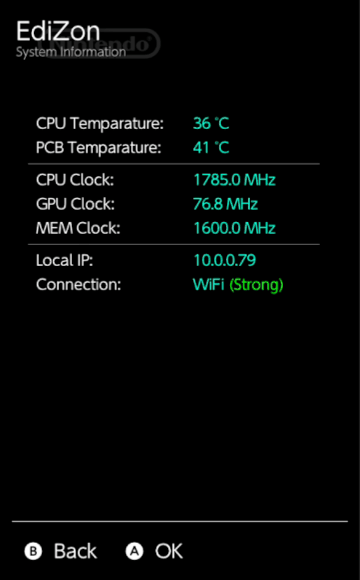
* Temperature readings are now done through i2c. | |||
'''v1.0.8 2024/06/07''' | |||
* Updated libnx. | |||
* Fixed temperature rendering. | |||
* Added Enabling Cheats by Default on Overlay Open. | |||
'''v1.0.7 2023/06/26''' | |||
* Squashed some more crashing issues! | |||
* Fixed mismatched cheats when hiding and showing the overlay. | |||
* Added a way to disable submenu logic for those who requested it. | |||
'''v1.0.6 2023/06/23''' | |||
*Using latest libnx and libtesla which fixes most crashes. | |||
'''v1.0.5 2023/04/01''' | '''v1.0.5 2023/04/01''' | ||
* Pulled latest libtesla to fix crashing issues related to docked mode | * Pulled latest libtesla to fix crashing issues related to docked mode | ||
| Line 86: | Line 118: | ||
Originally by [https://edizon.werwolv.net/ WerWolv]. | Originally by [https://edizon.werwolv.net/ WerWolv]. | ||
Continued Support by proferabg. | Continued Support by proferabg & ppkantorski. | ||
== External links == | == External links == | ||
* GitHub - https://github.com/proferabg/EdiZon-Overlay | * GitHub - https://github.com/proferabg/EdiZon-Overlay | ||
* GBAtemp - https://gbatemp.net/threads/updated-edizon-overlay-added-feature.603725/ | * GBAtemp - https://gbatemp.net/threads/updated-edizon-overlay-added-feature.603725/ | ||
Latest revision as of 04:31, 26 April 2026
| EdiZon-Overlay | |
|---|---|
 | |
| General | |
| Author | proferabg, ppkantorski |
| Type | Overlays |
| Version | 1.0.15 |
| License | Mixed |
| Last Updated | 2026/04/24 |
| Links | |
| Download | |
| Website | |
| Source | |
EdiZon-Overlay is a Tesla overlay for WerWolv's EdiZon, a save management, editing tool and memory trainer homebrew for the Nintendo Switch.
This allows you to easily enable/disable cheats while the game is running.
Installation
Place the .ovl file into the /switch/.overlays/ folder on your Switch's SD card.
Make sure you have nx-ovlloader and Tesla Menu installed.
User guide
Open the Tesla Menu with L+Down+Right Stick Button.
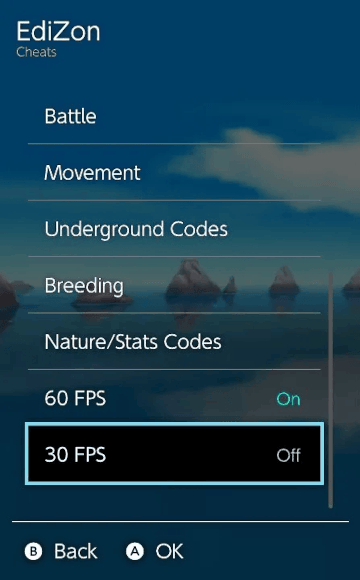
Select EdiZon > Cheats and choose the cheats you wish to enable.
Press B to exit the Tesla Menu and load into a new area if your cheats do not take effect immediately.
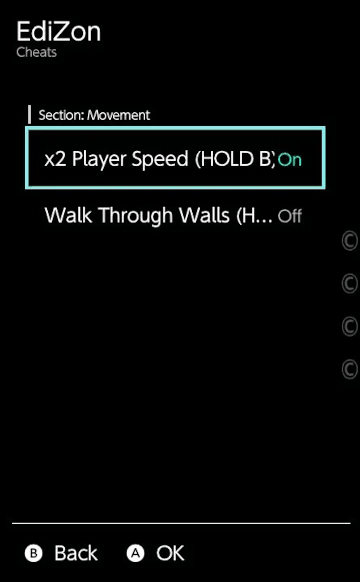
In your cheat text document you can add submenus by using these 2 tags
[--SectionStart:<Section Name>--]
[--SectionEnd:<Section Name>--]
Example:
[--SectionStart:Item Codes--]
00000000 00000000 00000000

[Items x999]
040A0000 01DB2A08 52807CE0

[--SectionEnd:Item Codes--]
00000000 00000000 00000000
This will create a submenu called Item Codes with Items x999 being a cheat in that submenu.
Warning: Having too many cheats at once can lead to stability issues and can crash.
Screenshots
Compatibility
Supports HOS 21.0.0.
Changelog
v1.0.15 2026/04/24
- Update libultrahand to v2.4.1.
v1.0.14 2025/12/06
- Update libultrahand to v2.2.0.
v1.0.13 2025/11/24
- gdbstub bug fix.
v1.0.12 2025/11/20
- Added support for HOS 21.0.0.
- Updated libultrahand to v2.1.5.
v1.0.11 2025/10/26
- Updated libultrahand to v2.1.4.
v1.0.10 2025/06/16
- Special thanks to @ppkantorski for fixing a few bugs with libultrahand.
- Updated libultrahand (fixes #33).
v1.0.9 2024/10/21
- Updated libnx.
- Now utilizing libtesla (Ultrahand) & libultra.
- Custom wallpaper / theme support.
- Users can override the system wallpaper / theme with sdmc:/config/edizon/wallpaper.rgba and sdmc:/config/edizon/theme.ini.
- Faster opening / game detection.
- Fix for local IP calls.
- Temperature readings are now done through i2c.
v1.0.8 2024/06/07
- Updated libnx.
- Fixed temperature rendering.
- Added Enabling Cheats by Default on Overlay Open.
v1.0.7 2023/06/26
- Squashed some more crashing issues!
- Fixed mismatched cheats when hiding and showing the overlay.
- Added a way to disable submenu logic for those who requested it.
v1.0.6 2023/06/23
- Using latest libnx and libtesla which fixes most crashes.
v1.0.5 2023/04/01
- Pulled latest libtesla to fix crashing issues related to docked mode
- Changed highlight color to light blue
- Please use the official Tesla Menu build from here.
v1.0.4 2023/02/26
- Horizon OS 16.0.0 Support.
- Thank you @alula for pulling submodules to latest and changing to compile with gnu++20 to match libtesla.
v1.0.3 2022/10/21
- HOS 15 Full Support.
- Removed WiFi Signal on HOS 15+.
- Added Connection Status in System Information on HOS versions 15+.
v1.0.2d 2022/10/14
- Update for HOS 15.0.0.
- This update removes the WIFI Signal level from the overlay for HOS 15.0.0 (works in lower versions) as calling wlaninfInitialize() will break the overlay.
- Fixed issue #6.
v1.0.2c 2022/05/27
- Update for HOS 14.0.0.
v1.0.2b 2022/11/30
- Bugfix for non-submenu cheats not showing.
v1.0.2 2022/11/29
- Added Submenu Feature. See Readme for more details.
v1.0.1 2022/11/29
- Updated for Edizon-SE 3.8.25 and libnx 4.2.0.
Credits
Originally by WerWolv.
Continued Support by proferabg & ppkantorski.