
Status Monitor Overlay Switch: Difference between revisions
More actions
No edit summary |
1.4.1 |
||
| (36 intermediate revisions by 2 users not shown) | |||
| Line 1: | Line 1: | ||
{{Infobox Switch Homebrews | {{Infobox Switch Homebrews | ||
|title=Status Monitor Overlay | |title=Status Monitor Overlay | ||
|image= | |image=statusmonitoroverlaynx.png | ||
|description=Monitor many stats of Nintendo Switch hardware | |description=Monitor many stats of Nintendo Switch hardware. | ||
|author=masagrator | |author=masagrator | ||
|lastupdated= | |lastupdated=2026/05/19 | ||
|type= | |type=Overlays | ||
|version= | |version=1.4.1 | ||
|license=GPL-2.0 | |license=GPL-2.0 | ||
|download=https://dlhb.gamebrew.org/switchhomebrews/ | |download=https://dlhb.gamebrew.org/switchhomebrews/statusmonitoroverlaynx.7z | ||
|website=https://gbatemp.net/threads/status-monitor-overlay-tesla-overlay-to-monitor-your-hardware.558505/ | |website=https://gbatemp.net/threads/status-monitor-overlay-tesla-overlay-to-monitor-your-hardware.558505/ | ||
|source=https://github.com/masagrator/Status-Monitor-Overlay | |source=https://github.com/masagrator/Status-Monitor-Overlay | ||
|donation=https://ko-fi.com/masagrator | |donation=https://ko-fi.com/masagrator | ||
}} | }} | ||
Monitor Your hardware in real time. This is an overlay homebrew dedicated to Nintendo Switch. You need to have installed Tesla environment to use it. | |||
==Features== | ==Features== | ||
* CPU Usage for each core ( | * CPU Usage for each core (Cores <code>#0</code>-<code>#2</code> are used by apps/games, Core <code>#3</code> is used by OS, background processes and also Tesla overlays). | ||
* GPU Load | * GPU Load. | ||
* CPU, GPU & RAM | * CPU, GPU & RAM target frequencies (also real frequencies + RAM Load if [https://github.com/retronx-team/sys-clk/releases sys-clk 2.0.0_rc4+] or [https://github.com/Horizon-OC/Horizon-OC/releases Horizon OC 2.2.0+] is installed, use only official RetroNX release for reliable results). | ||
* Used RAM categorized to: (not supported by FWs | * Used RAM categorized to: (not supported by FWs <5.0.0). | ||
** Total | ** Total. | ||
** Application | ** Application. | ||
** Applet | ** Applet. | ||
** System | ** System. | ||
** System Unsafe | ** System Unsafe. | ||
* SoC, PCB & Skin temperatures (Skin temperature not supported by FWs | * SoC, PCB & Skin temperatures (Skin temperature not supported by FWs <5.0.0). | ||
* Fan Rotation Level | * Fan Rotation Level. | ||
* PFPS | * PFPS, FPS, resolutions, game read speed [https://github.com/masagrator/SaltyNX/releases the author's fork of SaltyNX] is installed). | ||
* Battery temperature, raw charge, age, and average | * Battery temperature, raw charge, age, average voltage, average current flow and average power flow. | ||
* Charger type, max voltage, and max current | * Charger type, max voltage, and max current. | ||
* DSP usage | * DSP usage (only for FW older than 17.0.0). | ||
* NVDEC, NVENC and NVJPG clock rates. | |||
* Network type + Wi-fi password. | |||
==Installation== | |||
Requirements: | |||
* You need [[Tesla Menu Switch|Tesla Menu]] 1.2.3+. | |||
* For additional features you need [[Sys-clk_Switch|sys-clk]] 2.0.0_rc4 or newer + [[SaltyNX_Switch|SaltyNX]]. | |||
Place Status-Monitor-Overlay.ovl to /switch/.overlays/ folder. | |||
Restart Switch, you can then access overlays by pressing all 3 buttons at once: L, D-Pad Down and Right Stick (aka pressing it). | |||
==User guide== | |||
Tool contains five menus to choose, each one is explained [https://github.com/masagrator/Status-Monitor-Overlay/blob/master/docs/modes.md here]. | |||
Overlay supports customizations through config file, more [https://github.com/masagrator/Status-Monitor-Overlay/blob/master/docs/config.md here]. | |||
https:// | |||
You can exit from selected mode by pressing and holding Left Stick + Right Stick. To exit from main menu press B. | |||
If it's not working in dock, you need to first start Status Monitor, then put Nintendo Switch to dock. | |||
===FAQ=== | |||
'''Q. This homebrew has any impact on games?''' | |||
' | Negligible, you won't see any difference. Almost everything is done on Core <code>#3</code>, other cores usage is below 0.005% at 1 FPS refresh rate. | ||
'''Q. When opening Full or Mini mode, overlay is showing that Core #3 usage is at 100% while everything else is showing 0, eventually leading to crash. Why this happens?''' | |||
There are few possible explanations: | |||
* You're using nifm services connection test patches (in short <code>nifm ctest patches</code>) that are included in various packs. Those patches allow to connect to network that has no internet connection. But they cause nifm to randomly rampage when connected to network. Find any folder in <code>atmosphere/exefs_patches/</code> that has in folder name <code>nifm</code>, <code>nfim</code> and/or <code>ctest</code>, delete this folder and restart Switch. If you must use it, only solution is to use this overlay only in airplane mode. | |||
* You're using some untested custom sysmodule that has no proper thread sleeping implemented. Find out in atmosphere/contents any sysmodule that you don't need, delete it and restart Switch. | |||
* Your Switch is using sigpatches, is not a primary device, is using linked account, and is connected to network. Delete sigpatches, change your Switch to primary device, unlink account, or disable Wi-Fi. | |||
'''Q. When opening Status Monitor overlays stop responding, or something that I am trying to open while Status Monitor is opened is freezing (f.e. Album or HB Menu). How to fix this?''' | |||
This is related to SaltyNX, issue comes from too much sysmodules accessing sdcard at once. You must either update SaltyNX to at least 1.8.1 or limit amount of sysmodules that have such access (you can free one session by disabling logs in SaltyNX-Tool). | |||
==Screenshots== | |||
'''Full'''<br> | |||
https://dlhb.gamebrew.org/switchhomebrews/statusmonitoroverlaynx.png | |||
'''Mini'''<br> | |||
https://dlhb.gamebrew.org/switchhomebrews/statusmonitoroverlaynx2.png | |||
'''Micro'''<br> | |||
https://dlhb.gamebrew.org/switchhomebrews/statusmonitoroverlaynx3.png | |||
'''FPS Counter'''<br> | |||
https://dlhb.gamebrew.org/switchhomebrews/statusmonitoroverlaynx4.png | |||
==Media== | ==Media== | ||
'''Resident Evil 5 (Nintendo Switch) - Status Monitor Overlay and NX-FPS | '''Resident Evil 5 (Nintendo Switch) - Status Monitor Overlay and NX-FPS ([https://www.youtube.com/watch?v=9RqGEk4talI Marek])'''<br> | ||
<youtube>9RqGEk4talI</youtube> | <youtube>9RqGEk4talI</youtube> | ||
== | ==Changelog== | ||
''' | '''1.4.1 2026/05/19''' | ||
* 1.4.0 release triggered a very weird bug in HOS that causes Atmosphere sysmodules to not have access to pad input which resulted in not working layeredfs disabling and title override not working when this overlay was running. This issue was fixed by removing support for SL + SR buttons. | |||
** Changes default key combos for joycon sixaxis to: | |||
** Left: <code>ZL+L+LSTICK</code> | |||
** Right: <code>ZR+R+RSTICK</code> | |||
'''1.4.0 2026/05/12''' | |||
''' | * Add support for reading data from Horizon OC next to sys-clk | ||
** Horizon OC version must be at least 2.2.0 to properly read data from it | |||
* Add motion controls as an extension of what touch screen already can do | |||
** This is dedicated to wireless Joycons and Pro Controller | |||
# | ** For wireless Joycons there are two key combos that depend on which controller you want to use: | ||
*** Left Joycon default key combo: <code>Left Joycon SR + L-Stick</code> | |||
*** Right Joycon default key combo: <code>Right Joycon SL + R-Stick</code> | |||
''' | ** For Pro Controller default key combo is: <code>ZR + R + R-Stick</code> (not tested as I don't own it) | ||
* Corrected Battery Power Flow calculation | ** 4 new keys were added to config file under <code>[status-monitor]</code>: <code>motion_control</code>, <code>left_joycon_motion_key_combo</code>, <code>right_joycon_motion_key_combo</code>, <code>pro_controller_motion_key_combo</code>. More in docs | ||
* Fix an issue where Game Resolutions would randomly pop up 65535 at first Depth entry | |||
* Reduce amount of FS sessions to 1 to limit possible issues with session exhaustion | |||
'''v1.3.2+r6 2026/01/11''' | |||
* Critical bug fixes for touch navigation when utilizing swapTo for menu transitions. | |||
* Configurator touch navigation focus fixes. | |||
'''v1.3.2+r5 2026/01/11''' | |||
* Bug fix for RAM VDDQ and VDD2 voltage values being swapped on Mariko when not using sys-clk-oc EOS. | |||
* New Show Labels toggle for mini mode (on by default). | |||
** When off, element labels will be hidden. | |||
* Launch mode settings are now only applied / added to Ultrahand's overlays.ini if /config/ultrahand/overlays.ini exists. | |||
* Slight tweak to left side padding for Show Labels disabled on mini mode. | |||
* Frame initialization clipping bug fixes on mini, fps graph, fps counter, and resolutions modes for limited memory (4MB heap size). | |||
'''v1.3.2+r4 2026/01/11''' | |||
* Bug fix for real voltages (specifically vdd2) on Erista models causing crashes during game boots and displaying the wrong voltage when not using sys-clk-oc EOS. | |||
'''v1.3.2+r3 2026/01/11''' | |||
*Tweaks for List class update. | |||
'''v1.3.2+r2 2026/01/11''' | |||
* Bug fix for mini mode causing crashes when displaying too much content at once (buffer size increase). | |||
* Bug fix for the initial element display order for mini and micro modes on the configurator . | |||
* GPU load algorithm tweak (from official branch). | |||
'''v1.3.2+r1 2026/01/11''' | |||
* Proper 4MB nx-ovlloader heap size support. | |||
** Ultrahand notifications will be disabled on 4MB. | |||
* New mini mode element MEM for displaying the active amount of system memory. | |||
* Refinements to rounded rects (in libultrahand). | |||
* Notification flag file bug fix. | |||
'''v1.3.2 2025/11/16''' | |||
* Added compatibility for Atmosphere 1.10.0+. | |||
** Older Status Monitor Overlay releases can have random issues when using with Atmosphere 1.10.0 and newer. | |||
** This release is backwards compatible so you can use it with older Atmosphere too. | |||
** It is required to update to SaltyNX 1.6.0+ for the same reason! | |||
* Optimize CPU usage calculation so now there is less time spend on executing each loop, which gives us more precise results | |||
* Fix how CPU usage is calculated so now overlay doesn't report randomly minus 0. | |||
'''v1.3.1 2025/11/05''' | |||
* Fix an issue where in Mini and Full modes two resolutions were showing up next to each other, first being 0x0. Now it shows up only second resolution in that case. | |||
'''v1.3.0 2025/10/30''' | |||
* Add touch screen functionality to Mini, FPS Graph, FPS Counter and Game Resolutions modes. | |||
** You can now temporarily change position of them to wherever you want on screen. Position will reset after exiting chosen mode. | |||
** If you have issues with touch screen, you can disable touch screen functionality in config file by changing <code>touch_screen</code> to <code>false</code>, more [https://github.com/masagrator/Status-Monitor-Overlay/blob/master/docs/config.md here]. | |||
* Changed behavior of combo key so now it's more consistent between various FPS, now it won't exit until at least 200 ms will pass holding buttons. | |||
* Instead of printing 254, 254.0 or <code>inf</code> for FPS it will print now "n/d" aka "no data". | |||
* Ediit 30.10.2025 13:24 GMT: Fixed an issue with Mini mode going out of bounds when using touch screen to change its position, switching to docked mode which has different font size. | |||
'''v1.2.4 2025/10/29''' | |||
* Add to Mini Mode next to RAM Load which part of it belongs to CPU and GPU. | |||
* Edit 28.10.2025 23:50 GMT: Fixed an issue with switching from and to micro mode when overlay has different name than standard one. | |||
'''v1.2.3 2025/10/18''' | |||
* In Full mode and Mini mode if only one reported resolution is changed, other one now stays in the same place. This solves an issue where some games have similar amount of calls to two different resolutions, resulting in constantly swapping places. | |||
'''v1.2.2 2025/08/25''' | |||
* Round FPS Average to PFPS if difference is in range +/- 0.25 (you can turn off rounding in config file), thanks to this we can minimize changes in FPS Average where some games are under constant changes while they provide in fact locked 60 FPS. For best results utilize always newest SaltyNX! | |||
** This wasn't utilized before because PFPS reading was too unstable so current solution would not work. In SaltyNX 1.4.0 was introduced a better way to measure PFPS without cheating which gives now much stable results for referencing. | |||
* Change optimization level from -O2 to -O3 for better performance at cost of slighly bigger overlay. | |||
'''v1.2.1 2025/08/15''' | |||
* Fix an issue with FPS Graph incorrectly detecting when game is paused, causing random pausing for a short moment (Requires SaltyNX 1.4.6+). | |||
* Shadow update 15.08.2025 21:39 GMT: Fixed an issue with improper NX-FPS struct being utilized. | |||
'''v1.2.0 2025/08/01''' | |||
* Redesign game informations in Full mode to match stylistically with hardware informations | |||
* Add information about game read speed in Full and Mini modes (if you use config file, for Mini mode you must add "READ" value to "show" key, more in docs and config template). '''Requires SaltyNX 1.4.0+ to work properly.''' | |||
* Fix FPS Graph not showing properly max FPS value if display refresh rate is 100 Hz or higher | |||
* Redesign sleep logic so now overlay has snappier reaction time | |||
* Shadow update 31.07.2025 17:45 GMT: Fixed threads related to reading CPU usage, it didn't apply proper logic to exit them immediately when requested which could slow down moving between different modes. | |||
'''v1.1.9 2025/05/23''' | |||
*Fix an issue with FPS Graph not pausing when game doesn't push new frames. | |||
'''v1.1.8 2025/05/04''' | |||
* Add support for SaltyNX 1.2.1+. | |||
** Now it can read viewport resolutions from EGL and Vulkan games. | |||
* Added font cache to lower impact on games performance (you can disable it in config.ini with key <code>font_cache</code> but it's not advised). | |||
* When there is only one resolution available to read, Full and Mini mode will print just one resolution instead of second being "0x0". | |||
'''v1.1.7 2024/11/25''' | |||
*Remove for FPS Graph code maintaining compatibility with old SaltyNX, fixes issue with retrieving refresh rate for docked mode. | |||
'''v1.1.6 2024/11/06''' | |||
* Small code refactor which resulted in slightly smaller size. | |||
* Support SaltyNX 1.0.3+ display refresh rate update logic in FPS Graph to fix issue with graph randomly not adjusting height to refresh rate (if there is older SaltyNX used, overlay will use old logic). | |||
'''v1.1.5 2024/11/03''' | |||
* add new config key to status-monitor category - average_gpu_load, by default disabled. | |||
** Because GPU load by design shows only load for last 1/60s, this option allows for more accurate gpu load readings at the cost of visible slight bump in CPU Core #3 usage. | |||
'''v1.1.4 2024/10/13''' | |||
* Fix issue with overlay potentially crashing system on overlay's boot related to nv services. | |||
* Fix potential issue with sleep mode at 19.0.0+ that was first discovered in sys-clk [https://github.com/retronx-team/sys-clk/issues/85 retronx-team/sys-clk#85]. | |||
** For some reason using tsSessionGetTemperature is enough to crash system while is in sleep mode. | |||
** It was fixed by moving from ts service to i2c. Readings are not filtered, so reading output and behavior can be slightly different than what we were used to. | |||
'''v1.1.3 2024/09/02''' | |||
*Switch reading fan rotation level from "fan" service to "pwm" service. | |||
**This allows avoiding potential conflict with other homebrew/sysmodules (f.e. Nx-FanControl) because only one process can have fan controller session in "fan" service. | |||
'''v1.1.2 2024/08/08''' | |||
* Fix Resolutions sometimes going out of bounds in Full Mode. | |||
'''v1.1.1 2024/08/05''' | |||
* Added options to show 2 the best candidates for game's internal resolution in Mini and Full modes. | |||
* Added keys to config that can disable showing FPS and Resolutions in Full mode | |||
* Added value RES to show key in Mini mode that shows Resolutions. | |||
'''v1.1.0 2024/08/04''' | |||
*Added "Game Resolutions" menu to "Other" category. More [https://github.com/masagrator/Status-Monitor-Overlay/blob/master/docs/modes.md#other HERE]. | |||
'''v1.0.4 2024/06/25''' | |||
* Moved from c++20 to c++23 | |||
* With SaltyNX 0.8.0+ FPS Graph mode will adjust height according to received back display refresh rate. | |||
'''v1.0.3a 2024/01/05''' | |||
* Fix compability issues with combos from Ultrahand and Tesla configs after implementing [https://github.com/masagrator/Status-Monitor-Overlay/pull/72 #72]. | |||
'''v1.0.3 2024/01/04''' | |||
* Improved key combo and navigation handling (thanks to @IrneRacoonovich ). | |||
* Fixed an issue with battery readings not working after exiting Micro mode multiple times without rebooting Switch (this bug affected also other homebrew reading battery stats with PSM service). | |||
* Futureproofed for sys-clk IPC updates. | |||
'''v1.0.2 2023/21/09''' | |||
* Add new keys to config: battery_avg_iir_filter and battery_time_left_refreshrate, more in [https://github.com/masagrator/Status-Monitor-Overlay/blob/master/docs/config.md CONFIG]. | |||
* Changing battery_avg_iir_filter to true results in period time of average voltage being changed to 45s, and 11.25s for amperage. | |||
* Removed whole logic behind PR [https://github.com/masagrator/Status-Monitor-Overlay/pull/56 #56] instead relying now on max17050 TTE register. | |||
* Changed i2c communication code to avoid issues with wrong readings (thanks to ~lineon). | |||
* Move FPS Graph and FPS Counter to one subcategory "FPS". | |||
'''v1.0.1 2023/11/11''' | |||
*Allow hiding real frequencies, deltas and target frequencies in Full mode (deltas are not showed if both real + target frequencies are hidden). | |||
*This release also includes 2 shadow updates for 1.0.0, which includes fixes for overflowing of real frequencies + deltas, and also fixed RAM positioning calculations in Micro and Mini modes. | |||
'''v1.0.0 2023/11/11''' | |||
*Fixed bugs: | |||
**Temperatures for PCB and SoC were swapped in 0.9.2 release. | |||
**Sometimes exiting mode resulted in exiting overlay. | |||
*Changes: | |||
**Introduction of experimental configuration file, which allows changing exit button combo, Mini + Micro + FPS Counter + FPS Graph UIs, refresh rates. More explained [https://github.com/masagrator/Status-Monitor-Overlay/blob/master/docs/config.md here]. | |||
***Button combos are read from 3 different configurations files, the most important is status-monitor config, next config used by Ultrahand overlay, and last config for Tesla Menu. | |||
***Now default combo button is L + D-PAD Down + R Stick. If someone wants to bring back old combo, use status-monitor config file. | |||
**Allow reading real frequencies from sys-clk 2.0.0_rc4+ sysmodule, if not installed showed frequencies in Mini and Micro modes are falling back to target frequencies | |||
**Allow reading RAM load from sys-clk 2.0.0_rc4+ | |||
**Remove option to change refresh rate with button combo | |||
**Remove option to change position of Mini and FPS Counter modes with button combo | |||
**Show proper button icons in Full mode (only exceptions are general UP, DOWN, LEFT and RIGHT because they include both Sticks and D-Pad) | |||
**If sys-clk 2.0.0_rc4+ is active, Micro mode shows next to frequencies instead of @ also △ if real frequency is higher by 20 MHz than expected, ▽ if it's lower by 20 MHz, ≠ if it's lower by 50 MHz (seeing ≠ for longer than few seconds without any change suggests that your overclocking solution is bugged). | |||
**PFPS is now not showing in Mini mode | |||
**Edit: November 10th, 2023 18:04 GMT: Fixed positioning calculations for RAM in Micro and Mini modes when sys-clk is not working. | |||
**Edit: Novermber 11th, 2023 06:13 GMT: Fixed real frequencies and deltas overflowing above INT32_MAX | |||
'''v0.9.2 2023/10/14''' | |||
*17.0.0 FW issues fixed: | |||
**SoC and PCB temperatures showing 0 | |||
**Charger Type, Charger Max Voltage and Charger Max Current showing wrong values | |||
*General changes: | |||
**SoC and PCB temperatures across all FWs are now showing decimals | |||
**Next to Battery Power Draw in Full, Mini and Micro modes you can see now also estimated time left before Switch will shutdown (thanks to rkuchkarov for PR #56) | |||
**In Micro instead of MB for RAM now you will see GB up to one decimal | |||
**In Micro now power draw shows only one decimal | |||
**Fan level will now render only one decimal across all modes | |||
**Miscellaneous now also shows NVENC and NVJPG clocks | |||
*Since 17.0.0 audsnoop is not available, DSP Usage is not shown in Other -> Miscellaneous tab | |||
'''v0.9.1 2023/05/27''' | |||
* Now filepath for Micro mode is not hardcoded, it is retrieved via Tesla Menu. | |||
* To use it with changed filename it is required to update Tesla Menu to version at least 1.2.3. | |||
* On older versions of Tesla Menu it behaves the same as 0.9.0 version. | |||
'''v0.9.0 2023/04/23''' | |||
* Corrected Battery Power Flow calculation. | |||
* Changed Battery Stats reading to 2 readings per second. Current, Voltage and Power Flow are calculated now via 10 last readings. | * Changed Battery Stats reading to 2 readings per second. Current, Voltage and Power Flow are calculated now via 10 last readings. | ||
* Changed FPS average calculation to 10 last readings instead of constant averaging | * Changed FPS average calculation to 10 last readings instead of constant averaging. | ||
* Added Graphs tab with currently only FPS available (Graphs tab won't show for now if you don't have SaltyNX installed) | * Added Graphs tab with currently only FPS available (Graphs tab won't show for now if you don't have SaltyNX installed). | ||
* Moved Battery/Charger + Miscellaneous tabs under "Other" tab | * Moved Battery/Charger + Miscellaneous tabs under "Other" tab. | ||
* You can move now FPS Counter + FPS Graph to the bottom and top of screen by pressing ZR + R + D-Pad Down/Up | * You can move now FPS Counter + FPS Graph to the bottom and top of screen by pressing ZR + R + D-Pad Down/Up. | ||
* For FPS readings it is required to update NX-FPS to version 1.4.0+ | * For FPS readings it is required to update NX-FPS to version 1.4.0+. | ||
''' | '''v0.8.3 2023/04/16''' | ||
* Add Battery Power Flow stat into Full, Mini, Micro modes and Battery/Charger tab | * Add Battery Power Flow stat into Full, Mini, Micro modes and Battery/Charger tab. | ||
* Add Battery Current Flow into Battery/Charger tab | * Add Battery Current Flow into Battery/Charger tab. | ||
* Change Battery Voltage from 45s average to average of 5 to match better with Battery Current Flow and get faster responses to changes in voltage at the cost of slightly less accurate readings | * Change Battery Voltage from <code>45s average</code> to <code>average of 5</code> to match better with Battery Current Flow and get faster responses to changes in voltage at the cost of slightly less accurate readings. | ||
* Fix a random issue with allocing memory for reading Wi-Fi password and battery stats | * Fix a random issue with allocing memory for reading Wi-Fi password and battery stats. | ||
''' | '''v0.8.2 2023/04/01''' | ||
* Fix conditional handle leak | * Fix conditional handle leak. | ||
* Fix memory leak | * Fix memory leak. | ||
* Workaround race condition causing random crashes in docked mode | * Workaround race condition causing random crashes in docked mode. | ||
''' | '''v0.8.1 2023/03/03''' | ||
* Move reading FPS from dmnt:cht to SharedMemory. This fixes any stutterings, thread desyncing and cracking sounds you may have encountered when using NX-FPS in games. | * Move reading FPS from dmnt:cht to SharedMemory. This fixes any stutterings, thread desyncing and cracking sounds you may have encountered when using NX-FPS in games. | ||
* Requires NX-FPS 0.4+ and SaltyNX 0.5.0+ to read FPS. | * Requires NX-FPS 0.4+ and SaltyNX 0.5.0+ to read FPS. | ||
''' | '''v0.8.0 2023/02/27''' | ||
* Add new mode - Micro. | * Add new mode - Micro. | ||
* To access it YOU MUST NOT rename file, otherwise it will not show. | * To access it YOU MUST NOT rename file, otherwise it will not show. [https://github.com/masagrator/Status-Monitor-Overlay/blob/master/docs/modes.md#micro More]. | ||
* Edit: Fixed GPU Load in Micro mode. | * Edit: Fixed GPU Load in Micro mode. | ||
''' | '''v0.7.1 2023/02/23''' | ||
*It adds support for 16.0.0. | *It adds support for 16.0.0. | ||
''' | '''v0.7 2022/11/06''' | ||
* New 2 tabs were added: | * New 2 tabs were added: | ||
** Battery/Charger | ** Battery/Charger. | ||
** Miscellaneous | ** Miscellaneous. | ||
* You can now check Battery temperature, max supported charger voltage and current, connected Wi-Fi password and few others. | * You can now check Battery temperature, max supported charger voltage and current, connected Wi-Fi password and few others. | ||
''' | '''v0.6.4 2022/03/25''' | ||
* Added support for 14.0.0 FW. | * Added support for 14.0.0 FW. | ||
** HOS removed function for reading SoC and PCB temperatures in milli Celsius. Status Monitor 0.6.3 was outputting 0.0C because of that. Now it reads temperature in Celsius without decimals on FW 14.0.0+. | ** HOS removed function for reading SoC and PCB temperatures in milli Celsius. Status Monitor 0.6.3 was outputting 0.0C because of that. Now it reads temperature in Celsius without decimals on FW 14.0.0+. | ||
* Fixed slow boot time by reimplementing fix from Breeze repository. | * Fixed slow boot time by reimplementing fix from Breeze repository. | ||
''' | '''v0.6.3 2020/08/25''' | ||
*Fixed button combo. | *Fixed button combo. | ||
''' | '''v0.6.2 2020/08/24''' | ||
* Adapted c7cefce commit from main libtesla to my fork. Thanks to that Status Monitor is now showed on screenshots by default and also in videos. | * Adapted c7cefce commit from main libtesla to my fork. Thanks to that Status Monitor is now showed on screenshots by default and also in videos. | ||
''' | '''v0.6.1 2020/06/05''' | ||
* Fix issue related to always forcing opening cheat process with dmnt:cht that sometimes resulted in conflicts with other tools. | * Fix issue related to always forcing opening cheat process with dmnt:cht that sometimes resulted in conflicts with other tools. | ||
* Now it's checking first if cheat process is opened already. | * Now it's checking first if cheat process is opened already. | ||
''' | '''v0.6.0 2020/05/19''' | ||
* If dmnt:cht is not detected, it's using svc calls to read FPS values for NX-FPS (now only if SaltyNX check failed, FPS Counter won't show). | * If dmnt:cht is not detected, it's using svc calls to read FPS values for NX-FPS (now only if SaltyNX check failed, FPS Counter won't show). | ||
* Be aware that not using Atmosphere's dmnt:cht may introduce conflicts with other cheat engines, resulting in crashes or hangs. | * Be aware that not using Atmosphere's dmnt:cht may introduce conflicts with other cheat engines, resulting in crashes or hangs. | ||
''' | '''v0.5.5 2020/05/19''' | ||
* Now if dmnt:cht initializing didn't success or SaltyNX check failed, FPS Counter option won't show. | * Now if dmnt:cht initializing didn't success or SaltyNX check failed, FPS Counter option won't show. | ||
* Fixed issue with SaltyNX check returning false positive. | * Fixed issue with SaltyNX check returning false positive. | ||
''' | '''v0.5.4 2020/05/16''' | ||
*Fix issue with CPU Core usage stuck at last value when core usage is at peak. | *Fix issue with CPU Core usage stuck at last value when core usage is at peak. | ||
''' | '''v0.5.3 2020/05/12''' | ||
* Updated to libnx 3.2.0, which helps with very rare case of crashing overlay if pl sessions are depleted. | * Updated to libnx 3.2.0, which helps with very rare case of crashing overlay if pl sessions are depleted. | ||
* Fixed wrong version inside overlay. | * Fixed wrong version inside overlay. | ||
''' | '''v0.5.2 2020/04/24''' | ||
* Added version info for Tesla menu. | * Added version info for Tesla menu. | ||
* Added support for SX OS (FPS Counter is not available). | * Added support for SX OS (FPS Counter is not available). | ||
''' | '''v0.5.1 2020/03/14''' | ||
*Fixed wrong parsing temperatures for PCB and SoC. | *Fixed wrong parsing temperatures for PCB and SoC. | ||
''' | '''v0.5 2020/03/08''' | ||
* Main menu from which you can now choose 3 modes, all explained [https://github.com/masagrator/Status-Monitor-Overlay/blob/master/docs/modes.md here]. | * Main menu from which you can now choose 3 modes, all explained [https://github.com/masagrator/Status-Monitor-Overlay/blob/master/docs/modes.md here]. | ||
* Auto-switching input detection, so home button trick is now obsolete. | * Auto-switching input detection, so home button trick is now obsolete. | ||
''' | '''v0.4.2 2020/03/04''' | ||
*Repaired bug that was requiring in 0.4.1 only Right Stick to be pressed to exit. | *Repaired bug that was requiring in 0.4.1 only Right Stick to be pressed to exit. | ||
''' | '''v0.4.1 2020/03/03''' | ||
*Ported to new libtesla. Now requires Tesla menu >=1.0.2 to work correctly. | *Ported to new libtesla. Now requires Tesla menu >=1.0.2 to work correctly. | ||
''' | '''v0.4 2020/02/29''' | ||
*Added support for SaltyNX plugin - NX-FPS. | *Added support for SaltyNX plugin - NX-FPS. | ||
''' | '''v0.3 2020/02/27''' | ||
*Added | *Added: | ||
**Switching refresh rate between 1 and 5 FPS (More FPS results in higher Core #3 usage) | **Switching refresh rate between 1 and 5 FPS (More FPS results in higher Core #3 usage). | ||
*GPU | *GPU: | ||
**Load | **Load. | ||
*Changes/fixes: | *Changes/fixes: | ||
** Fixed critical bug that was shutting down Switch if FW was lower than 7.0.0 (thx to Behemoth for providing correct magic to IController) | ** Fixed critical bug that was shutting down Switch if FW was lower than 7.0.0 (thx to Behemoth for providing correct magic to IController). | ||
** Renamed 'Temperatures' to 'Thermal' | ** Renamed 'Temperatures' to 'Thermal'. | ||
** Renamed 'Fan Rotation' to 'Fan' | ** Renamed 'Fan Rotation' to 'Fan'. | ||
** Repositioned Thermal category | ** Repositioned Thermal category. | ||
** Added checks that prevents from using functions if services are not initialized. This helps with FWs <5.0.0 which doesn't support showing Memory used and Skin temperature. | ** Added checks that prevents from using functions if services are not initialized. This helps with FWs <5.0.0 which doesn't support showing Memory used and Skin temperature. | ||
** Buttons are now checked outside of FPS limitations, so detecting input and exiting is now smoother | ** Buttons are now checked outside of FPS limitations, so detecting input and exiting is now smoother. | ||
''' | '''v0.2 2020/02/22''' | ||
*Added | *Added: | ||
** CPU: | ** CPU: | ||
*** Actual frequency | *** Actual frequency. | ||
** GPU | ** GPU: | ||
*** Actual frequency | *** Actual frequency. | ||
** RAM | ** RAM: | ||
*** Actual frequency | *** Actual frequency. | ||
*** Used memory categorized to: Total, Application, Applet, System, System Unsafe | *** Used memory categorized to: Total, Application, Applet, System, System Unsafe. | ||
** Temperatures | ** Temperatures. | ||
** SoC temperature | ** SoC temperature. | ||
** PCB temperature | ** PCB temperature. | ||
** Skin temperature | ** Skin temperature. | ||
** Fan rotation level | ** Fan rotation level. | ||
* Changes/fixes: | * Changes/fixes: | ||
** Changed interval for everything to 1s | ** Changed interval for everything to 1s. | ||
** Changed refresh rate to 1 FPS, which reduced homebrew usage of Core #3 from 26 percent points to 1 percent point | ** Changed refresh rate to 1 FPS, which reduced homebrew usage of Core #3 from 26 percent points to 1 percent point. | ||
** Core Usage now always starts at 0% | ** Core Usage now always starts at 0%. | ||
''' | '''v0.11 2020/02/20''' | ||
* Code was changed to make each CPU core independent, so they will not block each other in case of heavy load. | * Code was changed to make each CPU core independent, so they will not block each other in case of heavy load. | ||
* Changed exit button from holding Left Stick to pressing Left Stick + Right Stick. | * Changed exit button from holding Left Stick to pressing Left Stick + Right Stick. | ||
''' | '''v0.1 2020/02/20''' | ||
* First Release. | * First Release. | ||
==Thanks To | ==Credits== | ||
* RetroNX channel for helping with coding stuff | Thanks To: | ||
* SunTheCourier for sys-clk-Overlay from which I learned how to make my own Tesla homebrew | *RetroNX channel for helping with coding stuff. | ||
* Herbaciarz for providing screenshots from HDMI Grabber | *SunTheCourier for sys-clk-Overlay from which I learned how to make my own Tesla homebrew. | ||
*Herbaciarz for providing screenshots from HDMI Grabber. | |||
*KazushiMe for writing code to read registers from max17050 chip. | |||
*CTCaer for Hekate from which I took max17050.h and calculation formulas for reading battery stats from max17050 chip. | |||
*ChanseyIsTheBest for testing Game Resolutions menu. | |||
== External links == | == External links == | ||
* | * GitHub - https://github.com/masagrator/Status-Monitor-Overlay | ||
* | * GitHub - https://github.com/ppkantorski/Status-Monitor-Overlay | ||
* GBAtemp - https://gbatemp.net/threads/status-monitor-overlay-tesla-overlay-to-monitor-your-hardware.558505/ | |||
* Homebrew App Store - https://apps.fortheusers.org/switch/Status-Monitor-Overlay | |||
Latest revision as of 01:25, 22 May 2026
| Status Monitor Overlay | |
|---|---|
 | |
| General | |
| Author | masagrator |
| Type | Overlays |
| Version | 1.4.1 |
| License | GPL-2.0 |
| Last Updated | 2026/05/19 |
| Links | |
| Download | |
| Website | |
| Source | |
| Support Author | |
Monitor Your hardware in real time. This is an overlay homebrew dedicated to Nintendo Switch. You need to have installed Tesla environment to use it.
Features
- CPU Usage for each core (Cores
#0-#2are used by apps/games, Core#3is used by OS, background processes and also Tesla overlays). - GPU Load.
- CPU, GPU & RAM target frequencies (also real frequencies + RAM Load if sys-clk 2.0.0_rc4+ or Horizon OC 2.2.0+ is installed, use only official RetroNX release for reliable results).
- Used RAM categorized to: (not supported by FWs <5.0.0).
- Total.
- Application.
- Applet.
- System.
- System Unsafe.
- SoC, PCB & Skin temperatures (Skin temperature not supported by FWs <5.0.0).
- Fan Rotation Level.
- PFPS, FPS, resolutions, game read speed the author's fork of SaltyNX is installed).
- Battery temperature, raw charge, age, average voltage, average current flow and average power flow.
- Charger type, max voltage, and max current.
- DSP usage (only for FW older than 17.0.0).
- NVDEC, NVENC and NVJPG clock rates.
- Network type + Wi-fi password.
Installation
Requirements:
- You need Tesla Menu 1.2.3+.
- For additional features you need sys-clk 2.0.0_rc4 or newer + SaltyNX.
Place Status-Monitor-Overlay.ovl to /switch/.overlays/ folder.
Restart Switch, you can then access overlays by pressing all 3 buttons at once: L, D-Pad Down and Right Stick (aka pressing it).
User guide
Tool contains five menus to choose, each one is explained here.
Overlay supports customizations through config file, more here.
You can exit from selected mode by pressing and holding Left Stick + Right Stick. To exit from main menu press B.
If it's not working in dock, you need to first start Status Monitor, then put Nintendo Switch to dock.
FAQ
Q. This homebrew has any impact on games?
Negligible, you won't see any difference. Almost everything is done on Core #3, other cores usage is below 0.005% at 1 FPS refresh rate.
Q. When opening Full or Mini mode, overlay is showing that Core #3 usage is at 100% while everything else is showing 0, eventually leading to crash. Why this happens?
There are few possible explanations:
- You're using nifm services connection test patches (in short
nifm ctest patches) that are included in various packs. Those patches allow to connect to network that has no internet connection. But they cause nifm to randomly rampage when connected to network. Find any folder inatmosphere/exefs_patches/that has in folder namenifm,nfimand/orctest, delete this folder and restart Switch. If you must use it, only solution is to use this overlay only in airplane mode. - You're using some untested custom sysmodule that has no proper thread sleeping implemented. Find out in atmosphere/contents any sysmodule that you don't need, delete it and restart Switch.
- Your Switch is using sigpatches, is not a primary device, is using linked account, and is connected to network. Delete sigpatches, change your Switch to primary device, unlink account, or disable Wi-Fi.
Q. When opening Status Monitor overlays stop responding, or something that I am trying to open while Status Monitor is opened is freezing (f.e. Album or HB Menu). How to fix this?
This is related to SaltyNX, issue comes from too much sysmodules accessing sdcard at once. You must either update SaltyNX to at least 1.8.1 or limit amount of sysmodules that have such access (you can free one session by disabling logs in SaltyNX-Tool).
Screenshots
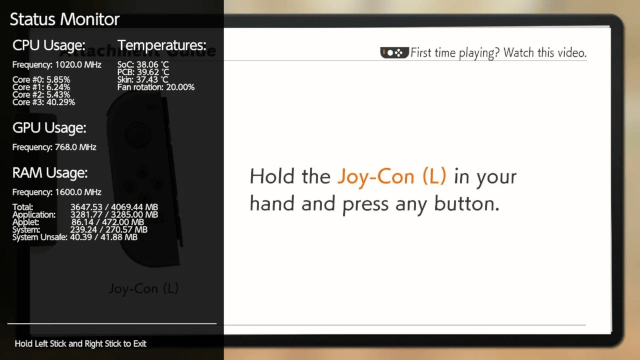
Full
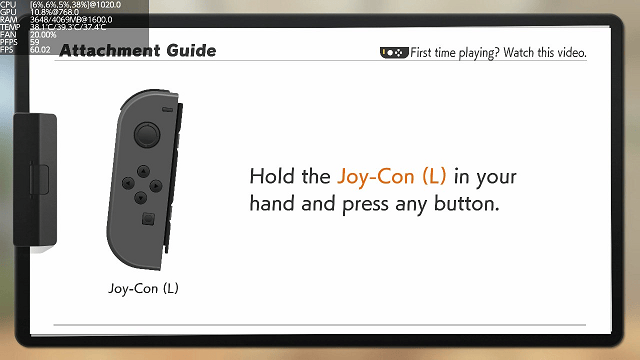
Mini
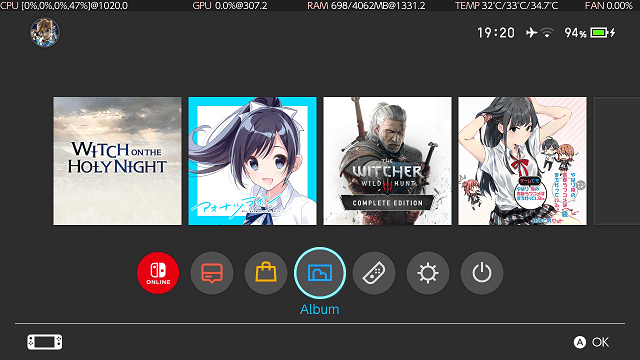
Micro
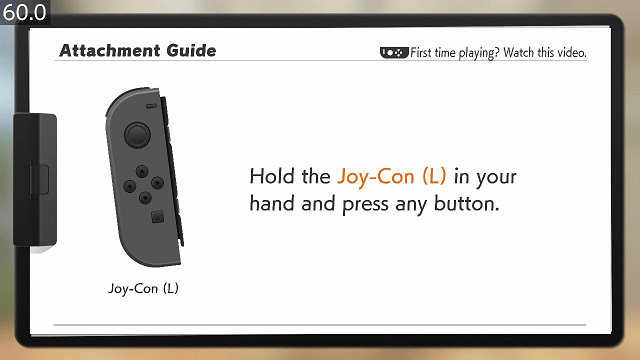
FPS Counter
Media
Resident Evil 5 (Nintendo Switch) - Status Monitor Overlay and NX-FPS (Marek)
Changelog
1.4.1 2026/05/19
- 1.4.0 release triggered a very weird bug in HOS that causes Atmosphere sysmodules to not have access to pad input which resulted in not working layeredfs disabling and title override not working when this overlay was running. This issue was fixed by removing support for SL + SR buttons.
- Changes default key combos for joycon sixaxis to:
- Left:
ZL+L+LSTICK - Right:
ZR+R+RSTICK
1.4.0 2026/05/12
- Add support for reading data from Horizon OC next to sys-clk
- Horizon OC version must be at least 2.2.0 to properly read data from it
- Add motion controls as an extension of what touch screen already can do
- This is dedicated to wireless Joycons and Pro Controller
- For wireless Joycons there are two key combos that depend on which controller you want to use:
- Left Joycon default key combo:
Left Joycon SR + L-Stick - Right Joycon default key combo:
Right Joycon SL + R-Stick
- Left Joycon default key combo:
- For Pro Controller default key combo is:
ZR + R + R-Stick(not tested as I don't own it) - 4 new keys were added to config file under
[status-monitor]:motion_control,left_joycon_motion_key_combo,right_joycon_motion_key_combo,pro_controller_motion_key_combo. More in docs
- Fix an issue where Game Resolutions would randomly pop up 65535 at first Depth entry
- Reduce amount of FS sessions to 1 to limit possible issues with session exhaustion
v1.3.2+r6 2026/01/11
- Critical bug fixes for touch navigation when utilizing swapTo for menu transitions.
- Configurator touch navigation focus fixes.
v1.3.2+r5 2026/01/11
- Bug fix for RAM VDDQ and VDD2 voltage values being swapped on Mariko when not using sys-clk-oc EOS.
- New Show Labels toggle for mini mode (on by default).
- When off, element labels will be hidden.
- Launch mode settings are now only applied / added to Ultrahand's overlays.ini if /config/ultrahand/overlays.ini exists.
- Slight tweak to left side padding for Show Labels disabled on mini mode.
- Frame initialization clipping bug fixes on mini, fps graph, fps counter, and resolutions modes for limited memory (4MB heap size).
v1.3.2+r4 2026/01/11
- Bug fix for real voltages (specifically vdd2) on Erista models causing crashes during game boots and displaying the wrong voltage when not using sys-clk-oc EOS.
v1.3.2+r3 2026/01/11
- Tweaks for List class update.
v1.3.2+r2 2026/01/11
- Bug fix for mini mode causing crashes when displaying too much content at once (buffer size increase).
- Bug fix for the initial element display order for mini and micro modes on the configurator .
- GPU load algorithm tweak (from official branch).
v1.3.2+r1 2026/01/11
- Proper 4MB nx-ovlloader heap size support.
- Ultrahand notifications will be disabled on 4MB.
- New mini mode element MEM for displaying the active amount of system memory.
- Refinements to rounded rects (in libultrahand).
- Notification flag file bug fix.
v1.3.2 2025/11/16
- Added compatibility for Atmosphere 1.10.0+.
- Older Status Monitor Overlay releases can have random issues when using with Atmosphere 1.10.0 and newer.
- This release is backwards compatible so you can use it with older Atmosphere too.
- It is required to update to SaltyNX 1.6.0+ for the same reason!
- Optimize CPU usage calculation so now there is less time spend on executing each loop, which gives us more precise results
- Fix how CPU usage is calculated so now overlay doesn't report randomly minus 0.
v1.3.1 2025/11/05
- Fix an issue where in Mini and Full modes two resolutions were showing up next to each other, first being 0x0. Now it shows up only second resolution in that case.
v1.3.0 2025/10/30
- Add touch screen functionality to Mini, FPS Graph, FPS Counter and Game Resolutions modes.
- You can now temporarily change position of them to wherever you want on screen. Position will reset after exiting chosen mode.
- If you have issues with touch screen, you can disable touch screen functionality in config file by changing
touch_screentofalse, more here.
- Changed behavior of combo key so now it's more consistent between various FPS, now it won't exit until at least 200 ms will pass holding buttons.
- Instead of printing 254, 254.0 or
inffor FPS it will print now "n/d" aka "no data". - Ediit 30.10.2025 13:24 GMT: Fixed an issue with Mini mode going out of bounds when using touch screen to change its position, switching to docked mode which has different font size.
v1.2.4 2025/10/29
- Add to Mini Mode next to RAM Load which part of it belongs to CPU and GPU.
- Edit 28.10.2025 23:50 GMT: Fixed an issue with switching from and to micro mode when overlay has different name than standard one.
v1.2.3 2025/10/18
- In Full mode and Mini mode if only one reported resolution is changed, other one now stays in the same place. This solves an issue where some games have similar amount of calls to two different resolutions, resulting in constantly swapping places.
v1.2.2 2025/08/25
- Round FPS Average to PFPS if difference is in range +/- 0.25 (you can turn off rounding in config file), thanks to this we can minimize changes in FPS Average where some games are under constant changes while they provide in fact locked 60 FPS. For best results utilize always newest SaltyNX!
- This wasn't utilized before because PFPS reading was too unstable so current solution would not work. In SaltyNX 1.4.0 was introduced a better way to measure PFPS without cheating which gives now much stable results for referencing.
- Change optimization level from -O2 to -O3 for better performance at cost of slighly bigger overlay.
v1.2.1 2025/08/15
- Fix an issue with FPS Graph incorrectly detecting when game is paused, causing random pausing for a short moment (Requires SaltyNX 1.4.6+).
- Shadow update 15.08.2025 21:39 GMT: Fixed an issue with improper NX-FPS struct being utilized.
v1.2.0 2025/08/01
- Redesign game informations in Full mode to match stylistically with hardware informations
- Add information about game read speed in Full and Mini modes (if you use config file, for Mini mode you must add "READ" value to "show" key, more in docs and config template). Requires SaltyNX 1.4.0+ to work properly.
- Fix FPS Graph not showing properly max FPS value if display refresh rate is 100 Hz or higher
- Redesign sleep logic so now overlay has snappier reaction time
- Shadow update 31.07.2025 17:45 GMT: Fixed threads related to reading CPU usage, it didn't apply proper logic to exit them immediately when requested which could slow down moving between different modes.
v1.1.9 2025/05/23
- Fix an issue with FPS Graph not pausing when game doesn't push new frames.
v1.1.8 2025/05/04
- Add support for SaltyNX 1.2.1+.
- Now it can read viewport resolutions from EGL and Vulkan games.
- Added font cache to lower impact on games performance (you can disable it in config.ini with key
font_cachebut it's not advised). - When there is only one resolution available to read, Full and Mini mode will print just one resolution instead of second being "0x0".
v1.1.7 2024/11/25
- Remove for FPS Graph code maintaining compatibility with old SaltyNX, fixes issue with retrieving refresh rate for docked mode.
v1.1.6 2024/11/06
- Small code refactor which resulted in slightly smaller size.
- Support SaltyNX 1.0.3+ display refresh rate update logic in FPS Graph to fix issue with graph randomly not adjusting height to refresh rate (if there is older SaltyNX used, overlay will use old logic).
v1.1.5 2024/11/03
- add new config key to status-monitor category - average_gpu_load, by default disabled.
- Because GPU load by design shows only load for last 1/60s, this option allows for more accurate gpu load readings at the cost of visible slight bump in CPU Core #3 usage.
v1.1.4 2024/10/13
- Fix issue with overlay potentially crashing system on overlay's boot related to nv services.
- Fix potential issue with sleep mode at 19.0.0+ that was first discovered in sys-clk retronx-team/sys-clk#85.
- For some reason using tsSessionGetTemperature is enough to crash system while is in sleep mode.
- It was fixed by moving from ts service to i2c. Readings are not filtered, so reading output and behavior can be slightly different than what we were used to.
v1.1.3 2024/09/02
- Switch reading fan rotation level from "fan" service to "pwm" service.
- This allows avoiding potential conflict with other homebrew/sysmodules (f.e. Nx-FanControl) because only one process can have fan controller session in "fan" service.
v1.1.2 2024/08/08
- Fix Resolutions sometimes going out of bounds in Full Mode.
v1.1.1 2024/08/05
- Added options to show 2 the best candidates for game's internal resolution in Mini and Full modes.
- Added keys to config that can disable showing FPS and Resolutions in Full mode
- Added value RES to show key in Mini mode that shows Resolutions.
v1.1.0 2024/08/04
- Added "Game Resolutions" menu to "Other" category. More HERE.
v1.0.4 2024/06/25
- Moved from c++20 to c++23
- With SaltyNX 0.8.0+ FPS Graph mode will adjust height according to received back display refresh rate.
v1.0.3a 2024/01/05
- Fix compability issues with combos from Ultrahand and Tesla configs after implementing #72.
v1.0.3 2024/01/04
- Improved key combo and navigation handling (thanks to @IrneRacoonovich ).
- Fixed an issue with battery readings not working after exiting Micro mode multiple times without rebooting Switch (this bug affected also other homebrew reading battery stats with PSM service).
- Futureproofed for sys-clk IPC updates.
v1.0.2 2023/21/09
- Add new keys to config: battery_avg_iir_filter and battery_time_left_refreshrate, more in CONFIG.
- Changing battery_avg_iir_filter to true results in period time of average voltage being changed to 45s, and 11.25s for amperage.
- Removed whole logic behind PR #56 instead relying now on max17050 TTE register.
- Changed i2c communication code to avoid issues with wrong readings (thanks to ~lineon).
- Move FPS Graph and FPS Counter to one subcategory "FPS".
v1.0.1 2023/11/11
- Allow hiding real frequencies, deltas and target frequencies in Full mode (deltas are not showed if both real + target frequencies are hidden).
- This release also includes 2 shadow updates for 1.0.0, which includes fixes for overflowing of real frequencies + deltas, and also fixed RAM positioning calculations in Micro and Mini modes.
v1.0.0 2023/11/11
- Fixed bugs:
- Temperatures for PCB and SoC were swapped in 0.9.2 release.
- Sometimes exiting mode resulted in exiting overlay.
- Changes:
- Introduction of experimental configuration file, which allows changing exit button combo, Mini + Micro + FPS Counter + FPS Graph UIs, refresh rates. More explained here.
- Button combos are read from 3 different configurations files, the most important is status-monitor config, next config used by Ultrahand overlay, and last config for Tesla Menu.
- Now default combo button is L + D-PAD Down + R Stick. If someone wants to bring back old combo, use status-monitor config file.
- Allow reading real frequencies from sys-clk 2.0.0_rc4+ sysmodule, if not installed showed frequencies in Mini and Micro modes are falling back to target frequencies
- Allow reading RAM load from sys-clk 2.0.0_rc4+
- Remove option to change refresh rate with button combo
- Remove option to change position of Mini and FPS Counter modes with button combo
- Show proper button icons in Full mode (only exceptions are general UP, DOWN, LEFT and RIGHT because they include both Sticks and D-Pad)
- If sys-clk 2.0.0_rc4+ is active, Micro mode shows next to frequencies instead of @ also △ if real frequency is higher by 20 MHz than expected, ▽ if it's lower by 20 MHz, ≠ if it's lower by 50 MHz (seeing ≠ for longer than few seconds without any change suggests that your overclocking solution is bugged).
- PFPS is now not showing in Mini mode
- Edit: November 10th, 2023 18:04 GMT: Fixed positioning calculations for RAM in Micro and Mini modes when sys-clk is not working.
- Edit: Novermber 11th, 2023 06:13 GMT: Fixed real frequencies and deltas overflowing above INT32_MAX
- Introduction of experimental configuration file, which allows changing exit button combo, Mini + Micro + FPS Counter + FPS Graph UIs, refresh rates. More explained here.
v0.9.2 2023/10/14
- 17.0.0 FW issues fixed:
- SoC and PCB temperatures showing 0
- Charger Type, Charger Max Voltage and Charger Max Current showing wrong values
- General changes:
- SoC and PCB temperatures across all FWs are now showing decimals
- Next to Battery Power Draw in Full, Mini and Micro modes you can see now also estimated time left before Switch will shutdown (thanks to rkuchkarov for PR #56)
- In Micro instead of MB for RAM now you will see GB up to one decimal
- In Micro now power draw shows only one decimal
- Fan level will now render only one decimal across all modes
- Miscellaneous now also shows NVENC and NVJPG clocks
- Since 17.0.0 audsnoop is not available, DSP Usage is not shown in Other -> Miscellaneous tab
v0.9.1 2023/05/27
- Now filepath for Micro mode is not hardcoded, it is retrieved via Tesla Menu.
- To use it with changed filename it is required to update Tesla Menu to version at least 1.2.3.
- On older versions of Tesla Menu it behaves the same as 0.9.0 version.
v0.9.0 2023/04/23
- Corrected Battery Power Flow calculation.
- Changed Battery Stats reading to 2 readings per second. Current, Voltage and Power Flow are calculated now via 10 last readings.
- Changed FPS average calculation to 10 last readings instead of constant averaging.
- Added Graphs tab with currently only FPS available (Graphs tab won't show for now if you don't have SaltyNX installed).
- Moved Battery/Charger + Miscellaneous tabs under "Other" tab.
- You can move now FPS Counter + FPS Graph to the bottom and top of screen by pressing ZR + R + D-Pad Down/Up.
- For FPS readings it is required to update NX-FPS to version 1.4.0+.
v0.8.3 2023/04/16
- Add Battery Power Flow stat into Full, Mini, Micro modes and Battery/Charger tab.
- Add Battery Current Flow into Battery/Charger tab.
- Change Battery Voltage from
45s averagetoaverage of 5to match better with Battery Current Flow and get faster responses to changes in voltage at the cost of slightly less accurate readings. - Fix a random issue with allocing memory for reading Wi-Fi password and battery stats.
v0.8.2 2023/04/01
- Fix conditional handle leak.
- Fix memory leak.
- Workaround race condition causing random crashes in docked mode.
v0.8.1 2023/03/03
- Move reading FPS from dmnt:cht to SharedMemory. This fixes any stutterings, thread desyncing and cracking sounds you may have encountered when using NX-FPS in games.
- Requires NX-FPS 0.4+ and SaltyNX 0.5.0+ to read FPS.
v0.8.0 2023/02/27
- Add new mode - Micro.
- To access it YOU MUST NOT rename file, otherwise it will not show. More.
- Edit: Fixed GPU Load in Micro mode.
v0.7.1 2023/02/23
- It adds support for 16.0.0.
v0.7 2022/11/06
- New 2 tabs were added:
- Battery/Charger.
- Miscellaneous.
- You can now check Battery temperature, max supported charger voltage and current, connected Wi-Fi password and few others.
v0.6.4 2022/03/25
- Added support for 14.0.0 FW.
- HOS removed function for reading SoC and PCB temperatures in milli Celsius. Status Monitor 0.6.3 was outputting 0.0C because of that. Now it reads temperature in Celsius without decimals on FW 14.0.0+.
- Fixed slow boot time by reimplementing fix from Breeze repository.
v0.6.3 2020/08/25
- Fixed button combo.
v0.6.2 2020/08/24
- Adapted c7cefce commit from main libtesla to my fork. Thanks to that Status Monitor is now showed on screenshots by default and also in videos.
v0.6.1 2020/06/05
- Fix issue related to always forcing opening cheat process with dmnt:cht that sometimes resulted in conflicts with other tools.
- Now it's checking first if cheat process is opened already.
v0.6.0 2020/05/19
- If dmnt:cht is not detected, it's using svc calls to read FPS values for NX-FPS (now only if SaltyNX check failed, FPS Counter won't show).
- Be aware that not using Atmosphere's dmnt:cht may introduce conflicts with other cheat engines, resulting in crashes or hangs.
v0.5.5 2020/05/19
- Now if dmnt:cht initializing didn't success or SaltyNX check failed, FPS Counter option won't show.
- Fixed issue with SaltyNX check returning false positive.
v0.5.4 2020/05/16
- Fix issue with CPU Core usage stuck at last value when core usage is at peak.
v0.5.3 2020/05/12
- Updated to libnx 3.2.0, which helps with very rare case of crashing overlay if pl sessions are depleted.
- Fixed wrong version inside overlay.
v0.5.2 2020/04/24
- Added version info for Tesla menu.
- Added support for SX OS (FPS Counter is not available).
v0.5.1 2020/03/14
- Fixed wrong parsing temperatures for PCB and SoC.
v0.5 2020/03/08
- Main menu from which you can now choose 3 modes, all explained here.
- Auto-switching input detection, so home button trick is now obsolete.
v0.4.2 2020/03/04
- Repaired bug that was requiring in 0.4.1 only Right Stick to be pressed to exit.
v0.4.1 2020/03/03
- Ported to new libtesla. Now requires Tesla menu >=1.0.2 to work correctly.
v0.4 2020/02/29
- Added support for SaltyNX plugin - NX-FPS.
v0.3 2020/02/27
- Added:
- Switching refresh rate between 1 and 5 FPS (More FPS results in higher Core #3 usage).
- GPU:
- Load.
- Changes/fixes:
- Fixed critical bug that was shutting down Switch if FW was lower than 7.0.0 (thx to Behemoth for providing correct magic to IController).
- Renamed 'Temperatures' to 'Thermal'.
- Renamed 'Fan Rotation' to 'Fan'.
- Repositioned Thermal category.
- Added checks that prevents from using functions if services are not initialized. This helps with FWs <5.0.0 which doesn't support showing Memory used and Skin temperature.
- Buttons are now checked outside of FPS limitations, so detecting input and exiting is now smoother.
v0.2 2020/02/22
- Added:
- CPU:
- Actual frequency.
- GPU:
- Actual frequency.
- RAM:
- Actual frequency.
- Used memory categorized to: Total, Application, Applet, System, System Unsafe.
- Temperatures.
- SoC temperature.
- PCB temperature.
- Skin temperature.
- Fan rotation level.
- CPU:
- Changes/fixes:
- Changed interval for everything to 1s.
- Changed refresh rate to 1 FPS, which reduced homebrew usage of Core #3 from 26 percent points to 1 percent point.
- Core Usage now always starts at 0%.
v0.11 2020/02/20
- Code was changed to make each CPU core independent, so they will not block each other in case of heavy load.
- Changed exit button from holding Left Stick to pressing Left Stick + Right Stick.
v0.1 2020/02/20
- First Release.
Credits
Thanks To:
- RetroNX channel for helping with coding stuff.
- SunTheCourier for sys-clk-Overlay from which I learned how to make my own Tesla homebrew.
- Herbaciarz for providing screenshots from HDMI Grabber.
- KazushiMe for writing code to read registers from max17050 chip.
- CTCaer for Hekate from which I took max17050.h and calculation formulas for reading battery stats from max17050 chip.
- ChanseyIsTheBest for testing Game Resolutions menu.
External links
- GitHub - https://github.com/masagrator/Status-Monitor-Overlay
- GitHub - https://github.com/ppkantorski/Status-Monitor-Overlay
- GBAtemp - https://gbatemp.net/threads/status-monitor-overlay-tesla-overlay-to-monitor-your-hardware.558505/
- Homebrew App Store - https://apps.fortheusers.org/switch/Status-Monitor-Overlay