
ReverseNX-RT Switch: Difference between revisions
More actions
No edit summary |
2.2.1 |
||
| (13 intermediate revisions by 2 users not shown) | |||
| Line 4: | Line 4: | ||
|description=Alternative version of ReverseNX that can switch between handheld and docked mode in Real Time. | |description=Alternative version of ReverseNX that can switch between handheld and docked mode in Real Time. | ||
|author=masagrator | |author=masagrator | ||
|lastupdated= | |lastupdated=2025/11/16 | ||
|type= | |type=Overlays | ||
|version= | |version=2.2.1 | ||
|license=MIT | |license=MIT | ||
|download=https://dlhb.gamebrew.org/switchhomebrews/ | |download=https://dlhb.gamebrew.org/switchhomebrews/reversenxrt.7z | ||
|website=https://gbatemp.net/threads/reversenx-rt-reversenx-in-real-time.566868/ | |website=https://gbatemp.net/threads/reversenx-rt-reversenx-in-real-time.566868/ | ||
|source=https://github.com/masagrator/ReverseNX-RT | |source=https://github.com/masagrator/ReverseNX-RT | ||
| Line 15: | Line 15: | ||
ReverseNX-RT is an alternative version of [https://github.com/masagrator/ReverseNX ReverseNX] that enables you to switch between handheld and docked mode in Real Time. | ReverseNX-RT is an alternative version of [https://github.com/masagrator/ReverseNX ReverseNX] that enables you to switch between handheld and docked mode in Real Time. | ||
Requires SaltyNX | Requires SaltyNX 1.6.0+ and Tesla environment installed. | ||
Overlay contains multiple modes, from which 2 are main ones, other are error notifications. | Overlay contains multiple modes, from which 2 are main ones, other are error notifications. | ||
| Line 21: | Line 21: | ||
==Installation== | ==Installation== | ||
Requirements: | Requirements: | ||
*[[SaltyNX Switch|SaltyNX | *[[SaltyNX Switch|SaltyNX 1.4.3+]] installed. | ||
*[[NX-ovlloader Switch|nx-ovlloader]] installed. | *[[NX-ovlloader Switch|nx-ovlloader]] installed. | ||
*[[Tesla Menu Switch|Tesla Menu]] installed. | *[[Tesla Menu Switch|Tesla Menu]] installed. | ||
To install, download the [https://github.com/masagrator/ReverseNX-RT/releases latest release] and place ReverseNX-RT-ovl.ovl in the /switch/.overlays/ directory. | |||
(If you have an older version installed, make sure you delete ReverseNX-RT.elf from SaltySD/plugins folder.) | |||
==User guide== | ==User guide== | ||
=== Main modes === | === Main modes === | ||
When running game and everything works as should | When running game and everything works as should, you should see two options: | ||
* Change system control (It also refers to ReverseNX-Tool flags - f.e. if you have docked flag set for this game in ReverseNX-Tool, when system control is enabled, it will force docked mode). | * Change system control (It also refers to ReverseNX-Tool flags - f.e. if you have docked flag set for this game in ReverseNX-Tool, when system control is enabled, it will force docked mode). | ||
* Change mode (disabled if system control is enabled). | * Change mode (disabled if system control is enabled). | ||
| Line 45: | Line 37: | ||
Game stays in current configuration until you will close game. | Game stays in current configuration until you will close game. | ||
When game is not running, SaltyNX is working and plugin is detected | When game is not running, SaltyNX is working and plugin is detected, you have option to (de)activate plugin from this menu. Deactivating it will result in renaming file so it will not be loaded by SaltyNX. Activating plugin renames to original filename. | ||
=== Error notifications === | === Error notifications === | ||
| Line 65: | Line 53: | ||
=== Troubleshooting === | === Troubleshooting === | ||
'''List of titles having compability issues with ReverseNX-RT''' | '''List of titles having compability issues with ReverseNX-RT:''' | ||
{| class="wikitable" | {| class="wikitable" | ||
| Line 71: | Line 59: | ||
!style="width: 25%;"| Versions | !style="width: 25%;"| Versions | ||
!style="width: 60%;"| Why? | !style="width: 60%;"| Why? | ||
|- | |- | ||
| Robotics;Notes Elite | | Robotics;Notes Elite | ||
| Line 81: | Line 65: | ||
|} | |} | ||
''' | '''Often when I'm closing game, Atmosphere crashes with error 0x41001. Why?''' | ||
Atmosphere 0.12.0 with new options for cheat engine bringed bug that causes showing this error in random instances. For some reason this overlay makes this bug occur more frequently. Either go back to 0.11.1 or update to newer version. | Atmosphere 0.12.0 with new options for cheat engine bringed bug that causes showing this error in random instances. For some reason this overlay makes this bug occur more frequently. Either go back to 0.11.1 or update to newer version. | ||
==Screenshots== | |||
https://dlhb.gamebrew.org/switchhomebrews/reversenxrt4.png | |||
https://dlhb.gamebrew.org/switchhomebrews/reversenxrt5.png | |||
==Changelog== | ==Changelog== | ||
'''v2.2.1''' | |||
*Added compatibility for Atmosphere 1.10.0+. | |||
**Older ReverseNX-RT releases can have random issues when using with Atmosphere 1.10.0 and newer. | |||
**This release is backwards compatible so you can use it with older Atmosphere too. | |||
**It is required to update to SaltyNX 1.6.0+ for the same reason! | |||
'''v2.2.0''' | |||
*Add Change Handheld DDR and Change Docked DDR options, they will show up in compatible games. More in README. | |||
*Requires SaltyNX 1.4.3+ to work properly! | |||
'''v2.1.0''' | |||
*Add option for saving settings. To work properly it is required to use SaltyNX 1.1.0+. | |||
'''v2.0''' | |||
*Added support for SaltyNX 0.7.0+. | |||
'''v1.1.1-update 2''' | |||
* Updated plugin to add proper support for Monster Hunter Rise so now there is no need to go back to home menu. | |||
* To achieve this 4 functions were hooked: | |||
** nn::oe::GetNotificationMessageEvent() | |||
** nn::os::InitializeMultiWaitHolder(nn::os::MultiWaitHolderType*, nn::os::SystemEventType*) | |||
** nn::os::LinkMultiWaitHolder(nn::os::MultiWaitType*, nn::os::MultiWaitHolderType*) | |||
** nn::os::WaitAny(nn::os::MultiWaitType*) - in case of detecting NotificationMessageEvent included in MultiWaitType argument it redirects call to nn::os::TimedWaitAny(nn::os::MultiWaitType*, nn::TimeSpan timeout) with timeout set to 1ms. | |||
* Overlay was not updated. | |||
'''v1.1.1''' | '''v1.1.1''' | ||
*Overlay: update libtesla to newest version that fixes random crashes in docked mode related to freeing framebuffer. | *Overlay: update libtesla to newest version that fixes random crashes in docked mode related to freeing framebuffer. | ||
Latest revision as of 04:59, 21 November 2025
| ReverseNX-RT | |
|---|---|
 | |
| General | |
| Author | masagrator |
| Type | Overlays |
| Version | 2.2.1 |
| License | MIT License |
| Last Updated | 2025/11/16 |
| Links | |
| Download | |
| Website | |
| Source | |
| Support Author | |
ReverseNX-RT is an alternative version of ReverseNX that enables you to switch between handheld and docked mode in Real Time.
Requires SaltyNX 1.6.0+ and Tesla environment installed.
Overlay contains multiple modes, from which 2 are main ones, other are error notifications.
Installation
Requirements:
- SaltyNX 1.4.3+ installed.
- nx-ovlloader installed.
- Tesla Menu installed.
To install, download the latest release and place ReverseNX-RT-ovl.ovl in the /switch/.overlays/ directory.
(If you have an older version installed, make sure you delete ReverseNX-RT.elf from SaltySD/plugins folder.)
User guide
Main modes
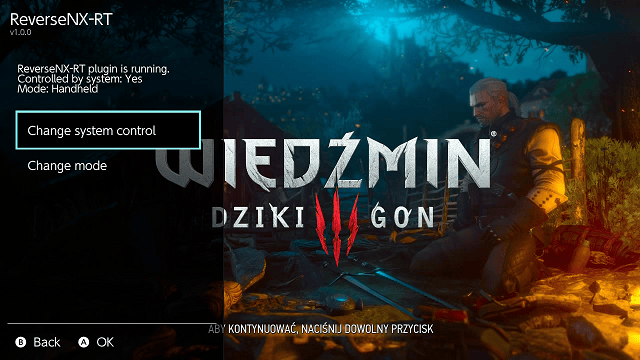
When running game and everything works as should, you should see two options:
- Change system control (It also refers to ReverseNX-Tool flags - f.e. if you have docked flag set for this game in ReverseNX-Tool, when system control is enabled, it will force docked mode).
- Change mode (disabled if system control is enabled).
Game stays in current configuration until you will close game.
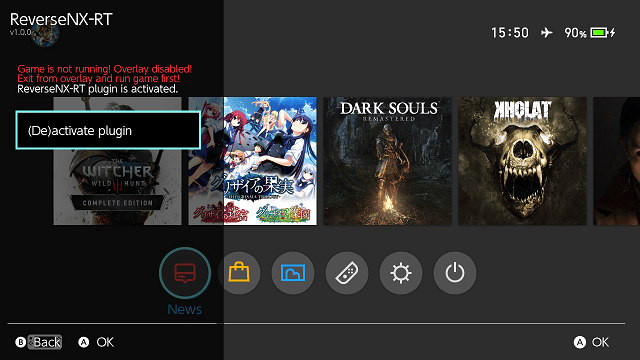
When game is not running, SaltyNX is working and plugin is detected, you have option to (de)activate plugin from this menu. Deactivating it will result in renaming file so it will not be loaded by SaltyNX. Activating plugin renames to original filename.
Error notifications
SaltyNX is not working! - SaltyNX crashed or is not installed correctly.
Can't detect ReverseNX-RT plugin! - ReverseNX-RT plugin is not detected in sdcard SaltySD/plugins. Put plugin to correct folder without renaming it.
Game was closed! Overlay disabled! Exit from overlay and run game first! - If you were using overlay in last running game and closed game without closing overlay, you need to close overlay to use it again.
ReverseNX-RT is not running! - Plugin was not injected. It's either 32-bit game or is in SaltyNX exceptions list.
Game doesn't support changing modes! - Plugin was injected and is working, but function for checking modes was not used. Either game doesn't have one (which means there is no difference between handheld and docked) or game just checks it later than when you wanted to check (for example game may not use it for few seconds after booting was finished). You need to exit from overlay and run it again later to check if error still occurs...
WRONG MAGIC! - Something went horribly wrong and overlay is reading value from wrong memory position. It should not happen if you are opening overlay after game boot process will finish. It may also happen if you will close overlay before closing game and open it after running next game, this time not compatible with SaltyNX.
Troubleshooting
List of titles having compability issues with ReverseNX-RT:
| Title | Versions | Why? |
|---|---|---|
| Robotics;Notes Elite | 1.0.1 | Broken PopNotificationMessage() thread, not working at all. |
Often when I'm closing game, Atmosphere crashes with error 0x41001. Why?
Atmosphere 0.12.0 with new options for cheat engine bringed bug that causes showing this error in random instances. For some reason this overlay makes this bug occur more frequently. Either go back to 0.11.1 or update to newer version.
Screenshots
Changelog
v2.2.1
- Added compatibility for Atmosphere 1.10.0+.
- Older ReverseNX-RT releases can have random issues when using with Atmosphere 1.10.0 and newer.
- This release is backwards compatible so you can use it with older Atmosphere too.
- It is required to update to SaltyNX 1.6.0+ for the same reason!
v2.2.0
- Add Change Handheld DDR and Change Docked DDR options, they will show up in compatible games. More in README.
- Requires SaltyNX 1.4.3+ to work properly!
v2.1.0
- Add option for saving settings. To work properly it is required to use SaltyNX 1.1.0+.
v2.0
- Added support for SaltyNX 0.7.0+.
v1.1.1-update 2
- Updated plugin to add proper support for Monster Hunter Rise so now there is no need to go back to home menu.
- To achieve this 4 functions were hooked:
- nn::oe::GetNotificationMessageEvent()
- nn::os::InitializeMultiWaitHolder(nn::os::MultiWaitHolderType*, nn::os::SystemEventType*)
- nn::os::LinkMultiWaitHolder(nn::os::MultiWaitType*, nn::os::MultiWaitHolderType*)
- nn::os::WaitAny(nn::os::MultiWaitType*) - in case of detecting NotificationMessageEvent included in MultiWaitType argument it redirects call to nn::os::TimedWaitAny(nn::os::MultiWaitType*, nn::TimeSpan timeout) with timeout set to 1ms.
- Overlay was not updated.
v1.1.1
- Overlay: update libtesla to newest version that fixes random crashes in docked mode related to freeing framebuffer.
v1.1
- Read/Write data from SharedMemory instead of using dmnt:cht.
- Requires SaltyNX 0.5.0+.
- Edit: Accidentally put old files.
v1.0.2
- Added support for FW 16.0.0.
v1.0.1
- Fixed svc magic reading in overlay.
v1.0
- First Release.