
Milkytracker Switch: Difference between revisions
More actions
No edit summary |
1.2.0-nx6 |
||
| (3 intermediate revisions by the same user not shown) | |||
| Line 1: | Line 1: | ||
{{Infobox Switch Homebrews | {{Infobox Switch Homebrews | ||
|title=MilkyTrackerNX | |title=MilkyTrackerNX | ||
|image= | |image=milkytrackernx.png | ||
|description=Switch port of MilkyTracker - An FT2 compatible music tracker. | |description=Switch port of MilkyTracker - An FT2 compatible music tracker. | ||
|author=retronx-team | |author=retronx-team | ||
|lastupdated= | |lastupdated=2026/01/14 | ||
|type= | |type=Music Apps | ||
|version=1.2.0- | |version=1.2.0-nx6 | ||
|license=GPL-3.0 | |license=GPL-3.0 | ||
|download=https://dlhb.gamebrew.org/switchhomebrews/ | |download=https://dlhb.gamebrew.org/switchhomebrews/milkytrackernx.7z | ||
|website=https://github.com/retronx-team/MilkyTrackerNX | |website=https://github.com/retronx-team/MilkyTrackerNX | ||
|source=https://github.com/retronx-team/MilkyTrackerNX | |source=https://github.com/retronx-team/MilkyTrackerNX | ||
| Line 45: | Line 45: | ||
==Screenshots== | ==Screenshots== | ||
https://dlhb.gamebrew.org/switchhomebrews/milkytrackernx2.png | https://dlhb.gamebrew.org/switchhomebrews/milkytrackernx2.png | ||
https://dlhb.gamebrew.org/switchhomebrews/milkytrackernx3.png | https://dlhb.gamebrew.org/switchhomebrews/milkytrackernx3.png | ||
| Line 52: | Line 53: | ||
==Changelog== | ==Changelog== | ||
'''v1.2.0-nx5 ''' | '''v1.2.0-mx6''' | ||
*Fixed building using the latest toolchain. | |||
*HOS 21.0.0+ support. | |||
'''v1.2.0-nx5''' | |||
*It compiles and runs now. | *It compiles and runs now. | ||
*Shortcuts have been replaced by what seemed the most useful: | *Shortcuts have been replaced by what seemed the most useful: | ||
| Line 58: | Line 63: | ||
**LSHIFT shortcut was replaced by BACKSPACE, so you can erase text and notes. | **LSHIFT shortcut was replaced by BACKSPACE, so you can erase text and notes. | ||
''' | '''v1.2.0-nx4''' | ||
*Compiled against latest libnx (v2.5.0). | *Compiled against latest libnx (v2.5.0). | ||
*Latest upstream changes merged. | *Latest upstream changes merged. | ||
Latest revision as of 09:28, 16 January 2026
| MilkyTrackerNX | |
|---|---|
 | |
| General | |
| Author | retronx-team |
| Type | Music Apps |
| Version | 1.2.0-nx6 |
| License | GPL-3.0 |
| Last Updated | 2026/01/14 |
| Links | |
| Download | |
| Website | |
| Source | |
MilkyTracker is an multi-platform music application for creating .MOD and .XM module files. It attempts to recreate the module replay and user experience of the popular DOS program Fasttracker II, with special playback modes available for improved Amiga ProTracker 2/3 compatibility.
Installation
Download the latest release, and extract the archive in the /switch/ folder on your SD Card.
Then, run the game from the hbmenu using hbl.
Controls
This section describes what shortcuts are added in the switch port, refer to the MilkyTracker readme for all keyboard shortcuts available.
Touch screen - Tap to click (hold controller L or R to right click)
Y - Keyboard CTRL
X - Keyboard BACKSPACE
A - Keyboard ENTER
B - Keyboard SPACE
D-Pad - Keyboard Up/Left/Right/Down
LB/RB - Mouse click (hold controller L or R to right click)
Stick - Mouse move (pushing on the stick allows you to change speed)
Plus/Minus - Open on screen keyboard
(Note: USB keyboard and mouse are supported.)
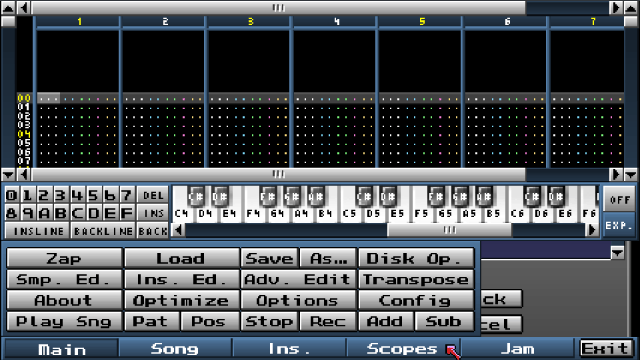
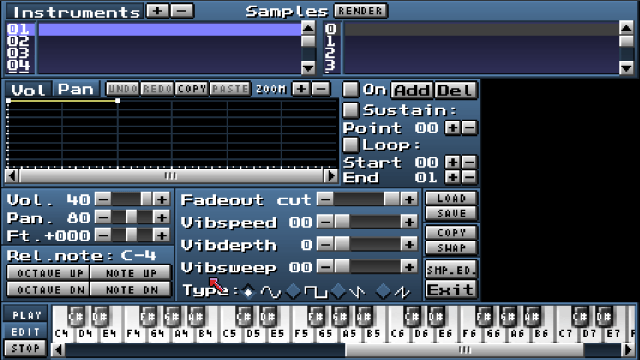
Screenshots
Media
How to Make Sounds with the Sample Editor - Getting Started with Chiptunes & MilkyTracker (2/4) (Gruber)
Changelog
v1.2.0-mx6
- Fixed building using the latest toolchain.
- HOS 21.0.0+ support.
v1.2.0-nx5
- It compiles and runs now.
- Shortcuts have been replaced by what seemed the most useful:
- You can now trigger the on-screen keyboard, to type filenames for example.
- LSHIFT shortcut was replaced by BACKSPACE, so you can erase text and notes.
v1.2.0-nx4
- Compiled against latest libnx (v2.5.0).
- Latest upstream changes merged.
- Build script refactored to remove redundant dependencies.
v1.2.0-nx3
- Small update which maps dpad buttons to keyboard arrows.
v1.2.0-nx2
- This release mainly adds controller shorcuts, and a number of fixes/improvements to file loading and touch input.
v1.2.0-nx-1
- Initial switch wip port.
- Supports Keyboard/Mouse or Touchscreen controls.