
Savegame Installer Wii: Difference between revisions
From GameBrew
More actions
No edit summary |
No edit summary |
||
| (2 intermediate revisions by the same user not shown) | |||
| Line 5: | Line 5: | ||
|author=Waninkoko | |author=Waninkoko | ||
|lastupdated=2008/05/05 | |lastupdated=2008/05/05 | ||
|type= | |type=Savegame Tools | ||
|version=2.0 | |version=2.0 | ||
|license=Mixed | |license=Mixed | ||
|download=https://dlhb.gamebrew.org/wiihomebrews/savegameinstallerwii.7z | |download=https://dlhb.gamebrew.org/wiihomebrews/savegameinstallerwii.7z | ||
|website=https://wiibrew.org/wiki/Savegame_Installer | |website=https://wiibrew.org/wiki/Savegame_Installer | ||
}} | }} | ||
This application allows you to install a savegame dumped by the [[Savegame Extractor Wii|Savegame Extractor]] in your Wii (data.bin files not supported). | This application allows you to install a savegame dumped by the [[Savegame Extractor Wii|Savegame Extractor]] in your Wii (data.bin files not supported). | ||
| Line 17: | Line 16: | ||
Copy the savegame you want to install to the SD card (directory "wiisaves/<game id>", just keep the directory structure created by the [[Savegame Extractor Wii|Savegame Extractor]]). | Copy the savegame you want to install to the SD card (directory "wiisaves/<game id>", just keep the directory structure created by the [[Savegame Extractor Wii|Savegame Extractor]]). | ||
Run this application. | Run this application. Insert the game DVD and press Reset or A button (Wiimote not supported). | ||
Insert the game DVD and press Reset or A button (Wiimote not supported). | |||
==Screenshots== | ==Screenshots== | ||
savegameinstallerwii2.png | https://dlhb.gamebrew.org/wiihomebrews/savegameinstallerwii2.png | ||
==Credits== | ==Credits== | ||
Latest revision as of 11:00, 25 February 2023
| Savegame Installer | |
|---|---|
 | |
| General | |
| Author | Waninkoko |
| Type | Savegame Tools |
| Version | 2.0 |
| License | Mixed |
| Last Updated | 2008/05/05 |
| Links | |
| Download | |
| Website | |
This application allows you to install a savegame dumped by the Savegame Extractor in your Wii (data.bin files not supported).
User guide
Copy the savegame you want to install to the SD card (directory "wiisaves/<game id>", just keep the directory structure created by the Savegame Extractor).
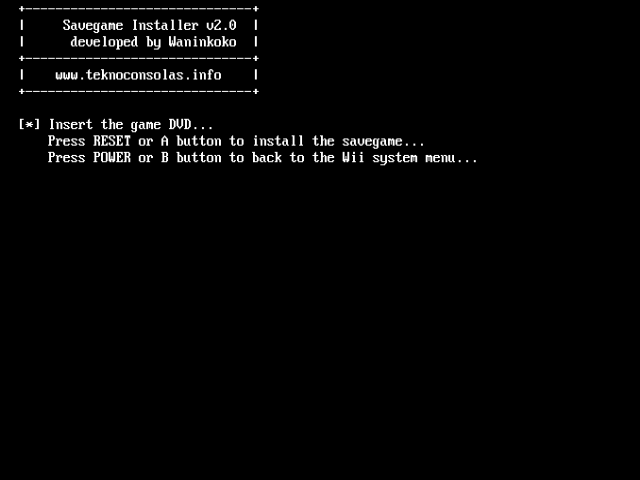
Run this application. Insert the game DVD and press Reset or A button (Wiimote not supported).
Screenshots
Credits
- bushing and marcan.
- danny.ml.
- ElOtroLado.net.