DSMetronome: Difference between revisions
From GameBrew
More actions
Created page with "{{Infobox homebrew | title = DSMetronome | image = File:Dsmetronome.jpg | type = Music | version = 1.0 | licence = Mixed | author = Demente..." |
No edit summary |
||
| (14 intermediate revisions by the same user not shown) | |||
| Line 1: | Line 1: | ||
{{Infobox | {{Infobox DS Homebrews | ||
| title | |title=DSMetronome | ||
| image | |image=dsmetronome.png | ||
| type | |description=Metronome on NDS. | ||
| version | |author=Demented | ||
| | |lastupdated=2009/01/14 | ||
| | |type=Music Apps | ||
| website | |version=1.0 | ||
|license=Mixed | |||
|download=https://dlhb.gamebrew.org/dshomebrew2/dsmetronome.zip | |||
|website=http://forum.palib.info/index.php?topic=6451.0 | |||
}} | }} | ||
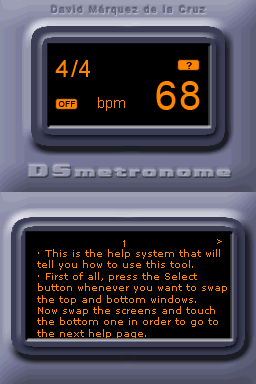
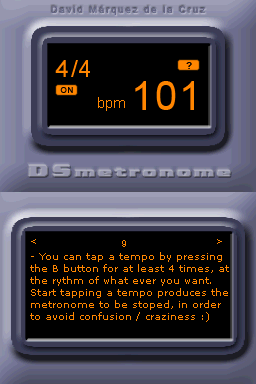
DSMetronome is a metronome, a tool to help practicing music. | |||
==Features== | ==Features== | ||
*A sequencer with drum kit elements | * A sequencer with drum kit elements. | ||
*Use drum kit to make your own rhythm | * Use drum kit to make your own rhythm. | ||
*Save configuration for use next time | * Save configuration for use next time. | ||
*Tap touch screen to match rhythms | * Tap touch screen to match rhythms. | ||
*Different Key signatures 4/4, 3/4, 2/4, 1/4 | * Different Key signatures 4/4, 3/4, 2/4, 1/4. | ||
*Help pages | * Help pages. | ||
==Controls== | ==Controls== | ||
Operate with Stylus. | |||
==Screenshots== | |||
https://dlhb.gamebrew.org/dshomebrew/dsmetronome2.png | |||
https://dlhb.gamebrew.org/dshomebrew/dsmetronome3.png | |||
== | ==External links== | ||
* PAlib - http://forum.palib.info/index.php?topic=6451.0 | |||

Latest revision as of 12:28, 20 August 2024
| DSMetronome | |
|---|---|
 | |
| General | |
| Author | Demented |
| Type | Music Apps |
| Version | 1.0 |
| License | Mixed |
| Last Updated | 2009/01/14 |
| Links | |
| Download | |
| Website | |
DSMetronome is a metronome, a tool to help practicing music.
Features
- A sequencer with drum kit elements.
- Use drum kit to make your own rhythm.
- Save configuration for use next time.
- Tap touch screen to match rhythms.
- Different Key signatures 4/4, 3/4, 2/4, 1/4.
- Help pages.
Controls
Operate with Stylus.
Screenshots