
FF3-Vita: Difference between revisions
From GameBrew
More actions
m HydeWing moved page Final Fantasy 3 Vita to FF3-Vita without leaving a redirect |
No edit summary |
||
| (13 intermediate revisions by one other user not shown) | |||
| Line 10: | Line 10: | ||
|description=Port of Final Fantasy 3 (3D Remake) for PS Vita. | |description=Port of Final Fantasy 3 (3D Remake) for PS Vita. | ||
|author=frangarcj, Rinnegatamante, TheFloW | |author=frangarcj, Rinnegatamante, TheFloW | ||
|lastupdated= | |lastupdated=2026/04/25 | ||
|type=Role | |type=Role Playing | ||
|version=1. | |version=1.2.2 | ||
|license=MIT | |license=MIT | ||
|download=https://dlhb.gamebrew.org/vitahomebrews/ff3vita.7z | |download=https://dlhb.gamebrew.org/vitahomebrews/ff3vita.7z | ||
|website=https://github.com/frangarcj/ff3_vita | |website=https://github.com/frangarcj/ff3_vita | ||
|source=https://github.com/frangarcj/ff3_vita | |source=https://github.com/frangarcj/ff3_vita | ||
|donation=[https://ko-fi.com/frangar], [https://www.patreon.com/Rinnegatamante], [https://www.patreon.com/TheOfficialFloW] | |||
}} | }} | ||
This is a wrapper/port of Final Fantasy 3 Android for the PS Vita. | This is a wrapper/port of Final Fantasy 3 Android for the PS Vita. | ||
| Line 30: | Line 31: | ||
Installing the required plugins: | Installing the required plugins: | ||
*Install kubridge and FdFix by copying kubridge.skprx and fd_fix.skprx to your taiHEN plugins folder | *Install [[Kubridge Vita|kubridge]] and [[FdFix Vita|FdFix]] by copying kubridge.skprx and fd_fix.skprx to your taiHEN plugins folder and adding two entries to your config.txt under *KERNEL (change accordingly if you are using ur0:tai): | ||
*KERNEL | *KERNEL | ||
ux0:tai/kubridge.skprx | ux0:tai/kubridge.skprx | ||
| Line 50: | Line 51: | ||
==Screenshots== | ==Screenshots== | ||
ff3vita3.png | https://dlhb.gamebrew.org/vitahomebrews/ff3vita3.png | ||
ff3vita4.png | https://dlhb.gamebrew.org/vitahomebrews/ff3vita4.png | ||
==Changelog== | ==Changelog== | ||
'''v1.2.2''' | |||
* Changes\n- Restore movie audio port reuse behavior (1.1-style)\n- Restore original port config after movie playback when reusing an existing port\n- Bump app version to 1.2.2 (SFO 01.22) | |||
'''v1.2.1''' | |||
*Bump version to 1.2.1\n- Enable vitaGL PHYCONT_ON_DEMAND in CI workflow for MP4 playback compatibility. | |||
'''v1.1''' | '''v1.1''' | ||
*Fixed an issue causing the game to crash with plugins hooking sceDisplaySetFrameBuf. | *Fixed an issue causing the game to crash with plugins hooking sceDisplaySetFrameBuf. | ||
| Line 70: | Line 77: | ||
==External links== | ==External links== | ||
* GitHub - https://github.com/frangarcj/ff3_vita | * GitHub - https://github.com/frangarcj/ff3_vita | ||
* VitaDB - https:// | * VitaDB - https://www.rinnegatamante.eu/vitadb/#/info/725 | ||
[[Category:Mobile game ports on Vita]] | |||
[[Category:Vita game ports]] | |||
Latest revision as of 00:46, 26 April 2026
| Final Fantasy 3 Vita | |
|---|---|
 | |
| General | |
| Author | frangarcj, Rinnegatamante, TheFloW |
| Type | Role Playing |
| Version | 1.2.2 |
| License | MIT License |
| Last Updated | 2026/04/25 |
| Links | |
| Download | |
| Website | |
| Source | |
| [[1], [2], [3] Support Author] | |
This is a wrapper/port of Final Fantasy 3 Android for the PS Vita.
The port works by loading the official Android ARMv7 executable in memory, resolving its imports with native functions and patching it in order to properly run.
Installation
Requirements:
- libshacccg.suprx
- kubridge.skprx
- fd_fix.skprx OR repatch_ex.skprx
- Game Data Files: Android
Installing the required plugins:
- Install kubridge and FdFix by copying kubridge.skprx and fd_fix.skprx to your taiHEN plugins folder and adding two entries to your config.txt under *KERNEL (change accordingly if you are using ur0:tai):
 *KERNEL
 ux0:tai/kubridge.skprx
 ux0:tai/fd_fix.skprx
- Note, don't install fd_fix.skprx if you're using repatch plugin.
- (Optional) Install PSVshell to overclock your device to 500Mhz.
- Install libshacccg.suprx, if you don't have it already, by following this guide.
Adding the game data files:
- Obtain your copy of Final Fantasy 3 legally from the Google Play store in form of an .apk file and one or more .obb files (usually located inside the /sdcard/android/obb/com.square_enix.android_googleplay.FFIII_GP/) folder. You can get all the required files directly from your phone or by using an apk extractor you can find in the play store. The apk can be extracted with whatever Zip extractor you prefer (eg: WinZip, WinRar, etc...) since apk is basically a zip file. You can rename .apk to .zip to open them with your default zip extractor.
- Copy the .obb file to ux0:data/ff3 and rename it to main.obb
- Open the apk and extract libff3.so from the lib/armeabi-v7a folder to ux0:data/ff3.
- Install FF3.vpk on your PS Vita.
Optional - Opening Video Playback:
- Extract from the apk, the file res/raw/opening.mp4 and convert it to 1280x720.
- (ffmpeg can be used for this task with the command ffmpeg -i opening.mp4 -vf scale=1280x720 output.mp4).
- Once converted, copy it to ux0:data/ff3 named as opening.mp4.
Screenshots
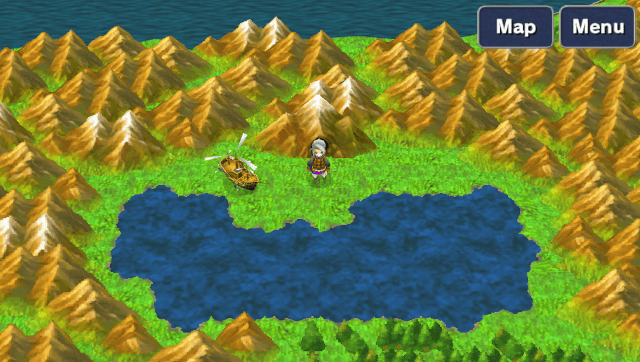
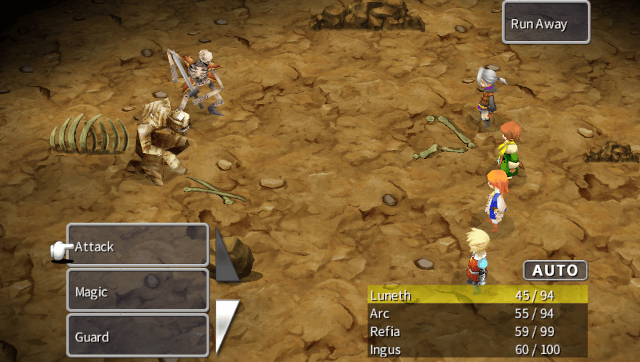
Changelog
v1.2.2
- Changes\n- Restore movie audio port reuse behavior (1.1-style)\n- Restore original port config after movie playback when reusing an existing port\n- Bump app version to 1.2.2 (SFO 01.22)
v1.2.1
- Bump version to 1.2.1\n- Enable vitaGL PHYCONT_ON_DEMAND in CI workflow for MP4 playback compatibility.
v1.1
- Fixed an issue causing the game to crash with plugins hooking sceDisplaySetFrameBuf.
- PostFX support.
- Fixed higher resolutions (720p,/1080i) support. Now works as intended.
- Added support for Simplified Chinese, Traditional Chinese and Korean languages.
- Configurator can now be launched from livearea.
- Added support for opening video playback.
- Thanks to @Rinnegatamante and @Electric1447.
Credits
- TheFloW for the initial arm elf loader.
- Rinnegatamante for vitaGL, companion app and fixes.
- Darthbellic for providing LiveArea assets.