
Minicraft GBA: Difference between revisions
More actions
No edit summary |
2.0 |
||
| (20 intermediate revisions by 2 users not shown) | |||
| Line 1: | Line 1: | ||
{{Infobox GBA Homebrews | {{Infobox GBA Homebrews | ||
|title=Minicraft | |title=Minicraft | ||
|image= | |image=minicraftgba2.png | ||
|description=Minicraft ported to the GBA. | |description=Minicraft ported to the GBA. | ||
|author= | |author=Vulcalien | ||
|lastupdated= | |lastupdated=2026/02/20 | ||
|type=Action | |type=Action | ||
|version= | |version=2.0 | ||
|license=GPL-3.0 | |license=GPL-3.0 | ||
|download=https://dlhb.gamebrew.org/gbahomebrews/minicraftgba.7z | |download=https://dlhb.gamebrew.org/gbahomebrews/minicraftgba.7z | ||
|website=https:// | |website=https://vulcalien.itch.io/minicraft-for-gba | ||
|source=https://github.com/Vulcalien/minicraft-gba | |source=https://github.com/Vulcalien/minicraft-gba | ||
}} | }} | ||
{{#seo: | |||
|title= (Action) - GameBrew | |||
|title_mode=append | |||
|image=minicraftgba2.png | |||
|image_alt=Minicraft | |||
}} | |||
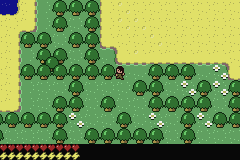
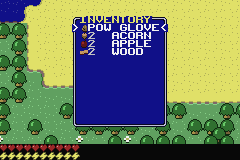
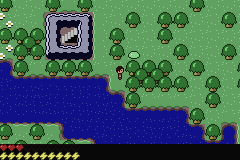
Minicraft is a GBA demake of Minicraft, a 2D game made by Markus Persson (aka Notch) for the 22nd Ludum Dare. | |||
The aim is to make a version that is as close as possible to the original. A pause menu and save feature were also added to improve the experience. | |||
==Installation== | |||
Open the gba ROM with your GBA emulator of choice (mGBA is highly recommended if you don't have one). | |||
== | |||
==User guide== | |||
===Differences due to Hardware limitations=== | |||
{| class="wikitable" | {| class="wikitable" | ||
! | ! | ||
| Line 46: | Line 46: | ||
| Inventory size | | Inventory size | ||
|align="center"| ∞ | |align="center"| ∞ | ||
|align="center"| | |align="center"| 96 | ||
|} | |} | ||
=== Game Light === | ===Game Light=== | ||
The light system is completely different, both visually and in how it works. | The light system is completely different, both visually and in how it works. | ||
The original Minicraft calculates the light for | The original Minicraft calculates the light for each pixel: that is, for various reasons, impractical to do on the GBA. | ||
The GBA version uses tiles, because the GBA is very good at handling them. That gives light a blocky look, but it seems acceptable. | |||
== | ===Performance Overlay=== | ||
By holding the L and R buttons down and then pressing Select, the performance overlay is enabled. | |||
Four hexadecimal values are written at the top corners: | Four hexadecimal values are written at the top corners: | ||
< | FF <--- vcount after 'tick' entity count ---> FF | ||
FF | FF <--- vcount after 'draw' sprite count ---> FF | ||
==Screenshots== | |||
https://dlhb.gamebrew.org/gbahomebrews/minicraftgba3.png | |||
https://dlhb.gamebrew.org/gbahomebrews/minicraftgba4.png | |||
https://dlhb.gamebrew.org/gbahomebrews/minicraftgba5.png | |||
==Media== | ==Media== | ||
'''Minicraft: The OTHER Version of Minecraft That Notch Created ([https://www.youtube.com/watch?v=ZEi7Uz6gTSE Logdotzip]) | '''Minicraft: The OTHER Version of Minecraft That Notch Created''' ([https://www.youtube.com/watch?v=ZEi7Uz6gTSE Logdotzip])<br> | ||
<youtube>ZEi7Uz6gTSE</youtube> | <youtube>ZEi7Uz6gTSE</youtube> | ||
== | ==Changelog== | ||
https:// | '''v2.0''' | ||
*This version brings a major overhaul to save files, switching to 64 KB files. Save files from previous versions are incompatible! Most of the changes are technical, such as improving how assets are embedded into the ROM and using my library ''libsimplegba'' to handle low-level operations. | |||
*About save files: Version 2.0 uses 64 KB Flash ROM to save. That is a comfortable amount of memory for the game. However, if your device only supports 32 KB SRAM saves, download [https://github.com/Vulcalien/minicraft-gba/releases/download/2.0/minicraft-gba_2.0_SRAM-32KB.zip this version] instead. I believe 32 KB should be enough, but I cannot guarantee you will never encounter saving issues. | |||
'''v1.3.0''' | |||
*This version brings improvements to the saving system, a way for the player to respawn and some performance optimization. | |||
'''v1.2.1''' | |||
*Version 1.2.1 is a source-only update that doesn't change the game ROM. The only difference compared to 1.2 is that the linker script is improved. | |||
'''v1.2''' | |||
*This update fixes two visual bugs and introduces frameskip. Frameskip should help prevent noticeable lag by reducing the frame rate when the CPU is under too much stress. | |||
'''v1.1''' | |||
* This update fixes a rendering bug that affected entities near a player holding a lantern. | |||
* The bug was present only on real Hardware, not in emulators. | |||
'''v1.0''' | |||
*First Release. | |||
== | ==Credits== | ||
Original game Minicraft by Markus Persson. | |||
==External links== | ==External links== | ||
* | * itch.io - https://vulcalien.itch.io/minicraft-for-gba | ||
* GitHub - https://github.com/Vulcalien/minicraft-gba | |||
* | |||
Latest revision as of 11:50, 20 February 2026
| Minicraft | |
|---|---|
 | |
| General | |
| Author | Vulcalien |
| Type | Action |
| Version | 2.0 |
| License | GPL-3.0 |
| Last Updated | 2026/02/20 |
| Links | |
| Download | |
| Website | |
| Source | |
Minicraft is a GBA demake of Minicraft, a 2D game made by Markus Persson (aka Notch) for the 22nd Ludum Dare.
The aim is to make a version that is as close as possible to the original. A pause menu and save feature were also added to improve the experience.
Installation
Open the gba ROM with your GBA emulator of choice (mGBA is highly recommended if you don't have one).
User guide
Differences due to Hardware limitations
| Original | GBA Demake | |
|---|---|---|
| World size | 128x128 | 112x112 |
| Entity limit | ∞ | 255 |
| Chest limit | ∞ | 32 |
| Inventory size | ∞ | 96 |
Game Light
The light system is completely different, both visually and in how it works.
The original Minicraft calculates the light for each pixel: that is, for various reasons, impractical to do on the GBA.
The GBA version uses tiles, because the GBA is very good at handling them. That gives light a blocky look, but it seems acceptable.
Performance Overlay
By holding the L and R buttons down and then pressing Select, the performance overlay is enabled.
Four hexadecimal values are written at the top corners:
FF <--- vcount after 'tick'     entity count ---> FF
FF <--- vcount after 'draw'     sprite count ---> FF
Screenshots
Media
Minicraft: The OTHER Version of Minecraft That Notch Created (Logdotzip)
Changelog
v2.0
- This version brings a major overhaul to save files, switching to 64 KB files. Save files from previous versions are incompatible! Most of the changes are technical, such as improving how assets are embedded into the ROM and using my library libsimplegba to handle low-level operations.
- About save files: Version 2.0 uses 64 KB Flash ROM to save. That is a comfortable amount of memory for the game. However, if your device only supports 32 KB SRAM saves, download this version instead. I believe 32 KB should be enough, but I cannot guarantee you will never encounter saving issues.
v1.3.0
- This version brings improvements to the saving system, a way for the player to respawn and some performance optimization.
v1.2.1
- Version 1.2.1 is a source-only update that doesn't change the game ROM. The only difference compared to 1.2 is that the linker script is improved.
v1.2
- This update fixes two visual bugs and introduces frameskip. Frameskip should help prevent noticeable lag by reducing the frame rate when the CPU is under too much stress.
v1.1
- This update fixes a rendering bug that affected entities near a player holding a lantern.
- The bug was present only on real Hardware, not in emulators.
v1.0
- First Release.
Credits
Original game Minicraft by Markus Persson.