
DSTwo iPlayer: Difference between revisions
From GameBrew
More actions
Created page with "{{Infobox homebrew | title = DSTwo iPlayer | image = 300px | type = Media players | version = 1.1 | licence = Mixed | auth..." |
No edit summary |
||
| (38 intermediate revisions by the same user not shown) | |||
| Line 1: | Line 1: | ||
{{Infobox | {{Infobox DS Homebrews | ||
| title | |title=DSTwo iPlayer | ||
| image | |image=Dstwoiplayer2.jpg | ||
| type | |description=Media player for DSTWO. | ||
| version | |author=supercard | ||
| | |lastupdated=2010/11/17 | ||
| | |type=Media Players | ||
| website | |version=1.1 | ||
| | |license=Mixed | ||
|download=https://dlhb.gamebrew.org/dshomebrew2/dstwoiplayer_1.1.rar | |||
|website=http://eng.supercard.sc/manual/dstwo/plugin/dstwo-iplayer.htm | |||
}} | |||
DSTWO iPlayer is a media player for [[DSTWO|DSTWO]]. It full use the internal cpu of DSTWO, so user can play RMVB/AVI/FLV and etc video format files and MP3/APE/FLAC and etc audio files directly with DSTWO, without converting anymore. | |||
==Installation== | |||
Download and unzip. | |||
Copy DSTWO iPlayer and _dstwoplug folders to the root of Micro SD card. | |||
You can put media files anywhere in the card. | |||
==User guide== | ==User guide== | ||
It | It supports the following formats: | ||
:RMVB | {| class="wikitable" style="width: 400px; | ||
|- | |||
! scope="row" style="width: 20%;"| Video | |||
| RMVB, RM, FLV, WMV, ASF, AVI. | |||
|- | |||
! scope="row"| Audio | |||
| MP3, WMA, APE, FLAC. | |||
|- | |||
|} | |||
It supports a resolution of 640x480 and subtitles in SRT format. | |||
===Interface=== | |||
https://dlhb.gamebrew.org/dshomebrew/dstwoiplayer2.png | |||
==Controls== | ==Controls== | ||
Up/Down - | Up/Down - Previous/next file | ||
Left/Right - | Left/Right - Forward/back play | ||
X - | X - Volume increase | ||
Y - | Y - Volume decrease | ||
A - | A - Play/pause | ||
B - | B - Stop | ||
Start - | Start - System setting | ||
Select - | Select - Turn on/off the backlight of bottom screen | ||
==Changelog== | ==Changelog== | ||
'''Version 1.1 2010 | '''Version 1.1 2010/11/17''' | ||
*Fixed the bug vertical bar appears when booting. | * Fixed the bug vertical bar appears when booting. | ||
*Fixed the unzip bug on linux system caused white screen when booting. | * Fixed the unzip bug on linux system caused white screen when booting. | ||
==External links== | |||
* Official website - http://eng.supercard.sc/manual/dstwo/plugin/dstwo-iplayer.htm | |||

Latest revision as of 12:33, 20 August 2024
| DSTwo iPlayer | |
|---|---|
| Error creating thumbnail: Unable to save thumbnail to destination | |
| General | |
| Author | supercard |
| Type | Media Players |
| Version | 1.1 |
| License | Mixed |
| Last Updated | 2010/11/17 |
| Links | |
| Download | |
| Website | |

DSTWO iPlayer is a media player for DSTWO. It full use the internal cpu of DSTWO, so user can play RMVB/AVI/FLV and etc video format files and MP3/APE/FLAC and etc audio files directly with DSTWO, without converting anymore.
Installation
Download and unzip.
Copy DSTWO iPlayer and _dstwoplug folders to the root of Micro SD card.
You can put media files anywhere in the card.
User guide
It supports the following formats:
| Video | RMVB, RM, FLV, WMV, ASF, AVI. |
|---|---|
| Audio | MP3, WMA, APE, FLAC. |
It supports a resolution of 640x480 and subtitles in SRT format.
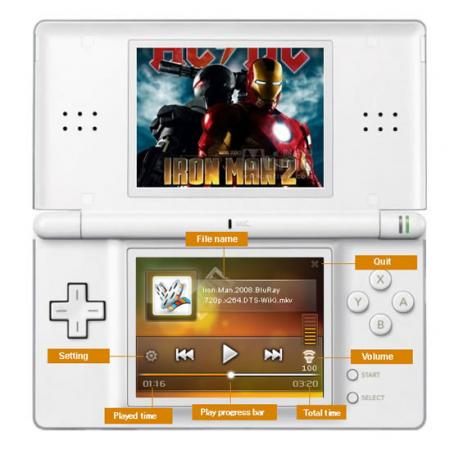
Interface
Controls
Up/Down - Previous/next file
Left/Right - Forward/back play
X - Volume increase
Y - Volume decrease
A - Play/pause
B - Stop
Start - System setting
Select - Turn on/off the backlight of bottom screen
Changelog
Version 1.1 2010/11/17
- Fixed the bug vertical bar appears when booting.
- Fixed the unzip bug on linux system caused white screen when booting.
External links
- Official website - http://eng.supercard.sc/manual/dstwo/plugin/dstwo-iplayer.htm