
Acnl-chat-sender 3DS: Difference between revisions
From GameBrew
More actions
No edit summary |
m Text replacement - "Category:PC utilities for 3DS homebrew" to "" |
||
| (13 intermediate revisions by the same user not shown) | |||
| Line 1: | Line 1: | ||
{{Infobox 3DS | {{Infobox 3DS Homebrews | ||
| title = acnl-chat-sender | |title=acnl-chat-sender | ||
| image = | |image=Acnlchatsender6.png | ||
| type = | |description=A chat sender utilizing NTR Debugger to send messages to the ingame chat via your PC. | ||
| version = | |author=rydoginator (RyDog) | ||
| | |lastupdated=2018/05/13 | ||
| | |type=PC Utilities | ||
|version=1.0 | |||
| | |license=Mixed | ||
| source = https:// | |download=https://dlhb.gamebrew.org/3dshomebrews/acnlchatsender.7z | ||
|website=https://github.com/rydoginator/acnl-chat-sender | |||
|source=https://github.com/rydoginator/acnl-chat-sender | |||
}} | }} | ||
ACNL-Chat-Sender, or Animal Crossing New Leaf Chat Sender, is a chat sender utilizing NTR Debugger to send messages to the ingame chat via your PC. | |||
This a modded version of NTR Debugger by cell9 to take your input and send it to ingame memory. Theoretically, this is like using a USB keyboard on the Wii version of Animal Crossing, if anyone ever did that. | |||
==User guide== | |||
===Requirements=== | |||
*.NET Framework + A windows PC with Windows 7 or later. | |||
* [[BootNTR 3DS|BootNTR]]. | |||
* Animal Crossing New Leaf: Welcome Amiibo (currently only supporting the game without the update preinstalled). | |||
* A keyboard connected to your PC. | |||
* Your PC connected to the same wifi as your 3DS. | |||
===How to use=== | |||
* Launch BootNTR, then launch Animal Crossing. It doesn't matter if you have any plugins or not, but make sure to press X+Y then enable the debugger in NTR's menu before selecting your character. | |||
* Figure out your 3DS's IP address. There are plenty of ways to do so. | |||
* Fill in the IP address of your 3DS, and click Connect. | |||
* Press the Hello button to test your connection. If it succeeded, then your top screen will flash green. | |||
* Now while in Animal Crossing, you need to have your keyboard (refer to the first screenshot) open in order to start typing. | |||
* Press enter or the send button to send your text. | |||
* If your message keeps getting deleted on the window, then close the keyboard and re open. | |||
* Enjoy. | |||
==Screenshots== | |||
https://dlhb.gamebrew.org/3dshomebrews/acnlchatsender3.png | |||
https://dlhb.gamebrew.org/3dshomebrews/acnlchatsender4.png | |||
==Media== | |||
'''[Tutorial] How to use ACNL-Chat-Sender''' ([https://www.youtube.com/watch?v=PEv0UZcibUg rydoginator]) <br> | |||
<youtube>PEv0UZcibUg</youtube> | <youtube>PEv0UZcibUg</youtube> | ||
= | ==Changelog== | ||
A | '''v1.0''' | ||
* Supports every version of the game with the Welcome Amiibo update besides the Korean Version with the Welcome Amiibo update pre-installed. | |||
'''v0.6 Beta''' | |||
* Remove the need for IronPython (compatibility with Wine for MacOS/Linux). | |||
* Faster text sending. | |||
'''v0.5 Beta''' | |||
* A lot more stability. | |||
* Text doesn't copy if the keyboard isn't open. | |||
* Copy text from ingame keyboard if the textbox and ingame keyboard are out of sync. | |||
* Paste text from clipboard now works. | |||
* Editing text at index works. | |||
'''v0.4 Beta''' | |||
* Japan support. | |||
* Characters send in real time to reduce latency when pressing send. | |||
* Fix some crashes. | |||
'''v0.3 Beta Pre-release''' | |||
* Support for utf16 characters. | |||
* Support for eur (might need more testing). | |||
'''0.2 Beta''' | |||
* Add pointer to prevent crash and work on island. | |||
'''v0.1 Beta''' | |||
* Only works on Animal Crossing with the green icon. | |||
* Only works when your keyboard is open and you're home/in someone else's town. | |||
== | ==External links== | ||
* GitHub - https://github.com/rydoginator/acnl-chat-sender | |||
* GBAtemp - https://gbatemp.net/threads/release-animal-crossing-new-leaf-chat-sender.501590 | |||
Latest revision as of 04:25, 6 May 2024
| acnl-chat-sender | |
|---|---|
 | |
| General | |
| Author | rydoginator (RyDog) |
| Type | PC Utilities |
| Version | 1.0 |
| License | Mixed |
| Last Updated | 2018/05/13 |
| Links | |
| Download | |
| Website | |
| Source | |
ACNL-Chat-Sender, or Animal Crossing New Leaf Chat Sender, is a chat sender utilizing NTR Debugger to send messages to the ingame chat via your PC.
This a modded version of NTR Debugger by cell9 to take your input and send it to ingame memory. Theoretically, this is like using a USB keyboard on the Wii version of Animal Crossing, if anyone ever did that.
User guide
Requirements
- .NET Framework + A windows PC with Windows 7 or later.
- BootNTR.
- Animal Crossing New Leaf: Welcome Amiibo (currently only supporting the game without the update preinstalled).
- A keyboard connected to your PC.
- Your PC connected to the same wifi as your 3DS.
How to use
- Launch BootNTR, then launch Animal Crossing. It doesn't matter if you have any plugins or not, but make sure to press X+Y then enable the debugger in NTR's menu before selecting your character.
- Figure out your 3DS's IP address. There are plenty of ways to do so.
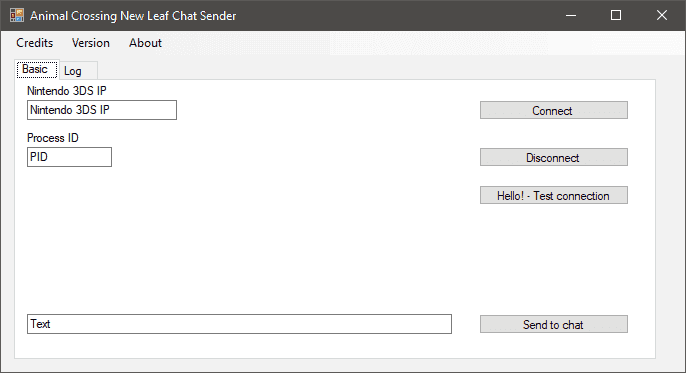
- Fill in the IP address of your 3DS, and click Connect.
- Press the Hello button to test your connection. If it succeeded, then your top screen will flash green.
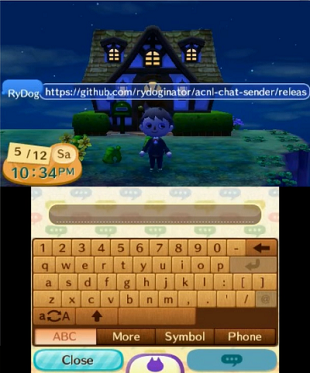
- Now while in Animal Crossing, you need to have your keyboard (refer to the first screenshot) open in order to start typing.
- Press enter or the send button to send your text.
- If your message keeps getting deleted on the window, then close the keyboard and re open.
- Enjoy.
Screenshots
Media
[Tutorial] How to use ACNL-Chat-Sender (rydoginator)
Changelog
v1.0
- Supports every version of the game with the Welcome Amiibo update besides the Korean Version with the Welcome Amiibo update pre-installed.
v0.6 Beta
- Remove the need for IronPython (compatibility with Wine for MacOS/Linux).
- Faster text sending.
v0.5 Beta
- A lot more stability.
- Text doesn't copy if the keyboard isn't open.
- Copy text from ingame keyboard if the textbox and ingame keyboard are out of sync.
- Paste text from clipboard now works.
- Editing text at index works.
v0.4 Beta
- Japan support.
- Characters send in real time to reduce latency when pressing send.
- Fix some crashes.
v0.3 Beta Pre-release
- Support for utf16 characters.
- Support for eur (might need more testing).
0.2 Beta
- Add pointer to prevent crash and work on island.
v0.1 Beta
- Only works on Animal Crossing with the green icon.
- Only works when your keyboard is open and you're home/in someone else's town.