
Vita VirtualKeyboard: Difference between revisions
From GameBrew
More actions
Created page with "{{Infobox Vita Homebrews |title=Vita VirtualKeyboard |image=VitaVirtualKeyboard.png |description=Turn your PSVita into a USB keyboard. |author=lp1 |lastupdated=2026/06/05 |type=Utilities |version=00.01 |license=N/A |download=https://dlhb.gamebrew.org/vitahomebrews/VitaVirtualKeyboard.7z?k33p0ld |website=https://github.com/lp1dev/vita_virtualkeyboard |source=https://github.com/lp1dev/vita_virtualkeyboard |donation= }} {{#seo: |title=Vita Homebrew Apps (Utilities) - GameBr..." |
No edit summary |
||
| Line 23: | Line 23: | ||
It was built with [https://github.com/lp1dev/quark quark] fully in HTML/JS. | It was built with [https://github.com/lp1dev/quark quark] fully in HTML/JS. | ||
'''Prerequisite''': It requires the latest hidkeyboard.skprx to be installed (from [https://github.com/lp1dev/vitakeyboard_fork vitakeyboard_fork]) as a | '''Prerequisite''': It requires the latest hidkeyboard.skprx to be installed (from [https://github.com/lp1dev/vitakeyboard_fork vitakeyboard_fork]) as a KERNEL plugin. | ||
== Installation == | == Installation == | ||
To install, you will need a jailbroken PS Vita. | To install, you will need a jailbroken PS Vita. | ||
Use either your SD card (if you use SD2Vita) or VitaShell's FTP server to add the .vkp file of the latest release available on the GitHub repo to your console and install it using VitaShell. | Use either your SD card (if you use SD2Vita) or VitaShell's FTP server to add the .vkp file of the latest release available on the GitHub repo to your console and install it using [[VitaShell]]. | ||
Make sure that you have also set up the | Make sure that you have also set up the hidkeyboard.skprx plugin and rebooted your console. | ||
Then, plug a USB cable into your console, launch the app and you're ready to go. | Then, plug a USB cable into your console, launch the app and you're ready to go. | ||
| Line 42: | Line 42: | ||
== External links == | == External links == | ||
* | * GitHub - https://github.com/lp1dev/vitakeyboard_fork | ||
* GitHub - https://github.com/lp1dev/vita_virtualkeyboard | |||
* VitaDB - https://www.rinnegatamante.eu/vitadb/#/info/1405 | * VitaDB - https://www.rinnegatamante.eu/vitadb/#/info/1405 | ||
Revision as of 06:07, 8 June 2026
| Vita VirtualKeyboard | |
|---|---|
 | |
| General | |
| Author | lp1 |
| Type | Utilities |
| Version | 00.01 |
| License | N/A |
| Last Updated | 2026/06/05 |
| Links | |
| Download | |
| Website | |
| Source | |
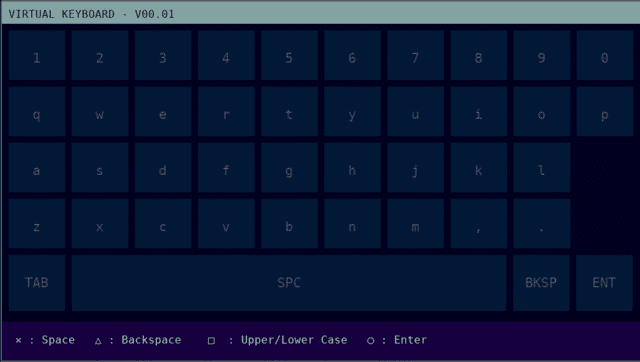
Vita VirtualKeyboard turns your jailbroken PS Vita into a full-fledged low-latency USB keyboard.
It was built with quark fully in HTML/JS.
Prerequisite: It requires the latest hidkeyboard.skprx to be installed (from vitakeyboard_fork) as a KERNEL plugin.
Installation
To install, you will need a jailbroken PS Vita.
Use either your SD card (if you use SD2Vita) or VitaShell's FTP server to add the .vkp file of the latest release available on the GitHub repo to your console and install it using VitaShell.
Make sure that you have also set up the hidkeyboard.skprx plugin and rebooted your console.
Then, plug a USB cable into your console, launch the app and you're ready to go.
Screenshots
Changelog
v00.01
- First Release.