
NeoPspFetch: Difference between revisions
From GameBrew
More actions
Created page with "{{Infobox PSP Homebrews |title=NeoPspFetch |image=neopspfetch.png |description=Display info in the same style of NeoFetch on Linux. |author=Wyped |lastupdated=2025/08/20 |type=System Tools |version=1.1 |license=MIT |download=https://dlhb.gamebrew.org/psphomebrew/NeoPspFetch_v1.1_source_code.zip |website=https://github.com/Wyped/NeoPspFetch |source=https://github.com/Wyped/NeoPspFetch }} NeoPspFetch is a PSP homebrew inspired by the system information tool NeoFetch on Lin..." |
1.2 |
||
| Line 4: | Line 4: | ||
|description=Display info in the same style of NeoFetch on Linux. | |description=Display info in the same style of NeoFetch on Linux. | ||
|author=Wyped | |author=Wyped | ||
|lastupdated= | |lastupdated=2026/06/04 | ||
|type=System Tools | |type=System Tools | ||
|version=1. | |version=1.2 | ||
|license=MIT | |license=MIT | ||
|download=https://dlhb.gamebrew.org/psphomebrew/NeoPspFetch_v1. | |download=https://dlhb.gamebrew.org/psphomebrew/NeoPspFetch_v1.2+source_code.zip | ||
|website=https://github.com/Wyped/NeoPspFetch | |website=https://github.com/Wyped/NeoPspFetch | ||
|source=https://github.com/Wyped/NeoPspFetch | |source=https://github.com/Wyped/NeoPspFetch | ||
| Line 42: | Line 42: | ||
== Compatibility == | == Compatibility == | ||
Tested with official Sony and Ostent batteries. Compatibility with third-party brands may vary. | Tested with official Sony and Ostent batteries. Compatibility with third-party brands may vary. | ||
== Changelog == | == Changelog == | ||
'''v1.2''' | |||
* PSP Street support by [https://github.com/Wyped @Wyped] in [https://github.com/Wyped/NeoPspFetch/pull/3 #3] | |||
'''v1.1''' | '''v1.1''' | ||
* Fix credits. | * Fix credits. | ||
| Line 58: | Line 59: | ||
* [https://pspdev.github.io/ PSPDEV SDK] | * [https://pspdev.github.io/ PSPDEV SDK] | ||
* Everybody who contributed to the PSP hacking scene. | * Everybody who contributed to the PSP hacking scene. | ||
* avenyet for PSP Street testing | |||
== External links == | == External links == | ||
* GitHub - https://github.com/Wyped/NeoPspFetch | * GitHub - https://github.com/Wyped/NeoPspFetch | ||
Latest revision as of 02:39, 5 June 2026
| NeoPspFetch | |
|---|---|
 | |
| General | |
| Author | Wyped |
| Type | System Tools |
| Version | 1.2 |
| License | MIT License |
| Last Updated | 2026/06/04 |
| Links | |
| Download | |
| Website | |
| Source | |
NeoPspFetch is a PSP homebrew inspired by the system information tool NeoFetch on Linux.
Features
- Display information along a cool ascii art, in the way of NeoFetch on Linux.
- Show firmware version, factory firmware version, motherboard model and more.
- Show battery status, capacity, temperature, and more.
- NeoPspFetch is signed and can be run on official and custom firmware..
Installation
Download the latest release.
Extract the contents of the ZIP archive to your PSP's /PSP/GAME/ directory.
Launch NeoPspFetch from the XMB.
Controls
Left/Right - Switch between pages
Select - Take a screenshot (save in ms0:/PICTURE/NeoPspFetch)
Start - Exit
Screenshots
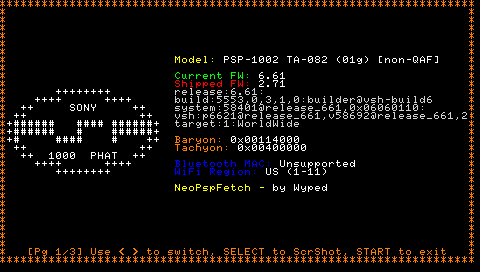
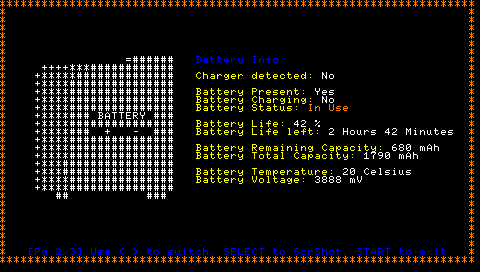
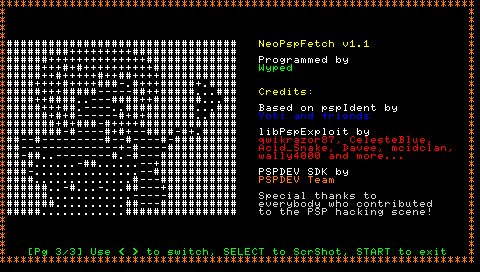
Compatibility
Tested with official Sony and Ostent batteries. Compatibility with third-party brands may vary.
Changelog
v1.2
v1.1
- Fix credits.
v1.0
- Initial release.
Credits
- Kernel detection code from pspIdent by Yoti and friends. Big thanks to them!
- LibPspExploit
- PSPDEV SDK
- Everybody who contributed to the PSP hacking scene.
- avenyet for PSP Street testing
External links
- GitHub - https://github.com/Wyped/NeoPspFetch