
FMVita: Difference between revisions
More actions
No edit summary |
0.4.3 |
||
| Line 4: | Line 4: | ||
|description=Multifunctional File Manager for PS Vita with a modernized interface and touchscreen compatibility. | |description=Multifunctional File Manager for PS Vita with a modernized interface and touchscreen compatibility. | ||
|author=WolffsRoom | |author=WolffsRoom | ||
|lastupdated=2026/ | |lastupdated=2026/06/02 | ||
|type=File Browsers | |type=File Browsers | ||
|version=0.3 | |version=0.4.3 | ||
|license=GPL-3.0 | |license=GPL-3.0 | ||
|download=https://dlhb.gamebrew.org/vitahomebrews/FMVita.7z | |download=https://dlhb.gamebrew.org/vitahomebrews/FMVita.7z | ||
| Line 97: | Line 97: | ||
== Changelog == | == Changelog == | ||
'''v0.4.3''' | |||
* QR download auto-install, touch-friendly QR dialogs, post-install launch, VPK context menu (Launch app/game), i18n updates, built-in videoplayer, button_fav/button_plus textures, build fix. | |||
'''v0.3.0''' | '''v0.3.0''' | ||
* Released 27 May. | * Released 27 May. | ||
Latest revision as of 02:38, 5 June 2026
| FMVita | |
|---|---|
 | |
| General | |
| Author | WolffsRoom |
| Type | File Browsers |
| Version | 0.4.3 |
| License | GPL-3.0 |
| Last Updated | 2026/06/02 |
| Links | |
| Download | |
| Website | |
| Source | |
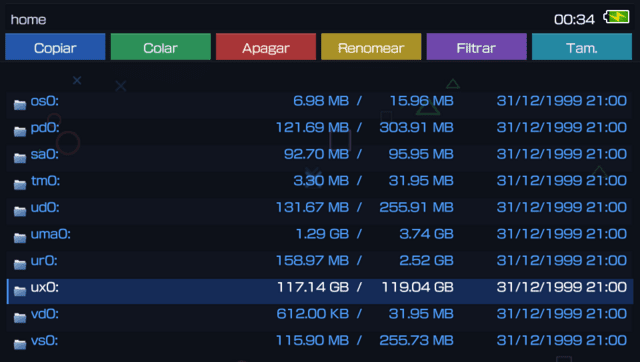
FMVita (File Manager Vita) is an enhanced fork of VitaShell (originally created by TheFloW). This version focuses on usability, expanding touchscreen support for the PS Vita, introducing animated backgrounds, various Quality of Life (QoL) improvements, and a new program file organization under the independent directory ux0:FMVita/.
FMVita was designed to prevent conflicts with the current configuration. It features a unique Title ID and its own dedicated folder structure, and can be installed side-by-side with the original VitaShell, OneMenuPlus, MolecularShell, or any other file manager.
Features
Interface and Themes
- Six Color Presets - Dark, Light, Blue, Red, Purple, and Brown. The system automatically calculates text, highlight, selection, dialog, and border colors.
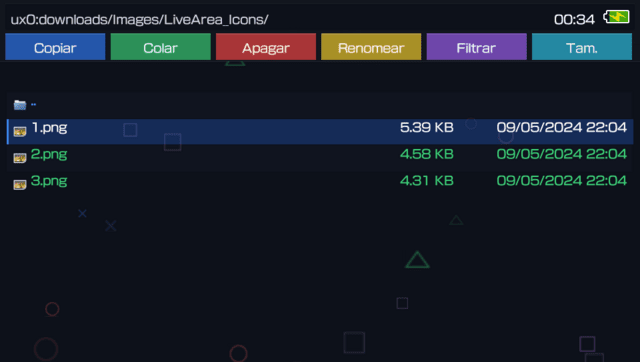
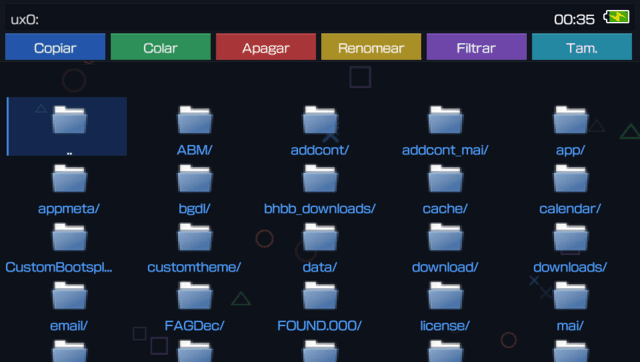
- Quick Action Toolbar - A toolbar featuring 8 quick shortcuts: Copy, Paste, Delete, Rename, Filter, Group, Search, and New.
- Transparency - The interface elements (topbar, cards, and buttons) feature a reduced alpha channel when using image backgrounds (GIF or PNG) for better visibility.
- Themed Scrollbar - An adaptive scrollbar that matches the theme's highlight color.
- Redesigned Address Bar - Displays the current directory path, battery status, and clock.
- Partial Support for VitaShell Themes - Themes developed for VitaShell are not 100% compatible with this version, only taking advantage of certain elements such as file icons.
Animated Backgrounds
- Four Procedural Animations - Particles (floating PlayStation icons), Waves (colored mist), Stars (starfield), and Squares (PS2-styled falling rectangles).
- Animated GIF Support - Loads from
ux0:FMVita/Gif/theme.gif(Mode 4) with multiple fallbacks. Powered by anstb_imageengine featuring frame delay control, cover-fit scaling, and clipping. - Static PNG Support - Native loading from
ux0:FMVita/Background/bg.png(Mode 5).
Touchscreen Support
- Native Dialogs - The old system YES/NO prompt has been replaced by custom Touch Dialogs (Confirmation, Deletion, and FTP) styled with PlayStation button icons.
- Drag-and-Drop - Hold
Square+ Touch (or perform a long press) to drag files into other folders. Features Auto-scroll when moving items near the screen edges. - Swipe Gestures - Swipe Left to go Back, Swipe Right to Enter.
- Multi-tap - Double-tap and hold to open the context menu.
- Mouse Cursor - Control a mouse pointer using the right analog stick (click with
Cross), featuring a smooth fade effect after inactivity.
- Column View - A 3-column layout (Grandparent / Parent / Current) for directory browsing. Highlights the active folder in gold within the upper columns and allows direct touch navigation on any column.
- Bookmarks and Recents - The
Squareshortcut jumps directly to bookmarks; theTriangleshortcut navigates to recent files (which automatically generate.lnksymlinks). - Search Tools - A Filter system (All/Folders/Files) on the toolbar and case-insensitive Search within the current directory.
- Enhanced Scrolling - Infinite scroll wrapping (from top to bottom and vice versa) and smooth lerp-based scrolling with acceleration.
- Symlinks - Tracking via a
SymlinkDirectoryPathlinked list to ensure correct navigation through shortcuts.
Undo System
- Undo Move and Copy actions directly from the context menu (
UNDO_ACTION). - Undo Move - Reverts the
sceIoRenamecommand. - Undo Copy - Cleanly deletes the file copied by mistake.
- The Undo option appears dynamically and also registers actions performed via Drag-and-Drop.
Security and Configuration
- System Protection - Renaming locks on critical system folders (verified via
isProtectedPath()) with custom error messages. - Independent Settings - Reads and writes directly to
ux0:FMVita/settings.txt(use_custom_config = 1by default; can be temporarily disabled by holdingLduring boot). - New Menu Options - USB Device (4 modes), SELECT Button (USB/FTP), View Mode (List/Grid/Column), Background Anim (6 modes), and Theme Preset (6 colors).
Removed Features and Optimizations
To keep the application lightweight and focused purely on file management, the following features from the original VitaShell have been deprecated or hidden:
- HENkaku Settings menu (PSN spoofing, unsafe homebrew toggle, version spoofing).
- Disable Auto-Update and Disable Warning Messages.
- Rear Touchpad support.
Installation
Transfer the FMVita .vpk file to the console (via FTP or USB) and install it using VitaShell (or any other file manager application currently in use).
FMVita completely isolates its data from the original VitaShell using the following directory structure:
| Original (VitaShell) | FMVita |
|---|---|
ux0:VitaShell/settings.txt |
ux0:FMVita/settings.txt
|
ux0:VitaShell/language/ |
ux0:FMVita/language/
|
ux0:VitaShell/theme/ |
ux0:FMVita/theme/
|
ux0:data/lastdir.txt |
ux0:FMVita/internal/lastdir.txt
|
ux0:VitaShell/bookmarks/ |
ux0:FMVita/bookmarks/
|
ux0:data/recent/ |
ux0:FMVITA/recent/
|
ux0:app/VITASHELL/module/* |
ux0:FMVita/module/*
|
| (Did not exist) | ux0:FMVita/Gif/theme.gif
|
| (Did not exist) | ux0:FMVita/Background/bg.png
|
Screenshots
Changelog
v0.4.3
- QR download auto-install, touch-friendly QR dialogs, post-install launch, VPK context menu (Launch app/game), i18n updates, built-in videoplayer, button_fav/button_plus textures, build fix.
v0.3.0
- Released 27 May.
v0.2.2 - Header overlay, status bar, GIF support, touch UX
- Header row now drawn on top of file list (overlay): scrolled items no longer pass over headers.
- HEADER_H increased from 22 to 26 for better readability.
- Header text uses full theme text color (brighter).
- STATUSBAR_H increased from 28 to 34, background opacity 230, brighter text.
- Fixed .GIF file selection freeze: FILE_TYPE_GIF added to file type system, routed to photo viewer.
- Toolbar buttons: action fires on touch RELEASE (not press), with hover highlight animation.
- Toolbar highlights fully colored when finger/mouse is over a button.
v0.2.1 - Fix header/status bar layout
- Header row labels moved up (ty=80) to prevent overlap with file list alternating strips.
- File info text (size/date) now skips drawing when it would extend into the status bar (y >= 516).
v0.1.0
- First functional version of FMVita (File Manager Vita), built on the base of VitaShell (by TheFloW), consolidating interface and usability modifications.
- Visual Customization: 6 new color presets; support for 4 native animations plus custom GIF and PNG backgrounds.
- Navigation and Interface: Column View (3-column layout); touch interaction with Touch Dialogs and Swipe Gestures; Mouse Cursor and Drag-and-Drop support; Quick Action Toolbar.
- File Management and Security: File Filter and Search system; quick-access buttons for Bookmarks and Recent Files; Undo System.
- Changes and Removals: Application data moved to the
ux0:FMVita/path; Trash removed to simplify direct file deletion; HENkaku Settings menu removed.
Credits
- TheFloW - Creator of the original VitaShell.
- Team Molecule - HENkaku.
- xerpi - ftpvitalib and vita2dlib libraries.
- Sean Barrett - stb_image implementation.
- WolffsRoom - FMVita development, visual modifications, and engine.